
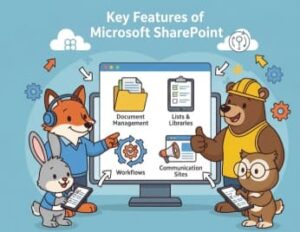
In today’s fast-paced digital workplace, organizations need tools that go beyond simple file storage. They require platforms that encourage collaboration, streamline processes, protect sensitive data, and adapt to changing business needs. Microsoft SharePoint has emerged as one of the most powerful and flexible solutions to meet these demands.
SharePoint is more than just a document management system—it is a comprehensive collaboration and content management platform that supports intranets, team sites, workflows, and enterprise-wide communication. Used by organizations of all sizes, SharePoint plays a critical role in building modern digital workplaces and enhancing productivity.
This blog explores the key features of Microsoft SharePoint and explains how it helps businesses work smarter and more efficiently.
Document Management and Collaboration
One of SharePoint’s strongest capabilities is its advanced document management system. Instead of scattered files across email inboxes or local drives, SharePoint offers a centralized repository where documents are securely stored and easily accessible.
With built-in version control, every change made to a document is tracked automatically. Users can review previous versions, compare edits, or restore earlier files if needed. This eliminates confusion and ensures that teams are always working on the most up-to-date content.
SharePoint also supports real-time co-authoring, allowing multiple users to edit documents simultaneously. Whether it’s a Word file, Excel spreadsheet, or PowerPoint presentation, teams can collaborate seamlessly without overwriting each other’s work. Metadata tagging further improves organization by enabling faster search and smarter content categorization.
Team Sites for Collaboration
SharePoint allows organizations to create team sites, which act as dedicated workspaces for projects, departments, or cross-functional teams. Each site can include document libraries, task lists, calendars, discussion boards, and announcements—all in one place.
These sites are highly customizable using modern web parts. Teams can tailor pages to display relevant information, deadlines, or progress updates. Since SharePoint integrates natively with Microsoft 365 tools like Teams, Outlook, and Planner, users can collaborate without constantly switching between applications.
Team sites help improve transparency, accountability, and collaboration by keeping everything organized and accessible.

Intranet and Communication Sites
Many organizations rely on SharePoint to build engaging company intranets and communication portals. Communication sites are designed to share news, updates, and resources across the organization.
With rich media support, businesses can embed videos, images, banners, and interactive content to capture employee attention. Audience targeting ensures that the right message reaches the right people, whether it’s a company-wide announcement or department-specific update.
A well-designed SharePoint intranet strengthens internal communication, boosts employee engagement, and supports organizational culture.
Lists and Libraries for Structured Data
SharePoint lists and libraries make it easy to manage structured data such as tasks, contacts, inventories, or service requests. Unlike spreadsheets, SharePoint lists offer better data control, validation, and collaboration features.
Users can create custom views to filter, sort, or group data based on specific criteria. For example, a task list can be viewed by priority, due date, or assigned user. With Power Automate, these lists can trigger workflows such as approval requests, alerts, or automated updates.
Workflow Automation and Business Processes
Automation is a major strength of SharePoint. By integrating with Power Automate, organizations can streamline repetitive tasks and complex business processes.
Common workflows include document approvals, employee onboarding, reminder notifications, and form submissions. More advanced workflows can integrate with third-party systems such as CRM platforms or helpdesk tools, reducing manual effort and errors.
Automated workflows not only save time but also ensure consistency and compliance across business operations.
Search and Content Discovery
SharePoint’s enterprise search capability allows users to quickly find documents, sites, and even people. Intelligent search results are enhanced by metadata, filters, and refiners, making it easier to locate relevant information.
Integration with Microsoft Delve helps surface personalized content based on user activity and collaboration patterns. This improves knowledge discovery and ensures that important information doesn’t get lost in large content repositories.
Security, Permissions, and Compliance
Security is a top priority for modern organizations, and SharePoint offers robust protection features. Administrators can set granular permissions at the site, folder, or document level, ensuring users only access what they are authorized to see.
Role-based access control simplifies management by assigning predefined roles such as owner, member, or visitor. SharePoint also supports data encryption, secure sharing, and compliance tools for retention policies, eDiscovery, and audit logs.
These capabilities make SharePoint suitable for industries with strict regulatory requirements.
Deep Integration with Microsoft Ecosystem
SharePoint works seamlessly within the Microsoft ecosystem, making it a natural choice for organizations already using Microsoft tools.
- Microsoft Teams uses SharePoint as its file storage backbone
- OneDrive allows offline access and synchronization
- Power Apps enables low-code custom application development
- Power BI allows embedding interactive dashboards and analytics
This integration creates a unified digital workplace experience.
Mobile and Cloud Accessibility
As a cloud-first platform, SharePoint Online enables users to access content anytime, anywhere, and on any device. The SharePoint mobile app allows employees to stay connected while on the go, improving productivity for remote and hybrid teams.
Cloud deployment also ensures scalability, reliability, and reduced infrastructure costs.
Branding, Customization, and Hybrid Support
Organizations can customize SharePoint with custom themes, layouts, and branding to match corporate identity. Modern UI elements ensure a responsive and intuitive user experience.
For businesses transitioning from legacy systems, SharePoint supports hybrid deployments, allowing both on-premises and cloud environments. Tools like the SharePoint Migration Tool (SPMT) simplify the move to SharePoint Online.
Microsoft SharePoint is a powerful, flexible platform that supports collaboration, communication, automation, and information management. Whether used for document storage, intranet development, or workflow automation, SharePoint helps organizations work more efficiently and securely.
By leveraging its deep Microsoft integrations, cloud accessibility, and customization options, businesses can build a modern digital workplace that evolves with their needs.
Extra posts:
 Azure Language Studio: A Complete Guide to Features, Use Cases, and Technical Setup
  Getting Started with Windows 365 Benefits, Use Cases, and Setup Guide
  Collaborate with Guests in a SharePoint Online Site A Complete Guide
  Mastering Microsoft Designer A Step-by-Step Guide, Benefits, and Use Cases
  Connecting SharePoint Data to Copilot Insights A Complete Guide to Smarter Collaboration
  A Complete Guide to Migrating from Google Sites to SharePoint Online