Skip to content

How to Enhance Prompts in Copilot A Guide for Project Managers

AI-powered tools like GitHub Copilot are transforming software development by assisting developers with code generation, debugging, and documentation. While Copilot is primarily used by engineers, project managers (PMs) can also leverage it to streamline project… 

How to Generate Slides in PowerPoint Using Microsoft Copilot in Minutes

Creating compelling and professional presentations can be time-consuming, but Microsoft Copilot, an AI-powered assistant, makes it significantly easier. Whether you need to build slides for a business meeting, a school project, or a sales pitch,… 

How to Sync Microsoft Forms with Excel for Efficient Data Collection

Collecting data is only half the job. The real value comes from organizing, understanding, and acting on that information. This is where syncing Microsoft Forms with Excel truly shines. Whether you’re running employee surveys, collecting… 

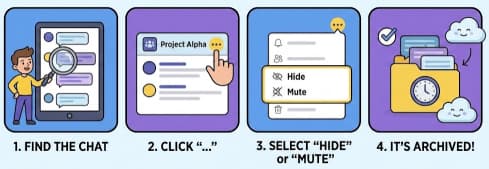
How to Archive Conversations in Microsoft Teams: A Complete Practical Guide

Microsoft Teams has become a central communication hub for many organizations, replacing long email threads and scattered messaging tools. Teams brings together chats, channels, meetings, and files in one place, making collaboration faster and more… 

How to Use Microsoft Stream A Beginner’s Guide

Microsoft Stream is a video-sharing service designed for businesses and organizations to upload, manage, and share videos securely within their enterprise. It’s part of the Microsoft 365 suite, making it easy to collaborate with your… 

How to Use Clipchamp A Beginner’s Guide

Video content creation is an essential part of modern communication, whether for social media, business, or personal projects. If you’re looking for a simple yet powerful video editor, Clipchamp is a fantastic tool to consider.… 

A Beginner’s Guide to Using Microsoft Kaizala

In today’s digital age, organizations are seeking powerful tools to streamline communication and collaboration. Microsoft Kaizala is one such tool, designed to meet the needs of modern work environments, especially in scenarios where team members… 

Microsoft key announcements in Sept 2024

In September 2024, Microsoft made several key announcements, focusing on advancements in AI, cloud services, and data governance. Extra posts: How to Use Copilot to Draft Messages and Announcements in Microsoft Teams GitHub Copilot vs.… 

Troubleshooting Common Issues in SharePoint Online

SharePoint Online, part of Microsoft 365, is a powerful collaboration tool that helps organizations manage documents, workflows, and content across teams. However, like any platform, SharePoint Online can occasionally run into problems. Below are some… 

What is SharePoint Premium?

SharePoint Premium is an upgraded version of Microsoft SharePoint, offering enhanced features for larger organizations with more complex needs. It integrates seamlessly with Microsoft 365, providing businesses with a centralized platform to manage documents, share… 

What is Microsoft 365 Copilot?

At its core, Microsoft 365 Copilot is an intelligent tool that helps users interact with Microsoft Office applications in more intuitive and efficient ways. It uses natural language processing (NLP) to understand user commands and… 

What is an AI Copilot?

An AI copilot is essentially a virtual assistant powered by machine learning algorithms that helps users perform specific tasks. Unlike traditional AI systems, which often operate in isolation, copilots are designed to collaborate with users,…