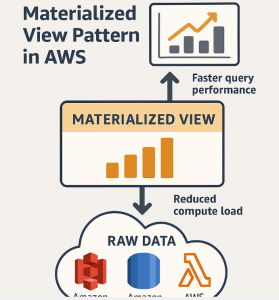
When designing modern data architectures, performance and scalability are non-negotiable. As datasets grow in size and complexity, querying raw data in real time becomes increasingly expensive and inefficient. To solve this, the Materialized View pattern provides a smart, scalable solution: precompute and store query results for fast access.
In this post, we’ll explore the Materialized View pattern and how you can effectively implement it using Amazon Web Services (AWS).
🧱 What Is the Materialized View Pattern?
A Materialized View is a precomputed, persisted version of a query result—usually based on joins, aggregations, or filters. Unlike a standard view (which is computed on-the-fly), a materialized view is physically stored and can be refreshed periodically or on demand.
This pattern is especially useful for:
- Dashboards and reports that use the same queries repeatedly.
- Reducing query times and compute costs.
- Improving performance for analytical workloads.
💡 Why Use Materialized Views in AWS?
AWS offers a broad portfolio of services that allow you to implement the materialized view pattern in a variety of ways, tailored to both streaming and batch workloads.
Benefits:
- 🔄 Reduce redundant computation.
- ⚡ Speed up complex queries (joins, aggregations, etc.).
- 💰 Optimize cost by caching results.
- 📊 Improve BI performance with low-latency views.
🛠️ Implementing the Pattern in AWS
Let’s explore how the Materialized View pattern can be applied using key AWS data services.
1. Amazon Redshift: Native Materialized Views
Amazon Redshift supports native materialized views for accelerating query performance, especially in analytics-heavy environments.
✅ Use Case
Dashboard showing daily sales totals by region.
📄 Example
sqlCopyEditCREATE MATERIALIZED VIEW sales_by_region AS
SELECT region, SUM(amount) AS total_sales
FROM sales
GROUP BY region;
🔁 Refresh Options
- Manual refresh:
sqlCopyEditREFRESH MATERIALIZED VIEW sales_by_region;
- Auto-refresh (available in Redshift Serverless & RA3):
- Automatically refreshes the view when base tables change.
🎯 Best Practices
- Use materialized views for queries with complex joins or aggregations.
- Monitor storage and refresh performance using Amazon CloudWatch.
2. Amazon Athena + AWS Glue + S3
Athena doesn’t support materialized views natively, but you can simulate them by:
- Running scheduled queries with AWS Glue Jobs or Athena scheduled queries.
- Storing the results in Amazon S3 as partitioned Parquet/ORC files.
- Querying the output as a table using Glue Data Catalog.
🧩 Components
- AWS Glue or Athena query
- Amazon S3 bucket for output
- Partitioned storage for performance
✅ Use Case
Create daily aggregated logs from raw web server logs in S3.
3. Amazon RDS / Aurora (PostgreSQL & MySQL)
Aurora and RDS (PostgreSQL or MySQL) allow materialized views via custom SQL and manual refresh logic.
📄 PostgreSQL Example
sqlCopyEditCREATE MATERIALIZED VIEW customer_summary AS
SELECT customer_id, COUNT(*) AS order_count
FROM orders
GROUP BY customer_id;
sqlCopyEditREFRESH MATERIALIZED VIEW customer_summary;
You can automate refreshes using:
- EventBridge scheduled tasks
- Lambda functions
⚠️ Aurora doesn’t currently support auto-refresh natively.
4. Amazon EMR + Apache Hive or Spark
In big data scenarios, you can precompute views using Apache Spark or Hive on Amazon EMR, and store the result in S3 or HDFS.
✅ Use Case
Daily aggregated clickstream data from raw events.
📄 Example (Spark SQL)
pythonCopyEditresult = spark.sql("""
SELECT user_id, COUNT(*) AS session_count
FROM events
GROUP BY user_id
""")
result.write.format("parquet").mode("overwrite").save("s3://your-bucket/views/session_summary/")
Schedule with Apache Airflow (MWAA) or Step Functions.
5. Amazon DynamoDB + AWS Lambda (Pattern Extension)
In NoSQL or serverless environments, you can materialize views manually by updating a summary table with AWS Lambda functions triggered via DynamoDB Streams.
✅ Use Case
Maintain a running total of purchases per customer.
🔁 Pattern
- Use Lambda to capture insert/update events.
- Update a summary table with precomputed totals.
🔁 Refresh Strategies in AWS
| Strategy | Use Case | Tools |
|---|---|---|
| Manual refresh | Infrequent updates, tight control | Redshift, PostgreSQL |
| Scheduled refresh | Periodic reports, dashboards | Athena, Glue, Lambda |
| Event-driven (Incremental) | Real-time updates | DynamoDB Streams, Lambda |
| Auto-refresh | Fully managed, live dashboards | Redshift Serverless |
🎯 Design Considerations
- Storage vs Freshness: More frequent refreshes = more compute/storage.
- Consistency: Choose strategies based on your tolerance for stale data.
- Partitioning: Use partitions to speed up refreshes and reduce cost.
- Security & Governance: Use Lake Formation, IAM, and encryption for controlled access.
✅ When to Use the Materialized View Pattern
- Your users run the same queries repeatedly.
- Performance is a bottleneck for BI tools or dashboards.
- You’re aggregating or joining large datasets.
- You want to decouple read-heavy systems from raw data storage.
🚫 When to Avoid It
- Your data changes constantly and must be reflected instantly.
- Storage cost of precomputed views is prohibitive.
- Your queries are highly dynamic and unpredictable.
📦 Wrapping Up
The Materialized View pattern is a cornerstone of high-performance, scalable data architectures in AWS. By precomputing and storing query results, you can deliver lightning-fast data access to your users while reducing overall compute costs.
Whether you’re using Amazon Redshift, Athena, RDS, or EMR, AWS provides the flexibility and tools to tailor this pattern to your workload and latency requirements.
Extra posts:
 Boosting Performance with the Materialized View Pattern in Azure
  CQRS on AWS Separating Read and Write Operations for Performance and Scalability
  Secret Store Pattern in AWS Using Secure Vaults for Credentials and Secrets
  API Gateway Pattern in AWS Managing APIs and Routing Requests to Microservices Building Resilient Systems with Immutable Infrastructure on AWS
  Token-Based Authentication in AWS Using JWT for Stateless Security