
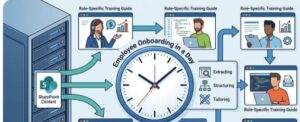
In today’s fast-paced business environment, the expectation to get new employees productive as quickly as possible is higher than ever. Yet, onboarding often remains one of the most fragmented and time-consuming processes within organizations. Information is scattered, training materials are outdated, and new hires are left navigating a maze of documents with little guidance.
What if onboarding could be streamlined into a single day without sacrificing depth or quality? By leveraging existing SharePoint content and transforming it into role-specific training guides, organizations can create a structured, efficient, and highly personalized onboarding experience.
The Problem with Traditional Onboarding
Most onboarding processes suffer from a few common challenges. First, there is an overwhelming amount of information delivered in an unstructured way. New employees are often handed access to folders filled with documents, policies, and guides, but with no clear direction on what to prioritize.
Second, training is rarely tailored. A marketing specialist and a finance analyst may receive access to the same onboarding materials, even though their roles require entirely different knowledge and tools. This leads to wasted time and reduced engagement.
Finally, onboarding is slow. It can take weeks—or even months—for employees to feel confident in their roles, largely because they are left to piece together information on their own.
Why SharePoint Is an Untapped Goldmine
Many organizations already store a wealth of knowledge in SharePoint. From SOPs and internal wikis to presentations, recorded trainings, and policy documents, SharePoint acts as a central repository of institutional knowledge.
However, the issue is not the lack of content it’s the lack of structure and accessibility. Content is often buried in nested folders, inconsistently labeled, and not optimized for learning. This is where the opportunity lies.
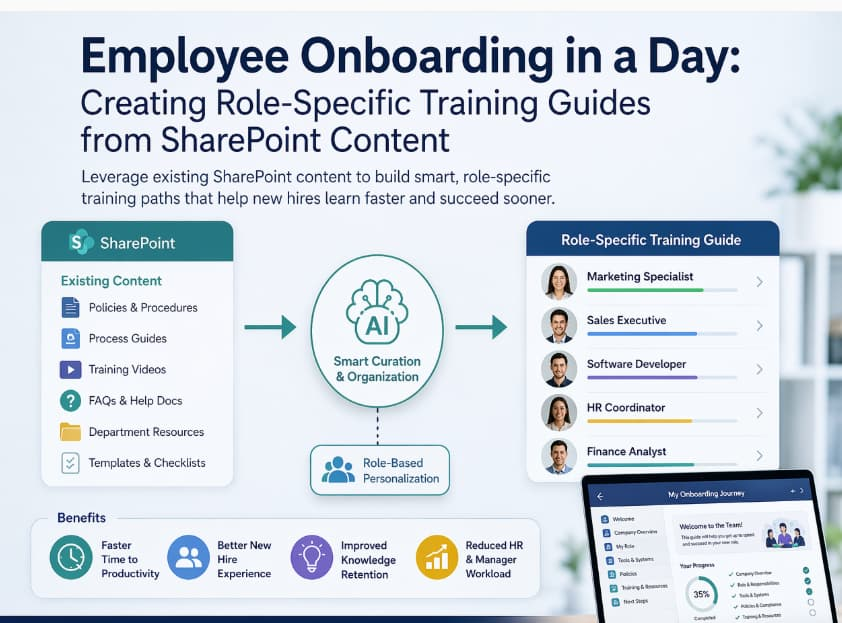
By extracting and organizing SharePoint content intelligently, companies can transform static documents into dynamic onboarding experiences.
Building Role-Specific Training Guides in a Day
Creating a complete onboarding experience in a single day might sound ambitious, but it becomes achievable when you focus on repurposing existing content rather than creating everything from scratch.
Step 1: Identify Role Requirements
Start by defining what each role truly needs to succeed in the first 30, 60, and 90 days. This includes tools, processes, key responsibilities, and performance expectations.
Break these down into categories such as:
- Core responsibilities
- Tools and systems
- Compliance and policies
- Team-specific workflows
This step ensures that the onboarding guide is purposeful rather than generic.
Step 2: Map SharePoint Content to Each Role
Next, audit your SharePoint environment. Identify documents, videos, and resources that align with each category you defined.
For example:
- A sales role might need CRM training documents, pitch decks, and customer journey maps.
- A developer might need codebase documentation, deployment guides, and architecture overviews.
Instead of dumping links, curate content thoughtfully. Choose only what is relevant and up-to-date.
Step 3: Structure the Learning Path
Once content is mapped, organize it into a logical flow. A well-structured onboarding guide should feel like a journey, not a checklist.
A simple structure could look like:
- Day 1: Orientation and company overview
- Day 2–3: Tools and systems
- Week 1: Core responsibilities
- Week 2+: Advanced workflows and real tasks
Even if everything is introduced in one day, the guide should provide a clear roadmap for continued learning.
Step 4: Add Context and Instructions
One of the biggest mistakes organizations make is assuming that content speaks for itself. It doesn’t.
Each resource should include:
- A short description of what it is
- Why it matters
- What the employee should do after reviewing it
This transforms passive reading into active learning.
Step 5: Personalize by Role
Customization is key. A role-specific onboarding guide should feel tailored, not templated.
For instance, instead of a generic “Company Tools” section, a marketing onboarding guide might say:
“Learn how we use analytics tools to measure campaign performance.”
This level of specificity increases relevance and engagement.
Step 6: Deliver Through a Centralized Hub
Finally, present the onboarding guide in a clean, accessible format. This could be a SharePoint page, an internal portal, or a learning management system.
The goal is to create a single source of truth where new hires can easily navigate their onboarding journey without confusion.
Benefits of One-Day Onboarding Frameworks
Implementing this approach offers several tangible benefits.
Faster Time to Productivity
When employees know exactly what to focus on, they ramp up faster. Instead of spending days searching for information, they can immediately start learning what matters most.
Improved Employee Experience
A structured and personalized onboarding process reduces overwhelm and builds confidence. New hires feel supported and valued from day one.
Better Knowledge Retention
Organized, role-specific learning paths improve retention by presenting information in context. Employees are more likely to remember what they learn when it is directly tied to their responsibilities.
Reduced HR and Manager Workload
By automating and standardizing onboarding guides, HR teams and managers spend less time answering repetitive questions and more time focusing on meaningful interactions.
Common Pitfalls to Avoid
While the process is straightforward, there are a few pitfalls to watch out for.
One is overloading the guide with too much content. Just because something exists in SharePoint doesn’t mean it should be included. Prioritize quality over quantity.
Another is neglecting updates. SharePoint content can quickly become outdated. Regular reviews are essential to ensure accuracy.
Lastly, avoid a one-size-fits-all approach. The effectiveness of this method relies on customization. Generic onboarding guides defeat the purpose.
The Future of Onboarding
As organizations continue to embrace digital transformation, onboarding will become increasingly data-driven and personalized. Leveraging tools like SharePoint is just the beginning.
In the future, AI and automation will play a larger role in dynamically generating training paths based on role, experience level, and even learning preferences. But even without advanced technology, the foundation remains the same: organize what you already have and make it meaningful.
Employee onboarding doesn’t have to be slow, overwhelming, or inefficient. By tapping into existing SharePoint content and transforming it into structured, role-specific training guides, organizations can deliver a high-impact onboarding experience in just one day.
The key is not creating more content but using what already exists in a smarter, more intentional way. When done right, onboarding becomes not just a process, but a powerful driver of employee success.
Extra posts:
 The ‘Digital Twin’ Employee Creating Hyper-Personalized Copilot Prompts with Copilot Studio
  Unlocking the Power of SharePoint Embedded A Modern Approach to Content Management
  SharePoint On premise Restoring Content Databases between Farms
  Creating Groups in Exchange Online and SharePoint Online A Unified Collaboration Experience SharePoint Framework (SPFx) The Modern Development Model for SharePoint
  Preparing Your SharePoint Content for Copilot: A Practical Guide