

Microsoft Teams is introducing a small but important change to the way people access private teams. Starting in late August 2026, users who try to join a private Microsoft Teams team using a join code will need approval from a team owner before they can become a member.
The change is part of Microsoft’s broader effort to give organizations more control over access to private collaboration spaces. While join codes will continue to work, entering a code will no longer mean instant access when the team is private.
For organizations that frequently use Teams codes to onboard employees, contractors, project members, or other collaborators, the change could alter a familiar workflow.
The rollout is scheduled to begin in late August 2026 and is expected to be completed by late September 2026 across Microsoft Teams environments worldwide, including GCC, GCC High, and DoD.
The good news for IT administrators is that no administrative action is required. Microsoft will enable the change by default. However, team owners should be made aware of the new approval step so that join requests do not sit unanswered.
What exactly is changing?
Today, join codes provide a convenient way for users to find and join a Microsoft Teams team. The code can be shared with people who need access without requiring an administrator to manually add each person.
Under the new experience, that process will depend on whether the team is private or public.
For private teams, a person who enters a valid join code will submit a request to join. The user will not be added immediately. Instead, a team owner will receive the request and must decide whether to approve or reject it.
For public teams, there is no change. Users can continue to join immediately using a join code.
That distinction is important because the update isn’t eliminating join codes. Microsoft is essentially adding an approval checkpoint to the process for private teams.
Why Microsoft is making the change
The main reason behind the update is better team governance and access control.
Private Teams environments are often used for projects, departments, leadership groups, client work, confidential discussions, or other collaboration that isn’t intended for everyone in an organization.
A join code can be convenient, but convenience can also create the possibility of unintended access. A code could potentially be shared beyond the group it was originally intended for. By requiring owner approval, Microsoft is giving teams an additional opportunity to verify who is requesting access.
Microsoft says the change also brings the join-by-code experience more closely in line with join-by-link behavior for private teams.
In practical terms, the company is moving toward a simple principle: having an invitation mechanism does not necessarily mean automatic membership in a private team.
That additional checkpoint may be particularly useful in larger organizations, where team owners may want to know exactly who is entering a private collaboration space.
How the new process will work
The existing tools for generating and entering a team code are not disappearing.
Team members who have the necessary permissions can still generate a code by going to:
Team settings > Team code
A person who receives the code can continue to enter it through the New items menu in Chat or Channels.
The difference comes after the code is submitted.
If the team is private, the request will be sent to a team owner. The owner can then approve or reject the request. The user becomes a member only after approval.
This means organizations should not necessarily interpret a successful code entry as immediate access.
For employees, the experience may feel like a small delay. Instead of being added instantly, they may see that their request is awaiting approval.
For team owners, however, the change introduces a new responsibility: monitoring incoming join requests.
Who will be affected?
The change applies to Microsoft Teams users attempting to join private teams through the join-by-code feature.
Microsoft says the updated experience will apply across:
- Microsoft Teams desktop
- Microsoft Teams web
- Microsoft Teams mobile
The feature will be enabled by default.
Public teams are not included in the change. Their join-by-code experience will continue to allow users to join immediately.
This means organizations with a mixture of public and private teams may see different behavior depending on the team they’re trying to access.
What does this mean for IT administrators?
For IT departments, the most straightforward part of the announcement is that there is no admin configuration required.
Microsoft will roll out the change automatically.
That doesn’t mean IT teams should ignore it, though. The bigger consideration is communication.
If employees have internal documentation explaining how to join Teams using a code, those instructions may need to be updated. Existing documentation that says users can enter a code and immediately gain access to a private team could become misleading once the update reaches the organization.
IT and Microsoft 365 support teams may also see an increase in questions such as, “Why haven’t I been added to the team yet?” or “Where did my Teams join request go?”
A short internal announcement could prevent much of that confusion.
Team owners have the biggest role to play
While administrators don’t need to turn anything on or off, team owners will be directly involved in the new workflow.
Owners should understand that requests generated through private-team join codes will require their attention.
This could be especially important for teams that regularly onboard new members.
Imagine a project team that shares its join code with every new contractor. Previously, the contractor might have entered the code and gained access right away. After the rollout, someone responsible for the team will need to approve the request.
For busy teams, forgotten approval requests could become a minor productivity issue.
Organizations may therefore want to identify teams that rely heavily on join codes and remind their owners to check incoming requests regularly.
A small change with a governance benefit
At first glance, this might seem like a minor Microsoft Teams interface update. But it reflects a larger trend in workplace collaboration software: balancing convenience with controlled access.
Codes are easy to share. That is one of their biggest advantages, but also one of their potential weaknesses.
Adding an approval step for private teams creates a human checkpoint between receiving a code and becoming a member.
For organizations concerned about accidental access, that can be valuable.
It also makes the distinction between public and private collaboration spaces clearer. Public teams are designed for easier access, while private teams are expected to have more controlled membership.
The new behavior reinforces that difference without removing the convenience of join codes altogether.
What organizations should do now
There is no mandatory administrative task associated with this rollout, but organizations can take a few simple steps to prepare.
First, inform team owners that private-team join requests will require approval.
Second, encourage owners to monitor incoming requests, particularly if their teams regularly use join codes for onboarding.
Third, review internal Microsoft Teams training and documentation. If the organization has instructions that specifically mention joining private teams by code, those materials may need to explain the approval step.
Finally, support teams should be prepared to explain the change to employees who notice that entering a code no longer results in immediate membership.
When will the change arrive?
Microsoft’s rollout is scheduled to begin in late August 2026 and continue through late September 2026.
The rollout covers worldwide Microsoft Teams environments, GCC, GCC High, and DoD.
Because Microsoft 365 features can reach organizations at different times during a rollout, companies may not all see the change on exactly the same day.
Once the feature reaches an organization, the new approval behavior will apply automatically.
The bottom line
Microsoft Teams isn’t getting rid of join codes. Instead, it is adding an approval layer when those codes are used to access private teams.
Users will still be able to generate and enter codes, but private-team membership will no longer happen automatically. A team owner will need to approve the request first.
For public teams, nothing changes.
For administrators, there is no configuration to perform. The main task is awareness: tell team owners, update documentation where necessary, and make sure someone is watching those join requests.
It’s a relatively small change, but for organizations that depend heavily on Teams for collaboration, understanding the new workflow now can help avoid confusion once the rollout reaches their users.
Extra posts:
 Microsoft Teams Is Getting a Smarter Meeting Assistant: Facilitator Can Now Join Channel Meetings
  Microsoft Teams Introduces Private Chat for Organizers and Presenters: A Major Upgrade for Meetings, Webinars, and Town Halls
  Microsoft Teams Mobile Calendar to Require Latest App Update by October 2026: Microsoft Announces Critical Change for iOS and Android Users
  Microsoft Teams Adds In-Meeting AI Toggle: Users Gain More Control Over Copilot and Facilitator
  Microsoft 365’s New Hero Link Is Changing How Teams Share Files
 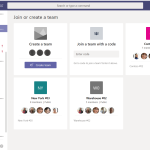 Join Microsoft Team using code