Artificial intelligence is transforming the way we work, write, and build software. One of the most visible examples of this transformation is the rise of AI assistants integrated into everyday tools. Among these assistants, Copilot has become a widely recognized concept. However, many people are confused about the differences between Microsoft 365 Copilot and GitHub Copilot.
While both tools share the same “Copilot” name and are powered by advanced AI models, they serve very different purposes and target different audiences. Understanding these differences is essential for organizations, developers, and professionals who want to make the most of AI-powered productivity tools.
In this article, we will compare Microsoft 365 Copilot and GitHub Copilot, exploring their features, use cases, and key differences.
What is Microsoft 365 Copilot?
Microsoft 365 Copilot is an AI-powered assistant integrated into productivity applications within Microsoft 365. It helps users complete everyday business tasks such as writing documents, summarizing meetings, analyzing spreadsheets, and generating presentations.
The tool works directly inside familiar applications like:
- Microsoft Word
- Microsoft Excel
- Microsoft PowerPoint
- Microsoft Outlook
- Microsoft Teams
Microsoft 365 Copilot acts like a productivity assistant that understands context from your files, emails, meetings, and company data.
Key Capabilities
1. Document Creation and Editing
Users can ask Copilot to generate reports, rewrite paragraphs, summarize documents, or adjust tone in Word.
2. Data Analysis
In Excel, Copilot can analyze data, generate insights, create formulas, and build visual charts from raw data.
3. Presentation Generation
In PowerPoint, Copilot can transform documents into slides or generate presentations based on prompts.
4. Email and Meeting Assistance
In Outlook and Teams, it can summarize long email threads or meeting discussions and suggest responses.
Who Uses Microsoft 365 Copilot?
Microsoft 365 Copilot is mainly designed for:
- Business professionals
- Managers and executives
- Marketing teams
- HR departments
- Analysts and researchers
Essentially, anyone who works with documents, spreadsheets, presentations, and communication tools can benefit from it.
What is GitHub Copilot?
GitHub Copilot is an AI coding assistant designed to help developers write code faster and more efficiently. It integrates directly into popular code editors such as Visual Studio Code.
GitHub Copilot was developed by GitHub in collaboration with OpenAI. It uses AI to suggest code snippets, functions, and entire blocks of code based on comments or existing code context.
Key Capabilities
1. Code Autocompletion
GitHub Copilot predicts the next lines of code as developers type, significantly speeding up the coding process.
2. Natural Language to Code
Developers can write a comment describing what they want, and Copilot generates the corresponding code.
Example:
// create a function that checks if a number is primeCopilot will automatically generate a working implementation.
3. Multi-Language Support
GitHub Copilot supports many programming languages including:
- Python
- JavaScript
- TypeScript
- Java
- C++
- Go
4. Code Suggestions and Refactoring
It helps developers improve code quality by suggesting optimized or cleaner versions of code.
Who Uses GitHub Copilot?
GitHub Copilot is designed for:
- Software developers
- Software engineers
- DevOps professionals
- Programming students
It is primarily focused on software development workflows.
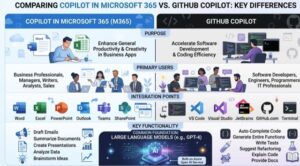
Key Differences Between Microsoft 365 Copilot and GitHub Copilot
Although both tools share the Copilot name and AI technology, they serve completely different purposes. Below are the most important differences.
1. Target Audience
The biggest difference lies in who the tools are designed for.
Microsoft 365 Copilot targets business users and office workers, helping them create content, manage communications, and analyze information.
GitHub Copilot targets developers, assisting them in writing and improving code.
In simple terms:
- Microsoft 365 Copilot = Productivity assistant
- GitHub Copilot = Coding assistant
2. Integration Environment
Another key difference is where each tool works.
Microsoft 365 Copilot is integrated inside productivity apps like Word, Excel, and PowerPoint.
GitHub Copilot works inside coding environments such as IDEs and code editors.
For example:
A marketing manager might use Microsoft 365 Copilot to generate a marketing plan in Word.
A developer might use GitHub Copilot to build the website backend using Python.
3. Core Functionality
The core capabilities of the two tools are very different.
Microsoft 365 Copilot focuses on:
- Writing documents
- Summarizing information
- Analyzing spreadsheets
- Creating presentations
- Managing communication
GitHub Copilot focuses on:
- Generating code
- Suggesting functions
- Completing code automatically
- Helping debug or refactor code
Essentially, one works with business content, while the other works with software code.
4. Data Context
Microsoft 365 Copilot uses data from:
- Emails
- Documents
- Meeting transcripts
- Corporate files
This allows it to generate highly contextual responses for workplace productivity.
GitHub Copilot uses context from:
- Existing source code
- Code comments
- Programming patterns
- Public code repositories
This allows it to generate relevant programming solutions.
5. Output Type
The outputs produced by the tools are also different.
Microsoft 365 Copilot generates:
- Text content
- Reports
- Summaries
- Presentations
- Data insights
GitHub Copilot generates:
- Code snippets
- Algorithms
- Functions
- Scripts
6. Typical Use Cases
Microsoft 365 Copilot Use Cases
- Writing a business proposal
- Summarizing a 20-page report
- Creating a PowerPoint presentation from a document
- Analyzing Excel sales data
- Summarizing meeting notes
GitHub Copilot Use Cases
- Writing a REST API endpoint
- Creating a database query
- Generating a sorting algorithm
- Completing repetitive code patterns
- Learning programming faster
When Should You Use Each Tool?
Choosing between these tools depends entirely on your workflow.
You should use Microsoft 365 Copilot if your daily work involves:
- Writing documents
- Preparing presentations
- Handling emails
- Analyzing business data
You should use GitHub Copilot if your work involves:
- Writing code
- Building applications
- Debugging software
- Learning programming languages
In many organizations, both tools can be used together. For example, a product team might use Microsoft 365 Copilot for planning documents while developers use GitHub Copilot to build the actual software.
AI copilots are quickly becoming essential tools in modern workplaces. Both Microsoft 365 Copilot and GitHub Copilot demonstrate how artificial intelligence can dramatically improve productivity.
However, they are designed for very different workflows.
Microsoft 365 Copilot enhances productivity across everyday business tasks, helping teams write, communicate, and analyze information more efficiently.
GitHub Copilot, on the other hand, empowers developers by accelerating coding workflows and reducing repetitive programming tasks.
Understanding these differences allows individuals and organizations to choose the right tool for their needs and fully leverage the benefits of AI-powered assistants.
As AI continues to evolve, we can expect these tools to become even more powerful and deeply integrated into both business operations and software development.
Extra posts:
 GitHub Copilot vs. Amazon Q Developer Pros, Cons & Key Differences
  Architecture vs. Design Key Differences Explained
  Comparing Copilot Studio with Dialogflow and IBM Watson Assistant: Which Conversational AI Platform Is Best in 2025?
  Stress-Free Travel How to Use Microsoft 365 and Copilot to Plan Your Vacation or Business Trip
  GitHub Copilot for Students How It Can Help You Learn Faster
  Top 10 Things You Can Do with GitHub Copilot as a New Developer