Empowering Educators and Students with AI
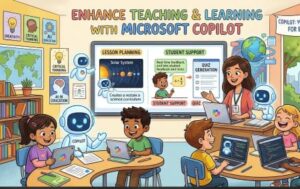
Artificial Intelligence is transforming education, helping institutions create more engaging, personalized, and efficient learning experiences. Among the latest innovations, Microsoft Copilot stands out as a powerful AI assistant designed to support educators, students, and administrators in their daily work.
Whether you’re preparing lesson plans, creating assessments, analyzing student performance, or streamlining administrative tasks, Microsoft Copilot helps schools and universities work smarter while keeping educators focused on what matters most teaching and inspiring students.
As educational institutions continue embracing digital transformation, Microsoft Copilot is becoming an essential tool for improving productivity, enhancing collaboration, and fostering innovation in both classrooms and campuses.
Why AI Matters in Modern Education
Education is evolving rapidly. Teachers are expected to deliver personalized learning experiences while managing increasing administrative responsibilities. Students expect interactive and technology-enabled learning environments that prepare them for future careers.
AI helps educational institutions by:
- Reducing repetitive administrative work
- Supporting personalized learning
- Improving collaboration
- Creating engaging educational content
- Enabling data-driven decision-making
- Increasing accessibility for diverse learners
Microsoft Copilot addresses these needs while maintaining enterprise-grade security and compliance.
Benefits of Microsoft Copilot for Teachers
1. Faster Lesson Planning
Preparing high-quality lesson plans often requires hours of research and content development.
Microsoft Copilot can help educators:
- Generate lesson outlines
- Create learning objectives
- Suggest classroom activities
- Develop discussion questions
- Recommend assessment ideas
- Adapt lessons for different learning levels
Instead of starting from a blank page, teachers can focus on refining ideas and delivering meaningful instruction.
2. Create Teaching Materials in Minutes
Teachers regularly prepare:
- Worksheets
- Quizzes
- Presentations
- Study guides
- Rubrics
- Classroom announcements
Microsoft Copilot accelerates this process by drafting professional-quality materials that educators can review and customize according to curriculum requirements.
This significantly reduces preparation time without compromising educational quality.
3. Personalized Learning Support
Every student learns differently.
Microsoft Copilot helps educators create differentiated instructional materials tailored to:
- Advanced learners
- Students needing additional support
- English language learners
- Diverse learning styles
By generating multiple versions of learning resources, teachers can provide more inclusive and personalized education.
4. Simplified Assessment Creation
Designing effective assessments can be time-consuming.
Microsoft Copilot assists in creating:
- Multiple-choice questions
- Short-answer assessments
- Essay prompts
- Classroom quizzes
- Formative assessments
- Practice exercises
Teachers can quickly generate assessment ideas while maintaining academic standards.
5. Improve Communication
Educators spend considerable time responding to emails and communicating with students, parents, and colleagues.
Microsoft Copilot can draft:
- Parent newsletters
- Student feedback
- Meeting summaries
- Email responses
- Classroom updates
- Project instructions
This allows teachers to communicate more effectively while saving valuable time.
How Students Benefit from Microsoft Copilot
Students can also use Microsoft Copilot responsibly to enhance learning rather than replace critical thinking.
Benefits include:
Better Study Support
Students can summarize lengthy notes, organize research materials, generate study guides, and understand complex concepts more efficiently.
Enhanced Writing Assistance
Microsoft Copilot helps students improve grammar, structure, readability, and clarity while encouraging them to develop their own ideas.
Research Organization
Instead of spending hours organizing information, students can quickly create outlines, categorize research findings, and prepare presentations.
Presentation Development
Students can generate professional PowerPoint presentations, speaker notes, and visual content suggestions for academic projects.
Supporting University Faculty and Researchers
Higher education institutions manage extensive research projects, grant applications, publications, and collaborative initiatives.
Microsoft Copilot helps faculty members by:
- Summarizing research papers
- Drafting research proposals
- Organizing literature reviews
- Creating presentation slides
- Managing meeting notes
- Analyzing Excel datasets
- Preparing academic reports
Researchers can dedicate more time to innovation while reducing administrative overhead.
Streamlining Administrative Operations
Educational institutions rely on efficient administration to support teaching and student success.
Microsoft Copilot assists administrative teams by:
- Drafting policy documents
- Creating meeting agendas
- Summarizing committee discussions
- Managing email communication
- Preparing reports
- Automating repetitive documentation
- Generating financial summaries in Excel
This improves operational efficiency across departments.
Enhancing Collaboration Across Campus
Modern education depends on teamwork.
Microsoft Teams combined with Microsoft Copilot enables faculty, staff, and students to collaborate more effectively by:
- Summarizing meetings automatically
- Highlighting action items
- Tracking decisions
- Creating meeting notes
- Drafting follow-up emails
- Organizing collaborative projects
This keeps everyone aligned while reducing manual note-taking.
Data-Driven Decision Making
School leaders and university administrators often manage large volumes of institutional data.
Microsoft Copilot helps analyze information from Excel spreadsheets to identify:
- Student performance trends
- Attendance patterns
- Budget insights
- Enrollment statistics
- Operational metrics
- Resource utilization
Instead of manually interpreting data, administrators receive actionable insights more quickly.
Improving Accessibility and Inclusive Learning
One of Microsoft’s strongest commitments is accessibility.
Microsoft Copilot supports inclusive education by helping create:
- Simplified content
- Reading-friendly materials
- Alternative explanations
- Clear communication
- Accessible documentation
These capabilities contribute to a more equitable learning environment for students with diverse needs.
Security and Responsible AI
Educational institutions handle sensitive student and organizational data.
Microsoft Copilot is designed with enterprise-grade security, privacy, compliance, and responsible AI principles. It respects organizational permissions, ensuring users only access information they are authorized to view.
This makes it a trusted solution for schools and universities seeking to adopt AI responsibly.
Best Practices for Implementing Microsoft Copilot
To maximize value, educational institutions should:
- Train educators on effective prompting techniques.
- Develop clear AI usage policies.
- Encourage responsible and ethical use.
- Integrate Copilot into existing teaching workflows.
- Monitor adoption and gather feedback.
- Share successful use cases across departments.
Successful implementation combines technology with professional development and institutional governance.
The Future of AI in Education
AI will continue to reshape education by supporting educators rather than replacing them.
Teachers remain central to learning because they provide mentorship, creativity, empathy, and critical thinking—qualities AI cannot replicate.
Microsoft Copilot serves as a trusted assistant that reduces repetitive work, enhances productivity, and enables educators to focus on meaningful student engagement.
As schools and universities prepare learners for an increasingly digital future, adopting AI-powered tools like Microsoft Copilot can strengthen teaching, improve operational efficiency, and create richer learning experiences.

Microsoft Copilot is more than an AI assistant—it is a productivity partner for modern education. From lesson planning and assessment creation to research support and administrative efficiency, it empowers schools and universities to achieve more with less effort.
By integrating AI into everyday academic workflows, educational institutions can create engaging classrooms, improve collaboration, and deliver better outcomes for both educators and students.
The future of education is not about replacing teachers with technology. It is about equipping teachers with intelligent tools that help them teach more effectively, support every learner, and build stronger educational communities.
FAQ
1. What is Microsoft Copilot in education?
Microsoft Copilot is an AI-powered assistant integrated into Microsoft 365 that helps teachers, students, researchers, and administrators improve productivity and collaboration.
2. How does Microsoft Copilot help teachers?
It assists with lesson planning, creating quizzes, drafting emails, preparing presentations, generating classroom resources, and reducing administrative tasks.
3. Can university students use Microsoft Copilot?
Yes. Students can use it to organize research, improve writing, summarize notes, prepare presentations, and support their learning while maintaining academic integrity.
4. Is Microsoft Copilot secure for schools?
Yes. Microsoft Copilot includes enterprise-grade security, privacy, compliance, and permission-based access controls designed to protect institutional and student data.
5. Why should schools adopt Microsoft Copilot?
Schools can save time, improve teaching quality, enhance collaboration, streamline administration, and support personalized learning experiences.