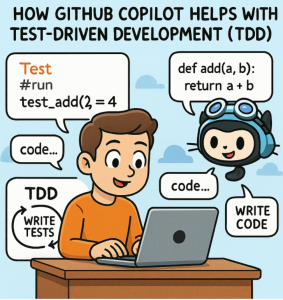
Test-Driven Development (TDD) has been a cornerstone of modern software engineering for decades. By writing tests before implementing functionality, developers ensure better design, maintainability, and fewer bugs. But while TDD is powerful, it can sometimes feel slow or cumbersome, especially when setting up repetitive test structures or boilerplate code.
This is where GitHub Copilot, the AI-powered coding assistant, becomes a valuable partner. It doesn’t replace the discipline of TDD, but it can accelerate the process and help developers stay in the flow.
1. Writing Tests Faster
TDD starts with writing a failing test that describes the desired behavior. Copilot shines here by:
- Generating test scaffolding: Based on the function name or docstring, Copilot can suggest unit test structures automatically.
- Providing assertions: It often predicts the expected output for common operations, saving time in writing detailed assertions.
- Adapting to frameworks: Whether you use
pytest,unittest,JUnit, orRSpec, Copilot can autocomplete idiomatic test cases in your chosen framework.
Example:
When you type def test_addition():, Copilot might suggest an assertion like assert add(2, 3) == 5. It picks up on context and fills in reasonable defaults.
2. Encouraging Red-Green-Refactor
The core TDD cycle is Red → Green → Refactor:
- Write a failing test (Red)
- Implement just enough code to make it pass (Green)
- Refactor for clarity and performance (Refactor)
Copilot helps you stay within this loop:
- Red: By suggesting test variations and edge cases, Copilot ensures your tests fail for the right reasons.
- Green: When you switch to implementation, Copilot uses test context to suggest code that satisfies the tests.
- Refactor: Copilot assists in extracting cleaner methods, renaming variables, and making code more expressive while ensuring tests keep passing.
3. Generating Edge Cases You Might Miss
Human developers sometimes focus on the “happy path” first. Copilot, trained on massive codebases, frequently suggests:
- Boundary conditions (e.g., empty strings, zero, null values).
- Exception handling tests (e.g., expecting a raised error).
- Performance-related scenarios (large inputs).
These suggestions can improve test coverage without requiring the developer to stop and brainstorm edge cases from scratch.
4. Reducing Cognitive Load
One of the biggest barriers to consistent TDD practice is mental overhead. Switching between writing tests, imagining implementation, and recalling syntax slows down momentum. Copilot:
- Handles the syntax details, like decorators, imports, or parameterized tests.
- Provides boilerplate code instantly, so developers can focus on test logic.
- Reduces context-switching, letting you stay immersed in the problem domain instead of wrestling with setup code.
5. Avoiding Over-Reliance
While Copilot is a great accelerator, TDD requires critical thinking:
- Don’t accept Copilot’s test blindly—ensure it reflects the business requirements.
- Avoid letting Copilot “solve the problem for you” before the test drives it. The value of TDD comes from thinking through requirements before implementation.
- Use Copilot as a partner, not an autopilot.
GitHub Copilot doesn’t change the principles of Test-Driven Development—it enhances them. By making test writing faster, implementation smoother, and edge cases easier to spot, it reduces friction in the TDD cycle.
The result? Developers can stay focused on solving problems, delivering cleaner code, and benefiting from the confidence that strong test coverage brings.
In short: TDD gives you quality, Copilot gives you speed. Together, they give you flow.
Extra posts:
 GitHub Copilot for Students How It Can Help You Learn Faster
  Top 10 Things You Can Do with GitHub Copilot as a New Developer
  Boosting Productivity with GitHub Copilot Real-World .NET Coding Examples
  Top 10 Things You Can Do with GitHub Copilot as a New Developer
  What Is the GitHub Copilot Certification and Why It Matters for Developers
  Mastering GitHub Copilot: Tips, Shortcuts, and Prompts That Work