
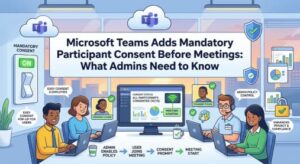
Microsoft Teams is getting a new compliance-focused feature that could change what participants see before joining certain meetings. Starting in September 2026, Microsoft will begin rolling out mandatory pre-meeting participant consent, allowing organizations to require attendees to acknowledge custom terms, disclaimers, compliance notices, or other important information before entering a Teams meeting.
The capability is designed primarily for organizations with regulatory, legal, privacy, governance, or internal policy requirements. Once enabled by an administrator, the consent requirement will apply broadly—including to meeting organizers, employees, external guests, and anonymous participants.
Microsoft says the feature will also record consent acknowledgments in audit logs, giving organizations an additional source of information for compliance monitoring, investigations, and reporting.
The feature is associated with Microsoft 365 Roadmap ID 561914 and will be introduced gradually across different Microsoft cloud environments through December 2026.
What Is Microsoft Teams Mandatory Participant Consent?
The new capability gives Teams administrators a way to place a consent step before participants join meetings covered by a configured policy.
Instead of simply clicking a meeting link and entering the meeting, participants may first be presented with organization-defined content. This could include a recording notification, privacy statement, terms and conditions, responsible AI guidance, confidentiality notice, or another compliance-related message.
Participants must acknowledge the configured content before they can proceed into the meeting.
Importantly, the policy does not automatically apply to every Teams meeting. The feature is disabled by default, meaning organizations that do nothing will not see a change to their existing meeting experience.
Administrators who decide the capability is appropriate for their organization will configure it through the Teams admin center.
That distinction is important for IT departments. The rollout itself does not mean every Teams meeting will suddenly require consent. Organizations must actively configure the capability before it affects users and meetings.
Why Microsoft Is Introducing the Feature
Compliance requirements can vary significantly between industries and organizations. A company may need participants to acknowledge that a meeting is being recorded, for example, while another organization may need to communicate confidentiality obligations or specific rules around the use of artificial intelligence.
Previously, organizations could communicate this information through meeting notices, policies, invitations, or other mechanisms. The new Teams capability provides a more structured way to place an acknowledgment directly into the meeting-joining experience.
This could be particularly useful in environments where demonstrating that a participant was presented with and accepted a particular notice is important.
The addition of audit logging is another significant part of the feature.
Microsoft says participant consent acknowledgments will be recorded in audit logs. That means administrators and compliance teams can have a record associated with the consent event, potentially making it easier to support internal audits, investigations, regulatory reviews, or governance processes.
In other words, Microsoft is not simply adding another pop-up before a meeting. It is connecting the consent experience with an organization’s broader compliance and auditing framework.
Everyone in the Meeting May Need to Accept
One of the most notable aspects of the new capability is its broad scope.
When a meeting is governed by a mandatory consent policy, all participants are expected to accept the configured consent before joining.
That includes:
- Meeting organizers
- Internal employees
- External participants
- Guests
- Anonymous attendees
Meeting organizers are not exempt.
This could be an important operational detail for organizations rolling out the feature. An administrator may configure a policy expecting it to apply primarily to external attendees, but the actual experience will also require the organizer to acknowledge the consent message when joining a meeting covered by the policy.
For frequently scheduled meetings, IT teams may therefore want to consider how the consent experience fits into existing workflows.
Organizations Can Create Their Own Consent Content
The feature is not limited to a single Microsoft-provided disclaimer.
Administrators will be able to define custom content for their organization’s needs. Depending on the organization’s policies, this could potentially include language covering meeting recording, confidentiality, data handling, regulatory obligations, acceptable use, or responsible AI.
This flexibility is one of the feature’s biggest advantages for compliance teams because different organizations have different requirements.
Admins will also be able to preview the consent experience before enabling it. That gives IT and compliance teams an opportunity to review the wording and understand how the message will appear to participants.
For organizations with legal or regulatory requirements, that preview step could be especially useful before deploying the policy broadly.
Multilingual Support Is Included
International organizations also receive some flexibility around language.
Administrators can configure one default language plus up to four additional languages for the consent experience.
Participants will see the consent content according to their device language settings when a matching configured language is available. If the participant’s language is not among those configured by the administrator, the default language will be displayed.
This approach should make the feature easier to deploy across multinational organizations without requiring completely separate consent policies for every supported language.
However, organizations should carefully review translations of legal or compliance language before deployment. A technically correct translation is not necessarily sufficient for regulatory purposes, particularly when the wording represents a formal legal notice or contractual acknowledgment.
When Will the Feature Roll Out?
Microsoft is planning a phased rollout across different environments.
The current schedule is:
Targeted Release: Beginning in September 2026.
Worldwide and GCC: Beginning in mid-October 2026, with rollout expected to finish by mid-November 2026.
GCC High and DoD: Beginning in mid-November 2026, with rollout expected to finish by mid-December 2026.
These dates mean organizations may not see the capability at exactly the same time. Microsoft 365 feature rollouts can also progress gradually, so administrators should monitor their tenant and Microsoft 365 communications during the relevant rollout period.
What Changes for Employees and Meeting Participants?
For users in organizations that do not enable the feature, essentially nothing changes.
Microsoft has stated that the feature is disabled by default and that there is no impact on users or meetings unless administrators configure it.
For users in organizations that enable it, however, joining some meetings will involve an additional step.
Participants will need to read the configured consent content and accept it before joining the meeting. This could introduce a small amount of friction, particularly for users joining meetings from mobile devices or for external guests who are unfamiliar with the organization’s requirements.
That makes communication important.
If an organization enables the feature without explaining why participants are seeing a new consent screen, users may assume that something is wrong with Teams or their meeting invitation.
A short internal announcement can make the transition much smoother.
What IT Administrators Should Do
Organizations do not need to take action simply because Microsoft is rolling out the capability.
If the feature is not relevant to the organization’s compliance requirements, administrators can leave it disabled.
For organizations considering deployment, however, there are several steps worth taking before enabling it.
First, review the legal and compliance requirement behind the proposed consent message. IT teams should work with legal, privacy, security, and compliance stakeholders where appropriate.
Second, determine which meetings should be governed by the policy and what content participants need to acknowledge.
Third, create the consent messaging and review it carefully. The wording should be understandable to ordinary participants rather than written entirely in technical or legal terminology.
Fourth, test the experience and use the administrator preview capability before enabling the policy.
Finally, update internal documentation and helpdesk guidance. Support teams should know why the consent screen appears, who is affected, and what participants should do if they encounter an issue.
Audit Logs Add an Important Governance Layer
The ability to record consent acknowledgments in audit logs may ultimately be one of the most valuable elements of this update.
For compliance teams, simply displaying a notice is different from having an auditable record that a participant acknowledged it.
The audit information can provide greater visibility for organizations that need to demonstrate compliance or investigate specific events.
At the same time, organizations should consider their own policies around audit data. Since consent acknowledgments represent additional information stored for compliance and auditing purposes, administrators should understand how the records fit into their organization’s retention, access, privacy, and governance practices.
This is particularly relevant for organizations operating under strict data protection or industry-specific regulatory requirements.
A Small Teams Change With Potentially Significant Compliance Benefits
At first glance, a consent screen before a Teams meeting might seem like a minor user-interface change. For organizations with significant compliance obligations, however, the implications could be much broader.
The combination of custom consent messaging, multilingual support, mandatory acknowledgment, and audit logging gives administrators a more structured mechanism for managing meeting-related compliance requirements.
The key point for organizations is that the feature will not automatically disrupt existing Teams meetings. It is an administrator-controlled capability and remains disabled unless an organization chooses to configure it.
That gives IT and compliance teams time to decide whether the feature is appropriate, develop the necessary messaging, test the experience, and prepare users.
With the first rollout beginning in September 2026 and broader availability following through November and December, organizations should begin reviewing their requirements now if they expect to use the capability.
For Microsoft Teams users, the change may simply mean one additional click before joining certain meetings. For administrators, legal teams, and compliance professionals, it could become another useful tool for demonstrating that important meeting policies and notices were clearly presented and acknowledged.
Bottom line: Microsoft Teams is turning pre-meeting consent into a configurable compliance control. Organizations that need stronger governance around meeting recording, confidentiality, responsible AI, or regulatory notices should watch the rollout and evaluate whether mandatory participant consent belongs in their Teams policy strategy.
Extra posts:
 Microsoft Teams Introduces Private Chat for Organizers and Presenters: A Major Upgrade for Meetings, Webinars, and Town Halls
  Best Practices for Running Effective Microsoft Teams Meetings
  Beginner’s Guide to Microsoft Teams: Chat, Meetings, and Channels
  Understanding Teams Policies: Messaging, Meetings & Calling | Complete Guide
  Troubleshooting Microsoft Intune Issues A Practical Guide for IT Admins
  Accessibility Features in Microsoft 365 That Most Admins Forget to Enable