In 2026, choosing the right storage device is more important than ever. Whether you’re buying a new Windows 11 laptop, upgrading an existing desktop, or building a custom PC, your storage choice directly impacts speed, performance, gaming experience, productivity, and overall system responsiveness.
Many users still wonder whether they should buy an SSD, stick with a traditional HDD, or choose a Hybrid Storage solution. Each option has its own strengths, weaknesses, and ideal use cases.
This guide explains everything in simple terms so you can make the right decision based on your budget and computing needs.
Why Storage Matters in Windows 11
Windows 11 is designed for modern hardware. Compared to older versions of Windows, it relies more heavily on fast storage for features like:
- Faster boot times
- Instant application launching
- Windows Updates
- Gaming performance
- Multitasking
- Virtual memory
- File searching
- AI-powered Windows features
A slow storage drive can make even a powerful processor feel sluggish.
That’s why understanding today’s storage technologies is essential.
What is an HDD?
An HDD (Hard Disk Drive) is the oldest type of storage still widely available.
It stores data on spinning magnetic disks while a mechanical arm reads and writes information.
Advantages
- Lowest cost per GB
- Available in huge capacities (8TB, 12TB, 16TB+)
- Excellent for backups
- Great for storing movies, photos, and archives
Disadvantages
- Much slower than SSDs
- Mechanical parts wear over time
- Generates more heat
- Higher power consumption
- Can be damaged by drops or vibrations
Typical Windows 11 boot time using an HDD:
45–90 seconds
Application loading is also noticeably slower.
What is an SSD?
SSD stands for Solid State Drive.
Unlike HDDs, SSDs contain no moving parts. Instead, they use flash memory chips similar to those found in smartphones.
This makes them dramatically faster.
There are several SSD types:
- SATA SSD
- NVMe SSD
- PCIe Gen 4 SSD
- PCIe Gen 5 SSD
Most modern Windows 11 computers now use NVMe SSDs.
Advantages of SSD
Lightning-Fast Boot Times
Windows 11 usually boots in:
10–20 seconds
Some premium systems boot even faster.
Faster App Launches
Programs like:
- Adobe Photoshop
- Microsoft Office
- Visual Studio
- Steam
- Chrome
open almost instantly.
Better Gaming Experience
Games load much faster.
Large open-world games like Cyberpunk 2077, Starfield, and Forza Horizon benefit greatly from SSD speeds.
Modern game engines increasingly expect SSD-level performance.
Silent Operation
Since SSDs have no moving parts, they operate silently.
Lower Power Usage
This is especially important for laptops.
Using an SSD can improve battery life compared to an HDD.
Better Reliability
Without spinning disks, SSDs are much more resistant to accidental bumps or drops.
Disadvantages of SSD
Although SSD prices continue to fall, they still cost more than HDDs.
For example:
- 1TB SSD costs more than
- 1TB HDD
Very high-capacity SSDs (4TB–8TB) remain expensive.
What is Hybrid Storage?
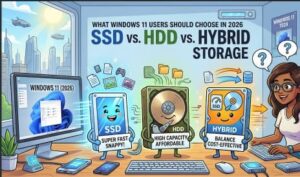
Hybrid storage combines the strengths of SSD and HDD.
There are two common approaches.
Option 1
A computer has:
- 1TB SSD
- 4TB HDD
Windows runs from the SSD.
Large files are stored on the HDD.
This is the most common setup.
Option 2
Some older Hybrid Drives (SSHDs) combined a small SSD cache with a traditional HDD.
These are becoming less popular because standalone SSDs have become affordable.
SSD vs HDD Performance Comparison
| Feature | SSD | HDD | Hybrid |
|---|---|---|---|
| Boot Speed | ⭐⭐⭐⭐⭐ | ⭐⭐ | ⭐⭐⭐⭐ |
| Game Loading | ⭐⭐⭐⭐⭐ | ⭐⭐ | ⭐⭐⭐⭐ |
| File Transfers | ⭐⭐⭐⭐⭐ | ⭐⭐ | ⭐⭐⭐⭐ |
| Price | ⭐⭐⭐ | ⭐⭐⭐⭐⭐ | ⭐⭐⭐⭐ |
| Capacity | ⭐⭐⭐ | ⭐⭐⭐⭐⭐ | ⭐⭐⭐⭐⭐ |
| Noise | Silent | Audible | Low |
| Durability | Excellent | Moderate | Excellent |
Which Storage is Best for Windows 11?
For Students
Choose:
512GB SSD
Fast enough for:
- Documents
- Browsing
- Online classes
- Streaming
- Everyday work
For Office Users
Recommended:
1TB NVMe SSD
Ideal for:
- Microsoft Office
- Teams
- Zoom
- Browsing
- Accounting software
For Gamers
Best choice:
- 1TB or 2TB NVMe SSD
Many modern games now recommend SSD installation.
Loading times are dramatically shorter.
For Content Creators
Editors working with:
- 4K videos
- Photoshop
- Blender
- Premiere Pro
should choose:
- 2TB NVMe SSD
Optionally add:
- 4TB HDD
for media storage.
For Professionals
Software developers and engineers benefit greatly from SSDs because:
- Projects compile faster
- Databases load quickly
- Virtual machines run better
- Docker containers perform efficiently
Is HDD Still Worth Buying in 2026?
Yes—but only for storage.
HDDs remain an excellent choice for:
- Backup drives
- NAS systems
- Home media servers
- Security camera recordings
- Large photo libraries
However, installing Windows 11 on an HDD is no longer recommended for most users due to significantly slower performance.
Should You Upgrade from HDD to SSD?
Absolutely.
Upgrading from an HDD to an SSD is one of the most noticeable improvements you can make to an older PC.
Benefits include:
- Faster startup
- Quicker software installation
- Improved responsiveness
- Better multitasking
- Reduced waiting time
- Less system freezing
Many users describe the upgrade as making their computer feel “brand new.”
SATA SSD vs NVMe SSD
Many people confuse these two SSD types.
SATA SSD
- Speed: Around 550 MB/s
- Lower cost
- Good upgrade for older computers
NVMe SSD
- Speed: 3,500–14,000 MB/s depending on PCIe generation
- Much faster
- Best choice for new Windows 11 PCs
If your motherboard supports NVMe, it is generally the better long-term investment.
Storage Capacity Recommendations for 2026
Casual Users
- 512GB SSD
Students
- 512GB–1TB SSD
Office Work
- 1TB SSD
Gamers
- 2TB NVMe SSD
Video Editors
- 2TB SSD + 4TB HDD
Business Users
- 1TB NVMe SSD
Future of Storage
Storage technology continues to evolve rapidly.
Emerging trends include:
- PCIe Gen 5 SSDs
- DirectStorage support in Windows 11
- AI-enhanced storage optimization
- Faster NAND flash memory
- Larger affordable SSD capacities
As prices continue to decline, SSDs are expected to become the default choice for nearly all consumer PCs.

Which Should You Choose?
For most Windows 11 users in 2026, an SSD is the clear winner. It offers exceptional speed, reliability, energy efficiency, and a much smoother computing experience. Whether you’re browsing the web, gaming, studying, or working professionally, an SSD significantly improves daily performance.
An HDD still has value as an affordable solution for storing large amounts of data, making it ideal for backups, media libraries, and archival storage. However, it should no longer be the primary drive for running Windows 11.
A hybrid setup—using an SSD for Windows and applications alongside an HDD for bulk storage—offers the best balance between performance, storage capacity, and cost. It is an excellent choice for users who need both speed and plenty of space.
Ultimately, if you’re purchasing or upgrading a Windows 11 PC in 2026, prioritize an NVMe SSD as your primary drive. It is the smartest investment for faster boot times, smoother multitasking, improved gaming, and better long-term performance.