

After installing SharePoint 2016 servers which are totally vanilla and new and you face that you get message in front of servers in red that “Upgrade is available” or for database “Upgrade is recommended”?
This situation can happen to you, the cause is some components in the database have not have been set to the expected version when the SharePoint 2016 Configuration Wizard created the Central Administration AdminContent database.
To resolve it you need to run this command:
PSConfig.exe -cmd upgrade -inplace b2b -wait -force -cmd applicationcontent -install -cmd installfeatures -cmd secureresources
From other side if you see on Admin database this message
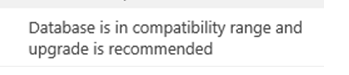
Then you will need to run this command:
Psconfig.exe -cmd upgrade -inplace b2b -waitExtra posts:
 SharePoint Servers Cumulative updates SharePoint On premise Restoring Content Databases between Farms SharePoint servers September 2019 Cumulative Updates
  How to Troubleshoot Windows 11 Upgrade Issues A Practical Guide
  Moving from Office 2016/2019 to Microsoft 365: What Changes?
  Free SharePoint Migration tool to SharePoint Online and Office 365