Skip to content

Managing App Permissions for Better Privacy in Windows 11 A Complete Guide

In today’s digitally connected world, privacy has become one of the most valuable assets we can protect. Whether you’re browsing online, installing new software, or simply checking your email, every action produces data. This data… 

Free Up Disk Space with Storage Sense & Disk Cleanup in Windows 11 A Complete Guide

Running out of disk space can drastically slow down your Windows 11 PC, causing programs to freeze, updates to fail, and overall performance to drop. Fortunately, Windows 11 includes two built-in tools designed to help… 

Troubleshooting Copilot Failures: A Guide to Diagnosing “Not Grounded” and “Permission Denied” Errors

A practical, human-friendly guide for helpdesk and support teams Microsoft Copilot is becoming a daily companion for knowledge workers—drafting documents, summarizing chats, automating tasks, and surfacing insights across Microsoft 365. But as helpful as Copilot… 

Recovering Deleted Files Using Windows File Recovery A Complete Guide

Accidentally deleting an important file can feel like a punch to the gut. Whether it’s a work document you spent hours perfecting, a set of vacation photos, or a crucial spreadsheet, losing data can create… 

How to Use File History for Backup in Windows 11

Backing up your files isn’t just something IT professionals need to worry about anymore—it’s a crucial part of everyday digital life. From work documents to family photos, losing important files can be devastating. Luckily, Windows… 

How to Map Network Drives in Windows 11: A Complete Step-by-Step Guide

If you work in an office environment, collaborate with a team, or simply want a convenient way to access files stored on another computer or NAS device in your home, mapping a network drive is… 

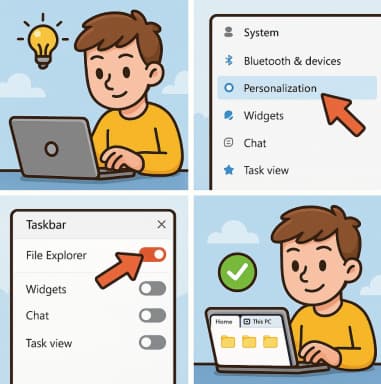
How to Enable Tabs in File Explorer in Windows 11

If you’ve ever wished File Explorer worked a little more like a modern web browser, you’re not alone. For years, Windows users requested a tabbed interface that would allow multiple folders to stay open in… 

Practical Use Cases Writing, Refactoring, and Testing Code with GitHub Copilot

In today’s fast-paced software development environment, efficiency and code quality are paramount. Developers are constantly seeking tools that can accelerate coding tasks without compromising quality. One tool that has rapidly gained popularity among programmers is… 

Prompt Engineering for Developers Getting the Best Out of Copilot

Artificial intelligence has revolutionized the way we code. GitHub Copilot, powered by OpenAI’s models, has become a game-changer for developers, offering real-time code suggestions, generating boilerplate code, and even helping solve complex problems. But like… 

Monitoring Security and Compliance Metrics for Copilot: A Human-Centered Guide

As organizations continue adopting AI-powered tools like Microsoft Copilot, one theme keeps rising to the surface: trust. Companies want to leverage Copilot to boost productivity, streamline workflows, and assist employees in their day-to-day tasks—but not… 

Building Copilot Usage Dashboards in Power BI A Complete Guide

As AI tools become essential in everyday workflows, organizations increasingly want to understand how these tools are being used. Microsoft Copilot—now integrated across Microsoft 365—promises improvements in productivity, decision-making, and collaboration. But like any tool,… 

The 4+1 View Model of Architecture Explained: A Complete Guide

Building large and complex software systems is a lot like constructing a skyscraper — it needs a solid foundation, clear blueprints, and collaboration across multiple teams. In software engineering, these “blueprints” are what we call…