

Building large and complex software systems is a lot like constructing a skyscraper — it needs a solid foundation, clear blueprints, and collaboration across multiple teams. In software engineering, these “blueprints” are what we call architectural views. One of the most effective and widely used frameworks for defining and organizing these views is the 4+1 View Model of Architecture, proposed by Philippe Kruchten in 1995 while working at Rational Software.
This model helps architects, developers, and stakeholders visualize a software system from multiple perspectives, ensuring that technical and business needs are aligned. In this post, we’ll explore what the 4+1 View Model is, why it’s important, and how each of its five views plays a key role in building robust, maintainable, and scalable systems.
What is the 4+1 View Model of Architecture?
The 4+1 View Model provides a structured way to describe the architecture of a software system using five complementary views:
- Logical View
- Process View
- Development View
- Physical View
- Scenarios (the +1 View)
Each view focuses on specific aspects of the system, addressing different concerns of various stakeholders. For example, developers might care about the code organization and components, while system engineers might care more about deployment and performance.
By combining these views, the model ensures that every aspect of the system — from structure to behavior to deployment — is captured and understood.
1. Logical View – The Functional Perspective
The Logical View describes how the system is structured to meet functional requirements. It focuses on object models, classes, relationships, and interactions.
This view is most useful for end-users, analysts, and designers, as it shows what the system does rather than how it does it.
Key Elements:
- Class diagrams
- Sequence diagrams
- State diagrams
- Object relationships
Example:
In an e-commerce application, the logical view would include entities such as Customer, Order, Product, and Payment, along with how they interact with each other.
Purpose:
The logical view helps ensure that the system’s design correctly implements the required business logic and user functionality.
2. Process View – The Dynamic Perspective
The Process View focuses on the system’s runtime behavior, including processes, threads, and communication mechanisms. It addresses performance, scalability, and concurrency — things that happen when the system is running.
This view is especially relevant to system integrators and performance engineers.
Key Elements:
- Process models
- Activity diagrams
- Communication protocols
- Synchronization and concurrency design
Example:
In the same e-commerce system, the process view might describe how the checkout process spawns a background thread for payment processing, or how multiple users can simultaneously place orders without data conflicts.
Purpose:
The process view ensures the system performs efficiently and can handle multiple operations simultaneously without failures.
3. Development View – The Implementation Perspective
The Development View (sometimes called the Implementation View) focuses on the system from a developer’s point of view. It describes how the software is organized in the development environment — including modules, components, libraries, and subsystems.
It’s useful for programmers, architects, and DevOps engineers, as it helps them manage version control, build systems, and project dependencies.
Key Elements:
- Module and component diagrams
- Source code organization
- Repositories and build structures
- Subsystem dependencies
Example:
For the e-commerce system, the development view might show how the project is divided into modules like frontend, backend, database, and API, along with how these parts are maintained in a Git repository.
Purpose:
This view ensures smooth collaboration and efficient code maintenance across teams by clarifying how the system is built and organized internally.
4. Physical View – The Deployment Perspective
The Physical View (or Deployment View) shows how the software is physically deployed across hardware and network infrastructure. It connects the software components to the actual environment in which they run.
This view is crucial for system engineers, network administrators, and operations teams.
Key Elements:
- Deployment diagrams
- Server configurations
- Network topology
- Hardware nodes and their connections
Example:
In our e-commerce example, the physical view would illustrate how the web server, application server, and database server are distributed across multiple machines or cloud instances.
Purpose:
This view ensures that the system runs reliably in the intended infrastructure, with appropriate performance, scalability, and fault tolerance.
5. Scenarios (The +1 View) – The Integrating Perspective
The “+1” View represents Scenarios, sometimes referred to as Use Cases. It ties together the other four views by illustrating how they collaborate to fulfill real-world functionality.
Scenarios help validate the architecture by showing how different parts of the system interact to achieve a particular goal.
Key Elements:
- Use case diagrams
- Interaction scenarios
- End-to-end workflows
Example:
A checkout scenario in the e-commerce system might walk through how a user selects products, places an order, processes payment, and receives confirmation — showing how the logical, process, development, and physical views all work together.
Purpose:
Scenarios act as a bridge between technical design and business needs, ensuring the architecture supports real-world use cases.
Why Use the 4+1 View Model?
The 4+1 model offers several advantages that make it a favorite among software architects:
- Improved Communication: Different stakeholders get views tailored to their concerns.
- Comprehensive Documentation: All aspects of the system are covered, reducing ambiguity.
- Better Validation: Scenarios help verify that the architecture supports real-world workflows.
- Flexibility: Works with various methodologies — from traditional UML-based design to modern agile architecture documentation.
- Scalability: Useful for both small applications and enterprise-scale systems.
By ensuring each perspective is represented, the 4+1 View Model provides a holistic, well-structured picture of the system architecture.
The 4+1 View Model of Architecture remains one of the most effective frameworks for documenting and understanding complex software systems. By breaking down the architecture into five interconnected views — logical, process, development, physical, and scenarios — it ensures that every aspect of the system is well-defined and aligned with stakeholder needs.
Whether you’re designing a small web app or a distributed enterprise solution, applying the 4+1 model can bring clarity, consistency, and structure to your architectural decisions.
In the end, the 4+1 model isn’t just about documentation — it’s about creating shared understanding across teams, bridging the gap between business goals and technical realities.
Extra posts:
 Architecture Decision Records (ADRs) A Lightweight Governance Model for Modern Software Teams
  Architecture vs. Design Key Differences Explained
  Shared Responsibility Model in Azure Explained (with Real Examples)
  Software Architecture Frameworks A Guide to the Landscape and Their Differences
  Trade-Off Analysis in Architecture: A Practical Guide from a Solution Architect
 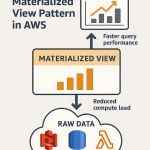 🚀 Materialized View Pattern in AWS Precompute for Performance