
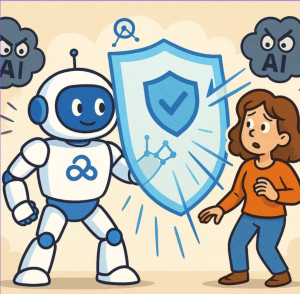
When organizations begin their journey with generative AI, the first question is rarely “What can this technology do?” The more important question is: “What can it see?”
Generative AI has the potential to transform productivity, decision-making, and collaboration. Tools like Microsoft Copilot can help employees summarize complex information, draft documents, analyze data, and discover insights across the organization. However, these capabilities also introduce a critical challenge: ensuring that AI has access only to the right information, for the right users, at the right time.
In the modern enterprise, data protection cannot be treated as an optional layer added after AI adoption. It must be built into the foundation of the technology itself.
Microsoft Copilot addresses this challenge by leveraging two powerful security pillars: Microsoft Graph and Microsoft Purview. Together, they create an invisible security and compliance framework that helps organizations adopt generative AI while maintaining control over sensitive business information.
This approach is not simply about enabling advanced AI capabilities. It is about responsible access — ensuring that AI enhances employee productivity without exposing information that users are not authorized to access.
Microsoft Graph: The Intelligence Layer Behind Copilot
At the heart of Microsoft Copilot is Microsoft Graph, the secure data connectivity layer that powers experiences across the Microsoft 365 ecosystem.
Microsoft Graph connects applications, users, devices, content, and organizational relationships across services such as Outlook, Teams, SharePoint, OneDrive, and other Microsoft 365 workloads. Rather than allowing Copilot to freely search through organizational data, Graph acts as the controlled pathway through which Copilot retrieves relevant information.
One of the most important characteristics of Microsoft Graph is that it is permission-aware by design.
This means Copilot does not receive special access privileges simply because it is powered by artificial intelligence. Instead, it operates within the same security boundaries already established for users.
For example:
- If an employee has permission to view a SharePoint document, Copilot can use that information when generating a response.
- If the employee does not have access to a document, email, or Teams conversation, Copilot cannot retrieve or summarize that content.
- Existing identity, role-based access controls, and organizational permissions continue to determine what information is available.
In other words, Copilot inherits the user’s permissions — it does not expand them.
This principle is essential in enterprise AI adoption. Organizations do not need to create a separate security model for Copilot. Instead, Copilot operates within the existing Microsoft 365 identity and access framework.
Microsoft Graph ensures that AI productivity does not come at the expense of information security.
Microsoft Purview: Extending Governance Into the AI Era
While Microsoft Graph determines who can access information, Microsoft Purview helps determine how information should be governed and protected.
Microsoft Purview provides a comprehensive set of capabilities for data classification, sensitivity labeling, compliance management, information protection, and data loss prevention (DLP). These controls allow organizations to understand their data landscape and apply policies that remain effective even as employees begin using AI-powered tools.
As organizations introduce Copilot, these governance capabilities become increasingly important.
Consider a company that has classified certain documents as Confidential or Highly Confidential. Those classifications do not disappear when users interact with AI. Copilot continues to respect the security and compliance controls associated with protected information.
Purview helps organizations ensure that:
- Sensitive business documents remain protected through existing classification and labeling policies.
- Data protection rules continue to apply when Copilot summarizes, analyzes, or generates content.
- Compliance requirements around financial information, personal data, intellectual property, and regulated content remain enforced.
- Administrators can define boundaries that reduce the risk of accidental exposure.
This creates a consistent governance experience where AI adoption does not bypass existing security investments.
Instead of treating generative AI as a separate technology requiring completely new controls, organizations can extend their established compliance framework into the AI environment.
Preventing Data Leakage Through Intelligent Controls
One of the biggest concerns surrounding enterprise AI adoption is accidental data exposure. Employees may unintentionally share sensitive information, ask AI tools questions involving confidential content, or generate responses that reveal information beyond intended audiences.
Microsoft’s approach focuses on preventing these risks at the foundation rather than relying only on user awareness.
The combination of Microsoft Graph and Purview creates a zero-trust approach to AI access.
Key protection mechanisms include:
No Unauthorized Access
Copilot does not operate as a privileged administrator. It does not automatically gain visibility into every file, mailbox, or conversation within an organization.
Its access remains limited by existing Microsoft 365 permissions.
This eliminates the risk of AI becoming a shortcut around traditional security controls.
Real-Time Permission Validation
Copilot requests are evaluated through Microsoft Graph’s security model. Access decisions are based on the user’s current permissions and organizational policies.
This means Copilot does not rely on broad, pre-approved access to enterprise data.
Policy-Aware Responses
Microsoft Purview policies help determine how sensitive information should be handled. Classification labels, DLP policies, and compliance rules continue influencing how information can be accessed and shared.
The result is an AI assistant that does more than generate accurate responses — it generates responses within organizational security boundaries.
Security Is the Foundation, Not a Feature
Generative AI represents a fundamental shift in how employees interact with information. Instead of searching through documents, emails, and collaboration platforms manually, users can ask natural-language questions and receive meaningful insights instantly.
However, this new interaction model requires a new approach to security.
AI is not just another productivity application. It becomes a new gateway into organizational knowledge. That makes identity, permissions, governance, and compliance more important than ever.
Microsoft’s architecture for Copilot reflects this reality by embedding security principles into the platform itself.
By combining:
- Microsoft Graph’s identity-aware access controls
- Microsoft Purview’s data governance and compliance capabilities
- Microsoft 365’s existing security framework
organizations can confidently introduce AI while maintaining control over their most valuable asset: data.
Responsible AI Begins With Responsible Data Management
Every Copilot interaction depends on organizational information. The quality, security, and governance of that information directly influence the safety and reliability of AI outcomes.
A successful AI strategy is not only about deploying advanced models. It is about ensuring those models operate within clearly defined boundaries.
Microsoft Copilot demonstrates that enterprise AI does not have to mean sacrificing security. With Microsoft Graph controlling access and Microsoft Purview enforcing governance, organizations can create an environment where employees benefit from AI-powered productivity while maintaining compliance and protecting sensitive information.
The future of AI adoption will not be defined only by how intelligent the technology becomes. It will also be defined by how effectively organizations protect the information that powers it.
The smartest AI solutions are not just those that provide answers — they are those built with an invisible shield that ensures every answer is trusted, secure, and responsible.
Extra posts:
 How Enterprises Are Leveraging Microsoft Copilot to Drive Innovation
  Combining Generative AI and Business Logic with Copilot Studio
  Leveraging Microsoft Copilot to Analyze IT Project Delivery vs. Milestones and Plan Due Dates
  Governance for Generative AI: Enforcing Data Loss Prevention (DLP) with Microsoft 365 Copilot
  How to Prevent Copilot from Indexing Sensitive HR Folders in SharePoint Using Purview DLP and SAM
  Microsoft 365 Purview Your Unified Shield for Data Governance & Compliance