
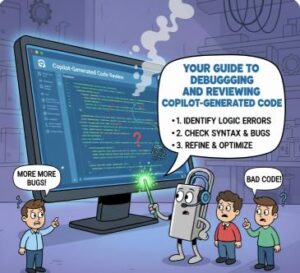
The rise of AI coding assistants like GitHub Copilot has been a game-changer. It’s like having a hyper-efficient, incredibly well-read junior developer peering over your shoulder, offering code snippets and completing functions almost as fast as you can think. This boost in productivity is phenomenal—until a tricky bug crawls into a piece of AI-generated code, or a security vulnerability lurks undetected.
The truth is, while Copilot is an amazing accelerator, it is not a replacement for a developer’s critical thinking and review process. AI-generated code, for all its brilliance, is still code written by an engine trained on massive datasets, including the good, the bad, and the slightly outdated. You, the human developer, are the crucial “Human-in-the-Loop”—the final guardian of code quality, security, and logic.
This blog post is your essential guide to navigating this new landscape. We’ll lay out the best practices for debugging and reviewing code generated by your AI partner, ensuring you leverage its speed without compromising on quality or security.
The Review Mindset: Don’t Just Accept, Inspect
The biggest mistake developers make with AI-generated code is treating it as gospel. The code looks neat, it passes a superficial sniff test, and it saves time—so it must be right, right? Not always. Your primary role shifts from writing all the code to vetting and integrating the suggested code.
1. The Sanity Check: Read-Through and Intent Matching
Before you even run the code, stop and read it.
- Match the Intent: Did Copilot actually do what you asked? It’s common for the AI to misinterpret a subtle part of your comment or prompt. A function named
getUserNamemight accidentally fetch the user’s ID instead, simply because that’s a common pattern in its training data. - Check for Hallucinations: AI models sometimes hallucinate functions, methods, or library calls that sound perfectly plausible but don’t actually exist in your codebase or the referenced library. A quick check of imports and external documentation is a must if you see an unfamiliar method.
- Assess Completeness and Context: Did the AI generate a complete function, or did it cut off mid-loop? Does it handle the local variables and context correctly? This is especially common when working across multiple files; the AI’s internal context might be incomplete.
2. Guarding the Security Perimeter
AI models are trained on all public code—and that includes code with security flaws. Studies have shown developers are more likely to introduce insecure code when using an assistant and, worse, more likely to believe the insecure code is safe. Security is your number one manual review priority.
- Input Validation is King: Look at any section of code that interacts with user input (forms, API parameters, URL queries, etc.). Is the input properly sanitized, escaped, and validated? Be highly suspicious of any AI-generated code that builds a database query string directly from user input (a classic path to SQL Injection).
- Secrets and Hardcoding: Search for anything that looks like a password, API key, or secret token. The AI might accidentally expose credentials in the code.
- Authorization vs. Authentication: Did the code only check if the user is logged in (authentication), or did it also check if the user has the permission to perform the action (authorization)? The AI often misses the subtle business logic of authorization.
Debugging Best Practices: Using Copilot to Fix Itself
Once you’ve done the initial manual review and started testing, inevitably a bug will appear. The great news is that Copilot itself is a powerful debugging partner.
1. Leverage Copilot Chat and Slash Commands
Modern Copilot integrations often include powerful commands to make debugging faster. These commands feed the AI the most relevant context (the error message, the stack trace, the problematic code) directly.
- /explain: Highlight the problematic code or paste a cryptic error message and use
/explain. This command provides a step-by-step breakdown of what the code is doing or why the error occurred, translating jargon into plain English. - /fix: When you know a piece of code is buggy, highlight it and use
/fix. Copilot will analyze the surrounding context, the error (if provided), and your intent to generate a potential solution. Always preview and manually review the fix before accepting it. - /tests: A core best practice in development is Test-Driven Development (TDD). Use the
/testscommand on a function to quickly generate a suite of unit tests. Running these tests is the fastest way to confirm that the generated code works for the “happy path” and, more importantly, for the common edge cases the AI might have missed.
2. The Structured Debugging Flow
A systematic approach prevents you from wasting time chasing shadows.
- Reproduce the Bug: Figure out the exact steps that make the error happen. You can’t fix what you can’t reliably break.
- Isolate the AI Code: Identify the specific function or block of code that Copilot generated and that the error is occurring within.
- Ask Copilot to Explain: Use
/explainon the error or the function to get an initial theory. - Use Breakpoints: Use your IDE’s traditional debugging tools (like breakpoints and step-through functionality—F10/F11). This lets you see the state of the variables at the exact moment the failure occurs. The AI needs this real-world context to provide an accurate fix.
- Refine the Prompt/Fix: If the manual debugging shows you an incorrect variable value, tell Copilot Chat: “The variable
userCountis0when it should be5. Why is this function not updating it correctly?” This specific, contextual feedback is gold for the AI.
Going Beyond: Proactive Quality Assurance
The best way to debug AI-generated code is to prevent the bugs from being accepted in the first place.
1. Automate Your Checks
Your automated tooling is the perfect counterbalance to the AI’s tendency to prioritize functionality over best practices.
- Linters and Formatters: Tools like ESLint, Prettier, or Black will catch style inconsistencies, unused variables, and potential syntax issues. Ensure these run automatically on all new code.
- Static Analysis Tools (SAST): Use tools like SonarQube, Snyk, or built-in IDE security scanners. These tools are trained to spot patterns of vulnerabilities (like SQL injection or hardcoded secrets) and are highly effective at reviewing code that an AI might have inadvertently introduced a flaw into.
- Code Coverage: Use your test runner’s coverage reports to ensure that the AI-generated code is fully exercised by the unit tests you created (and the ones you had Copilot generate!).
2. Master Contextual Prompting
The quality of the output code is directly proportional to the quality of your input prompt. Think of the prompt as a mini-specification for a detailed code reviewer.
| Bad Prompt | Good Prompt |
Write a function to save user data. | Write a Python function called 'save_user_profile(user_id, data)' that serializes the data dictionary into a JSON string and securely writes it to a file named after the user_id in the /data/profiles directory. **Handle FileNotFoundError and include input validation for the user_id.** |
The good prompt is specific, defines the output format/name, and most importantly, explicitly demands error handling and validation—forcing the AI to address edge cases.
The Developer’s New Role
GitHub Copilot and other generative AI tools are revolutionary, but they fundamentally change the developer’s job. You are no longer just a code producer; you are a critical integrator, a security auditor, and a master prompter.
By adopting a strict, systematic review process—especially focusing on security, edge cases, and using the AI’s own debugging tools like /explain and /fix—you can harness the incredible speed of AI without sacrificing the robustness and integrity of your final product. The future of coding is a collaboration, and by mastering these best practices, you ensure the human element remains the strongest, smartest, and most secure part of the team.
Extra posts:
 Writing Cleaner Code with GitHub Copilot Suggestions
  Turbocharge Your Coding Top GitHub Copilot Shortcuts and Productivity Tips for VS Code
  Debugging and Testing Your Copilot Studio Bots Efficiently
  Low-Code vs Pro-Code How Copilot Studio Bridges the Gap
  Beyond the Code: Setting Up Alerts for Unusual GitHub Copilot Activity (and Why You Need To)
  Practical Use Cases Writing, Refactoring, and Testing Code with GitHub Copilot