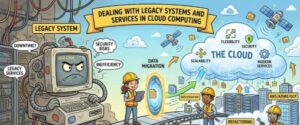
Every organization reaches a point where technology that once powered innovation begins to slow progress. Legacy systems, although reliable and familiar, often become barriers to growth, agility, and digital transformation. As businesses increasingly adopt cloud computing to improve scalability, reduce operational costs, and enhance security, one major challenge remains how to deal with legacy systems and services without disrupting business operations.
Many enterprises still depend on applications developed years or even decades ago. These systems often support critical business processes, customer databases, financial operations, and internal workflows. Replacing them overnight is rarely possible. Instead, organizations need a strategic approach that balances modernization with business continuity.
This article explores the challenges of legacy systems in cloud computing, practical modernization strategies, and best practices for ensuring a successful transition.
What Are Legacy Systems?
Legacy systems are older software applications, hardware platforms, or IT infrastructures that continue to perform essential business functions despite being built on outdated technologies. They may still work efficiently, but they often lack compatibility with modern cloud platforms, APIs, and security standards.
Examples include:
- Mainframe applications
- On-premises ERP systems
- Older customer relationship management (CRM) software
- Custom-built enterprise applications
- Traditional database systems
- Monolithic applications
Although these systems continue to provide value, maintaining them becomes increasingly expensive and difficult as technology evolves.
Why Legacy Systems Become a Challenge
One of the biggest misconceptions is that legacy systems are “bad.” In reality, many legacy applications have been refined over years of business use and contain valuable business logic. The problem arises when these systems struggle to meet modern business demands.
Some common challenges include:
Limited Scalability
Traditional infrastructure often requires physical servers, making it difficult to scale resources during periods of high demand. Cloud environments, on the other hand, allow organizations to scale computing resources almost instantly.
High Maintenance Costs
Older systems typically require specialized expertise, outdated hardware, and expensive licensing agreements. Finding professionals who understand aging technologies can also become increasingly difficult.
Security Risks
Legacy software may no longer receive security updates from vendors, leaving organizations exposed to vulnerabilities and compliance risks.
Poor Integration
Modern cloud services rely heavily on APIs and microservices. Legacy applications often lack these integration capabilities, making communication between systems more complicated.
Slower Innovation
Businesses relying heavily on outdated infrastructure may struggle to adopt artificial intelligence, machine learning, data analytics, automation, or modern customer experiences.
Why Cloud Computing Changes the Game
Cloud computing provides businesses with flexible infrastructure, faster deployment, improved collaboration, and reduced operational costs. Instead of maintaining expensive physical servers, organizations can leverage cloud platforms that automatically handle infrastructure management.
Benefits include:
- Elastic scalability
- Reduced infrastructure costs
- High availability
- Disaster recovery capabilities
- Enhanced security features
- Global accessibility
- Faster software deployment
However, moving legacy systems directly to the cloud without careful planning often leads to performance issues and increased costs.
Strategies for Dealing with Legacy Systems
There is no universal migration strategy. The best approach depends on business goals, application complexity, technical debt, and budget.
1. Rehosting (Lift and Shift)
Rehosting involves moving an existing application from on-premises infrastructure to the cloud with minimal modifications.
This strategy is suitable when organizations need quick migration with minimal downtime.
Advantages include:
- Fast deployment
- Lower initial cost
- Minimal application changes
However, lift-and-shift does not solve underlying architectural limitations.
2. Replatforming
Replatforming introduces small optimizations while moving applications to the cloud.
For example:
- Migrating databases to managed cloud services
- Moving file storage to cloud storage
- Updating operating systems
This approach improves performance without requiring a complete application redesign.
3. Refactoring
Refactoring involves modifying the application’s architecture to fully leverage cloud-native capabilities.
This may include:
- Breaking monolithic applications into microservices
- Containerizing applications
- Implementing Kubernetes
- Using serverless computing
- Modern API integration
Although refactoring requires greater investment, it often delivers the highest long-term benefits.
4. Replacing
Sometimes maintaining a legacy application costs more than replacing it.
Organizations may choose Software-as-a-Service (SaaS) alternatives for:
- CRM
- HR management
- Accounting
- Collaboration
- Customer support
Replacing outdated software can significantly reduce maintenance costs while improving productivity.
5. Retaining
Not every legacy system needs immediate migration.
Applications with low business impact or regulatory constraints may remain on-premises while surrounding systems move to the cloud.
This creates a hybrid environment that balances modernization with operational stability.
Hybrid Cloud: A Practical Solution
Many enterprises adopt hybrid cloud architectures because complete migration is often unrealistic.
A hybrid approach allows organizations to:
- Keep sensitive workloads on-premises
- Run customer facing applications in the cloud
- Synchronize databases
- Gradually modernize applications
- Reduce migration risks
Hybrid cloud also provides flexibility during digital transformation initiatives.
Common Migration Challenges
Cloud migration is rarely just a technical project. It affects business processes, employees, security, and governance.
Some common obstacles include:
Data Migration Complexity
Moving large volumes of historical data requires careful planning to maintain accuracy, consistency, and minimal downtime.
Business Continuity
Critical business operations cannot simply stop during migration.
Organizations often use phased migration strategies to reduce disruptions.
Employee Resistance
Long-time users may resist adopting new technologies.
Training, communication, and change management play a crucial role in successful modernization.
Compliance Requirements
Industries such as healthcare, finance, and government must comply with strict regulatory standards regarding data storage and security.
Cloud migration plans should address these compliance requirements from the beginning.
Best Practices for Legacy Modernization
Successful cloud transformation requires more than selecting a cloud provider.
Consider these best practices:
Assess Every Application
Before migration, evaluate:
- Business value
- Technical complexity
- Security requirements
- Operational costs
- Performance issues
Not every application deserves the same modernization effort.
Prioritize High-Impact Systems
Focus first on applications that provide the greatest business benefits after migration.
Quick wins help build confidence and demonstrate return on investment.
Automate Where Possible
Automation simplifies:
- Infrastructure provisioning
- Application deployment
- Monitoring
- Security updates
- Backup processes
Automation also reduces human error.
Strengthen Security
Cloud security should include:
- Multi-factor authentication
- Encryption
- Identity management
- Continuous monitoring
- Zero Trust principles
Security should be integrated throughout the migration process rather than treated as an afterthought.
Monitor Performance Continuously
Cloud environments generate valuable operational insights.
Monitoring tools help organizations identify bottlenecks, optimize costs, and improve application performance over time.
The Future of Legacy Modernization
Cloud computing continues to evolve rapidly. Organizations are increasingly combining cloud migration with technologies such as artificial intelligence, edge computing, automation, and advanced analytics.
Rather than viewing modernization as a one-time project, businesses are treating it as an ongoing journey. Incremental improvements allow organizations to reduce technical debt while continuously adapting to changing customer expectations and market demands.
Modernization also opens the door to innovation. Cloud-native applications enable faster product releases, improved customer experiences, and better resilience in an increasingly competitive digital landscape.

Legacy systems remain an essential part of many organizations, but relying on outdated technology indefinitely can limit growth, increase operational costs, and expose businesses to security risks. Cloud computing provides a powerful opportunity to modernize these systems while improving scalability, flexibility, and overall business performance.
The key to success lies in choosing the right modernization strategy. Whether an organization opts for rehosting, replatforming, refactoring, replacing, or a hybrid approach, careful planning and continuous evaluation are essential. There is no one-size-fits-all solution, but with a thoughtful roadmap, businesses can preserve the value of their existing systems while embracing the advantages of modern cloud technologies.
Ultimately, dealing with legacy systems is not about abandoning the past it is about building a bridge between proven business processes and the innovations that will shape the future.