Microsoft is making another important change to the way organizations manage external access to SharePoint Online and OneDrive. The company is retiring SharePoint One-Time Passcode (SPO OTP) authentication and moving external collaboration to Microsoft Entra B2B.
For Microsoft 365 administrators, this is more than a change to the sign-in experience. It affects how external users are authenticated, how guest accounts are created and governed, how Conditional Access policies are applied, and how administrators troubleshoot access to previously shared content.
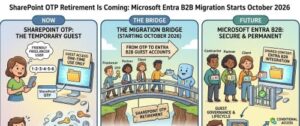
Microsoft’s latest update, published on July 17, 2026, also changes the timeline for the final retirement. Phase 1, which moves new external sharing invitations and authentication to Microsoft Entra B2B, is now fully rolled out in Production environments. Phase 2, the retirement of SharePoint Online OTP authentication, is scheduled to begin October 1, 2026, with completion expected by October 31, 2026.
The rollout does not currently include GCC, GCCH, and DoD environments. Microsoft says new dates for those environments will be communicated through the Microsoft 365 Message Center.
For administrators, the message is straightforward: now is the time to identify external collaborators, review guest policies, and prepare for the October transition.
What is changing in SharePoint and OneDrive?
Historically, SharePoint Online could use its own one-time passcode authentication flow when an external person accessed content through a specific people sharing link. In many cases, an external collaborator could receive an email, request a one-time code, enter that code, and access the shared content without having a corresponding Microsoft Entra B2B guest account in the organization’s directory.
That model is being retired.
Microsoft is moving external sharing authentication toward Microsoft Entra B2B, creating a more consistent identity and governance model across Microsoft 365.
Under the new approach, external users who need access to SharePoint or OneDrive content will generally be represented as guest users in Microsoft Entra. The Entra B2B Invitation Manager can automatically create the guest account when a new external sharing invitation is issued.
This means the external sharing process becomes more closely connected to the organization’s existing identity, security, and governance controls.
For Microsoft 365 administrators, that is arguably the most important part of the change.
The new timeline administrators need to know
The transition is happening in two major phases.
Phase 1: Microsoft Entra B2B for new external sharing
Microsoft began transitioning new external sharing invitations and authentication to Microsoft Entra B2B during May and June 2026.
As of the July 17 update, this Phase 1 rollout is fully complete for Production environments.
For new specific-people sharing links created after the transition reaches a tenant, external users without an existing B2B guest account can have a guest account automatically created through the Entra B2B Invitation Manager.
Authentication then takes place through Microsoft Entra B2B. Depending on the organization’s configuration, email one-time passcode authentication may still be available for B2B guests.
There is an important distinction, however.
External users who authenticated through the old SPO OTP process for links created before the transition can continue using that method for the time being.
That temporary compatibility period ends in October.
Phase 2: SPO OTP retirement
The final retirement of SPO OTP is scheduled to begin October 1, 2026, for Production environments.
Microsoft expects the retirement to be completed by October 31, 2026.
Once the retirement takes effect, external users who previously accessed content using SPO OTP but do not have a matching Microsoft Entra B2B guest account may receive an access denied message when opening older specific-people links.
This is where administrators need to pay close attention.
The files and folders themselves are not necessarily being removed. Instead, the authentication method that previously allowed the external user to reach that content is being retired.
Who is affected?
The change is broad.
Microsoft says the transition affects Microsoft 365 tenants and external users accessing OneDrive or SharePoint files, folders, and sites.
For organizations with a large number of external collaborators, the biggest risk is likely to be with users who have access to older sharing links but do not have corresponding guest accounts in Microsoft Entra.
That could include:
- Contractors
- Vendors
- Customers
- Partners
- Consultants
- Temporary project members
- External auditors
- Former employees who still collaborate externally
- Users from other organizations
- External users who were given specific-people sharing links in the past
An organization may have hundreds or even thousands of such links, so simply waiting for users to report access problems may not be the best strategy.
What happens to existing external users?
The impact depends on whether the external collaborator already has a B2B guest account.
External users who already have a guest account
If an external collaborator already exists as a Microsoft Entra B2B guest in the organization’s directory, Microsoft says there is no change in behavior.
These users are already operating through the identity model that Microsoft is standardizing on.
External users without a B2B guest account
This is the group administrators should investigate.
For specific-people links created after the new external sharing behavior was rolled out, a B2B guest account can be automatically created through the Entra B2B Invitation Manager.
For older specific-people links, SPO OTP continues to work until the October retirement.
After October, however, an external user without a matching B2B guest account can be denied access.
The practical result is that an old link that has worked for months or years could suddenly stop working after the retirement.
The most important migration step: identify external collaborators
The first step for administrators should be visibility.
Before October, review your organization’s external sharing reports and identify external collaborators who do not have corresponding guest accounts.
This gives the IT and security teams an opportunity to distinguish between:
- External users who still need access.
- External users whose access should be removed.
- External users who should be converted or represented as B2B guests.
- Old sharing relationships that no longer have a business purpose.
This is also a good opportunity to clean up external access rather than simply migrating every historical collaborator.
A guest account should exist because there is a legitimate business reason for the external relationship.
Step two: review Microsoft Entra guest invitation settings
Administrators should verify that Microsoft Entra is configured to allow the appropriate users to invite or create guest accounts.
For example, organizations may need to review the Guest Inviter role and determine which administrators or users are responsible for external collaboration.
Do not assume that every employee should be allowed to invite guests.
The migration is an opportunity to establish a controlled guest invitation process based on business requirements and security policies.
Step three: review Conditional Access policies
One of the significant security benefits of the move to Microsoft Entra B2B is that external users become more closely integrated with Microsoft Entra security controls.
Administrators should therefore review Conditional Access policies affecting guest and external identities.
Consider questions such as:
- Are guest users covered by the appropriate Conditional Access policies?
- Are risky sign-ins handled appropriately?
- Are administrators enforcing MFA where required?
- Are there policies that unintentionally block external collaborators?
- Are trusted locations or device requirements appropriate for guests?
- Are there policies specifically designed for external users?
The goal should not simply be to make the migration work. The goal should be to ensure the resulting identity model is secure.
Step four: check email OTP configuration
Microsoft Entra B2B can support email one-time passcode authentication for guest users when it is enabled.
Organizations that rely on this authentication method should verify that email OTP has not been disabled in Microsoft Entra External ID settings.
This is particularly important for external users who do not use a Microsoft account or an organizational Microsoft Entra identity.
Administrators should test the authentication experience before the October deadline rather than discovering a configuration problem when an important external partner is unable to access a SharePoint document.
Step five: test old and new sharing scenarios
Testing should cover both sides of the transition.
Create or test a new external sharing scenario and confirm that the external user is handled through Microsoft Entra B2B.
Then identify representative older sharing links that were originally authenticated through SPO OTP.
Test those scenarios with users who do and do not have existing B2B guest accounts.
This helps administrators understand exactly what users will experience after October.
What happens if an external user loses access?
Microsoft provides two primary ways to restore access.
The first is for an administrator to manually create the required guest account for the external user.
The second option can be easier for everyday SharePoint administrators and content owners: an internal user with the appropriate permissions can share or re-share at least one file, folder, or site with the external collaborator.
That sharing action can automatically create the required B2B guest account.
Once the guest account exists, the external user can regain access to previously shared content.
This makes user support an important part of the migration plan.
Help desk and SharePoint support teams should know that an “access denied” message after October may not mean the content was deleted or the sharing permission was intentionally removed.
It could simply mean that the external user’s old SPO OTP authentication path is no longer available.
The EnableAzureADB2BIntegration setting is also changing
Administrators should also be aware that the EnableAzureADB2BIntegration setting will no longer control external sharing behavior beginning with the May 2026 transition.
Microsoft is also removing the option to disable Entra B2B integration.
In other words, organizations should not build a migration strategy around continuing to control external sharing through the previous SPO OTP or integration model.
The direction is clear: external collaboration is moving into the Microsoft Entra identity framework.
Compliance and auditing are changing too
This update also has implications for compliance teams.
Microsoft identifies several areas where the change affects administration and monitoring.
Authentication events and guest lifecycle activities will be handled through Microsoft Entra audit and identity logs rather than relying on the previous SPO OTP logging model.
That means security teams should update their monitoring and compliance procedures accordingly.
Organizations that have documented processes for reviewing external access, investigating authentication events, or demonstrating compliance should make sure those procedures point to the correct Microsoft Entra logs.
Conditional Access, Identity Protection, guest governance, and other Microsoft Entra controls also become more relevant to external SharePoint and OneDrive access.
A practical migration checklist for Microsoft 365 admins
With the October deadline approaching, administrators can use the following checklist:
1. Inventory external access
Identify external collaborators and sharing relationships across SharePoint Online and OneDrive.
2. Find users without B2B guest accounts
Pay particular attention to external users who rely on older specific-people links.
3. Validate guest invitation settings
Confirm that the right administrators and users can create or invite B2B guests.
4. Review Conditional Access
Check policies affecting guest identities, MFA, risky sign-ins, locations, devices, and authentication.
5. Verify email OTP
If your organization depends on email OTP for B2B guests, make sure it remains enabled where appropriate.
6. Test external sharing
Test both newly created sharing invitations and older links.
7. Proactively create required guests
For important external collaborators, do not wait until October. Create or establish their B2B guest identity in advance.
8. Update support documentation
Tell help desk teams how to handle access-denied reports after SPO OTP retirement.
9. Communicate with users
Warn SharePoint owners and employees that external collaborators may experience access issues with older links.
10. Review compliance monitoring
Update audit, reporting, and investigation procedures to account for Microsoft Entra authentication and guest lifecycle events.
What Microsoft 365 administrators should do now
The October retirement may look like an authentication change, but its real impact is broader.
Microsoft is effectively moving external SharePoint and OneDrive collaboration from a SharePoint-specific authentication experience into a centralized identity and governance model.
For organizations with well-managed Microsoft Entra guest accounts, the transition should be relatively straightforward.
The bigger challenge will be organizations with years of external sharing history, thousands of links, and collaborators who have never existed as guest identities in the tenant.
That is why the best migration strategy is proactive rather than reactive.
Administrators should start by identifying external users without B2B guest accounts, reviewing guest invitation policies, checking Conditional Access, testing email OTP where required, and communicating the change to SharePoint owners.
The key date to remember is October 1, 2026, when SPO OTP retirement begins in Production environments, with completion expected by October 31, 2026.
There is still time to prepare.
But for Microsoft 365 teams managing critical external collaboration, waiting until users start reporting “access denied” messages is not a good migration plan.
The shift to Microsoft Entra B2B ultimately gives organizations a more consistent way to manage external identities, apply security controls, monitor guest activity, and govern collaboration across Microsoft 365. The immediate task for administrators is making sure that the external users who still need access are ready for that new identity model before the old one disappears.
Note: Microsoft’s July 17, 2026 update states that Phase 1 and Phase 2 exclude GCC, GCCH, and DoD environments. Microsoft will communicate new dates for those environments through the Message Center.