
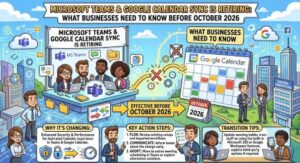
Microsoft is retiring calendar synchronization between Microsoft Teams and Google Workspace in October 2026. Here’s what organizations need to know, what will stop working, and how administrators can prepare before the October 1 action deadline.
Microsoft is making a significant change to the way organizations using both Microsoft Teams and Google Workspace manage their calendars. The company has announced the retirement of its calendar syncing capability between Microsoft Teams and Google Workspace, with the change taking effect in October 2026.
For businesses that currently rely on this integration, the announcement is more than a routine product update. Once the retirement takes effect, previously matched calendars will stop synchronizing, administrators will lose access to the calendar sync setup in the Teams Admin app, and organizations will need to move users toward an alternative approach for scheduling Microsoft Teams meetings through Google Calendar.
Microsoft says affected customers began receiving notifications in August 2026. Organizations have been advised to take action ahead of the retirement, including preserving account-matching information that may be needed later.
The key deadline for administrators is October 1, 2026.
What Is Microsoft Retiring?
The feature being retired allows organizations to synchronize calendars between Microsoft Teams and Google Workspace through the calendar synchronization capability available in the Teams Admin app.
The integration was designed to help organizations operating across both ecosystems keep calendar information synchronized. This can be particularly useful in companies where some employees rely heavily on Google Workspace while Microsoft Teams remains the primary platform for meetings and collaboration.
However, Microsoft is now ending support for this particular calendar synchronization capability.
Beginning in October 2026, organizations will no longer be able to use the existing Teams Admin app functionality to synchronize Google Workspace and Microsoft Teams calendars.
Microsoft’s stated reason is that it wants to focus its development and investment on supported integration experiences. In particular, the company is pointing customers toward the Microsoft Teams Meeting add-on for Google Workspace as the recommended alternative for users who need to schedule Teams meetings from Google Calendar.
When Will the Change Happen?
The retirement is scheduled for October 2026, with Microsoft advising organizations to prepare before the change takes effect.
Affected customers began receiving notifications in August 2026, giving administrators time to identify impacted users and make the necessary transition.
The important point for IT teams is that this isn’t a temporary outage or a change that administrators can work around by reconfiguring the existing calendar sync feature. Microsoft is retiring the capability itself.
That means organizations currently depending on it should treat the coming months as a migration window rather than waiting until synchronization stops.
Who Is Affected?
Not every Microsoft Teams or Google Workspace customer will necessarily be affected.
The primary audience for this change is organizations that are currently using the calendar syncing capability between Microsoft Teams and Google Workspace through the Teams Admin app.
If your organization has never configured this synchronization, there may be little or no action required.
However, IT administrators should still determine whether the feature is currently configured in their environment. A company can easily have users working across both Microsoft and Google platforms without every administrator being aware of how calendar integration was originally configured.
This makes an inventory of the current setup an important first step.
What Happens When Calendar Sync Stops?
The most obvious impact will be the end of calendar synchronization between Microsoft Teams and Google Workspace through the retired capability.
Microsoft has identified several changes organizations should expect.
First, calendar syncing will no longer be supported.
Second, calendars that were previously matched and configured for synchronization will stop syncing.
Third, administrators will no longer have access to the calendar sync setup through the Teams Admin app.
For employees who have become accustomed to seeing synchronized calendar information, this could create confusion if the organization has not communicated the change clearly.
The impact may be especially noticeable in hybrid technology environments where Google Calendar is the primary scheduling tool but Microsoft Teams is used for online meetings.
The retirement therefore isn’t simply an administrative change. Depending on how an organization uses the integration, it could affect everyday meeting scheduling and calendar workflows.
Why Microsoft Is Making the Change
Microsoft says the retirement will allow it to focus investments on supported integration experiences.
This is a common pattern in cloud software. Providers periodically retire older or less strategically important integrations while concentrating resources on products and integrations that they intend to develop and support long term.
In this case, Microsoft is specifically highlighting the Microsoft Teams Meeting add-on for Google Workspace.
The distinction is important.
Microsoft isn’t telling organizations that Teams and Google Workspace can no longer work together. Rather, it is moving users away from the existing calendar synchronization capability and toward a more focused integration for scheduling Teams meetings from Google Calendar.
For businesses, the practical question is therefore not whether Microsoft Teams and Google Calendar can coexist, but how users should schedule and manage Teams meetings once the old synchronization method disappears.
The Recommended Alternative: Teams Meeting Add-on for Google Workspace
For users who need to schedule Microsoft Teams meetings from Google Calendar, Microsoft recommends using the Microsoft Teams Meeting add-on for Google Workspace.
The add-on provides an integration point between Google Calendar and Microsoft Teams, allowing users to schedule Teams meetings while working within Google’s calendar environment.
This could be particularly useful for organizations that have standardized on Google Workspace for email and calendars but continue to use Microsoft Teams for collaboration, video meetings, or communication.
Administrators should therefore evaluate whether the add-on is already deployed and, if not, determine how it can be introduced to affected users.
The transition should ideally happen before the existing calendar synchronization stops. Giving employees time to become familiar with the new workflow can reduce support requests after the retirement date.
What IT Administrators Should Do Now
Microsoft has outlined several recommended actions for organizations.
1. Identify affected users
Start by determining whether your organization currently uses Microsoft Teams and Google Workspace calendar synchronization through the Teams Admin app.
Don’t assume that because both platforms are deployed, the retired feature is necessarily being used. Check the actual configuration.
Creating a list of affected users or departments can also make communication and migration easier.
2. Notify users before October
Employees should know that calendar synchronization is going away.
A short internal announcement can explain what is changing, when it is happening, and what users should do if they schedule Microsoft Teams meetings from Google Calendar.
The earlier users are informed, the more time they have to adapt.
3. Save account-matching information
Microsoft specifically recommends that administrators retrieve and retain account matching information they may need from the Teams Admin app before the retirement.
This is an important step because administrators may lose access to the calendar synchronization setup after the feature is retired.
IT teams should therefore review the current configuration and preserve relevant information before the deadline.
4. Prepare the recommended alternative
Organizations should evaluate the Microsoft Teams Meeting add-on for Google Workspace for users who need to schedule Teams meetings from Google Calendar.
This is an opportunity to test the new workflow with a small group before rolling it out broadly.
5. Update internal documentation
Any company documentation that explains how employees schedule Teams meetings from Google Calendar should be reviewed.
Old instructions referring to the retired calendar sync capability could become misleading once the retirement takes effect.
Updating internal knowledge bases, onboarding documents, IT guides and help-desk procedures ahead of October can prevent unnecessary confusion.
What Users Should Expect
For employees, the most important thing to understand is that calendar synchronization will stop if they are currently relying on the retired feature.
That doesn’t necessarily mean Microsoft Teams meetings can no longer be scheduled through Google Calendar.
Instead, Microsoft recommends the Teams Meeting add-on for Google Workspace for that scenario.
Users should follow whatever process their organization’s IT team establishes. In centrally managed environments, administrators may deploy or configure the required add-on rather than asking every employee to manage the transition independently.
Employees should also avoid assuming that an existing synchronized calendar will continue working indefinitely after October.
Is There a Compliance Impact?
According to Microsoft’s announcement, no compliance considerations have been identified for this retirement.
That said, organizations should still consider the operational impact of the change.
For companies with formal IT change-management processes, the retirement should be recorded and assessed like any other software integration change. This is particularly relevant where calendar workflows are connected to internal scheduling procedures, meeting-room systems, automated processes or employee support documentation.
The absence of a specific compliance impact does not mean organizations should ignore the change. It simply means Microsoft has not identified a direct compliance consideration associated with this retirement.
Why Businesses Shouldn’t Wait Until October
The biggest risk isn’t necessarily the technical retirement itself. It’s discovering after the deadline that users were depending on the old integration.
Calendar systems are deeply embedded in everyday business operations. Employees schedule meetings, manage availability, coordinate projects and communicate with customers through their calendars every day.
If a synchronization workflow disappears unexpectedly, users may initially interpret the resulting behavior as an error rather than a planned retirement.
A proactive transition gives organizations the opportunity to test the alternative, communicate with users and address questions before the old functionality disappears.
For IT departments, the best approach is therefore straightforward: identify, document, communicate and migrate.
A Simple Timeline for IT Teams
With October approaching, organizations can use a simple timeline to stay on track.
Now: Determine whether Microsoft Teams and Google Workspace calendar synchronization is being used.
Before October 1: Retrieve and retain account-matching information from the Teams Admin app and identify affected users.
Before retirement: Notify employees and introduce the recommended Teams Meeting add-on for Google Workspace where appropriate.
During September: Test the new scheduling workflow and update internal documentation.
October 2026: Expect the old calendar synchronization capability to stop being supported and previously synchronized calendars to stop syncing.
This approach can turn what might otherwise be a disruptive product retirement into a relatively routine IT transition.
The Bigger Picture for Microsoft and Google Workspace Users
The retirement is another reminder that organizations operating across multiple cloud ecosystems need to keep track of integration dependencies.
Microsoft Teams and Google Workspace are both widely used business platforms, and many organizations don’t operate exclusively within one vendor’s ecosystem. Employees may use Google Calendar for scheduling while using Teams for meetings, or use Microsoft services alongside Google productivity tools.
Those cross-platform workflows can be extremely valuable, but they also depend on integrations that can change over time.
The lesson for IT leaders is simple: integrations should be treated as part of an organization’s technology inventory, not as permanent infrastructure.
When a vendor announces a retirement, teams that already know which integrations they depend on can respond quickly. Those without that visibility may discover the problem only when users report that something has stopped working.
Final Takeaway
Microsoft’s retirement of Microsoft Teams and Google Workspace calendar synchronization in October 2026 is a change that affected organizations should address now rather than after the service stops working.
The existing calendar sync capability will no longer be supported, previously matched calendars will stop synchronizing, and administrators will lose access to the calendar sync setup in the Teams Admin app.
For organizations that need users to schedule Microsoft Teams meetings through Google Calendar, Microsoft recommends moving to the Microsoft Teams Meeting add-on for Google Workspace.
The immediate priorities are clear: identify affected users, preserve account-matching information, communicate the change, test the alternative and update internal documentation.
With the retirement scheduled for October 2026 and Microsoft already notifying affected customers, there is still time to make the transition smoothly. The key is simply not to wait until users discover the change for themselves.
Extra posts:
 Microsoft Teams Mobile Calendar to Require Latest App Update by October 2026: Microsoft Announces Critical Change for iOS and Android Users
  Bi-Directional Sync Between Google Workspace and Microsoft Teams A Game-Changer for Business Collaboration
  SharePoint OTP Retirement Is Coming: Microsoft Entra B2B Migration Starts October 2026
  Microsoft Teams Gets Smarter With Personalized Multilingual Meeting Recaps
  Microsoft Teams Is Getting a Smarter Meeting Assistant: Facilitator Can Now Join Channel Meetings
  Microsoft Teams Gets a Workflow Upgrade: Multiple Steps Could Transform Everyday Automation