
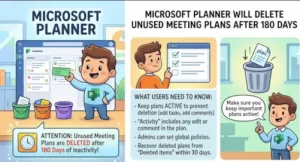
Microsoft is introducing a new expiration policy for Planner plans created from Teams meetings, with inactive plans set to be automatically deleted after 180 consecutive days without task activity.
The change, identified in Microsoft 365 Message Center update MC1479508, is scheduled to begin rolling out worldwide in early October 2026, with the rollout expected to finish by mid-October. The policy is aimed specifically at meeting-created Planner plans and is designed to remove plans that remain unused long after the meetings that created them have ended.
For users and IT teams, the important detail is that simply opening or viewing a plan will not keep it alive. Microsoft defines qualifying activity as creating, editing or deleting a task.
That means an old meeting plan that is still occasionally viewed but no longer actively maintained could eventually be scheduled for deletion.
What is changing in Microsoft Planner?
Planner plans created from Teams meetings can sometimes remain in an organization long after the original project, discussion or event has finished.
Under the new policy, Microsoft will give those plans a defined lifecycle. If a meeting-created Planner plan records no qualifying task activity for 180 consecutive days, it will expire and be deleted.
The policy begins tracking activity for new meeting-created plans after the rollout. Existing meeting-created plans are outside the scope of the change, according to Microsoft’s Message Center notice. No plan will be deleted less than 180 days after the rollout begins.
Microsoft says the purpose is to reduce clutter and improve lifecycle management for meeting-created plans.
The distinction matters because this is not a blanket expiration rule for every Planner plan. The change specifically targets plans generated from Teams meetings.
What counts as Planner activity?
One of the most important details for users is Microsoft’s definition of activity.
The 180-day clock is reset by task activity such as:
- Creating a task
- Editing a task
- Deleting a task
Simply opening a plan or looking through its tasks does not count as activity.
That could catch teams off guard. A plan might still be useful as a reference document, yet appear inactive from Planner’s perspective because nobody has changed a task for six months.
For organizations that use meeting-created plans as long-term reference material, this distinction should be communicated clearly to users.
Users will receive warnings before deletion
Microsoft is not planning to delete affected plans without advance notice.
Meeting organizers will receive email notifications 30 days and seven days before a plan is scheduled for deletion. The notifications will identify affected plans, provide the date of the last activity and include a link to view the tasks in Planner.
This gives organizers an opportunity to decide whether a plan still has value.
If it does, users can select Keep plan.
Choosing that option extends the plan for another 180 days without requiring users to modify a task. Microsoft says the action can be repeated as many times as necessary.
That creates an important distinction between a genuinely abandoned plan and a plan that is still useful but doesn’t require frequent task changes.
What happens when a plan is deleted?
The deletion applies to the Planner plan and Planner-specific data associated with it.
Microsoft says Loop tasks and meeting notes are not affected by the expiration of the Planner plan. That means organizations should not interpret the policy as deleting the entire content history of the Teams meeting.
This separation is particularly relevant because Planner operates alongside other Microsoft 365 services and containers. Microsoft’s documentation notes that Planner plans can exist in meeting and channel contexts and that different types of Planner data have their own storage and compliance characteristics.
Still, users should not assume that content elsewhere in Microsoft 365 provides a complete substitute for a deleted Planner plan. If important task information exists only in Planner, it should be reviewed before the deletion date.
There is a 30-day recovery window
Accidental deletion will not necessarily mean immediate permanent loss.
Microsoft says deleted meeting-created Planner plans can be recovered within 30 days, but recovery requires an IT administrator to submit a request to Microsoft support.
After that 30-day period, the deletion becomes permanent under the policy described in the Message Center update.
That makes the recovery window an important part of an organization’s support process.
IT help desks should know that a user who discovers a deleted plan may have a limited opportunity to recover it. Waiting several weeks before escalating a request could push the organization beyond the recovery period.
What admins need to know
There is no administrator action required to enable the feature.
The more practical task is communication.
Organizations should make sure users who create Teams meetings understand that a Planner plan generated from a meeting is no longer necessarily permanent. This is particularly important for departments that use meeting plans for recurring projects, steering committees, client work or other activities where the task list may sit untouched for long periods.
Microsoft’s guidance points administrators toward several preparation steps:
- Tell meeting organizers about the 180-day inactivity period.
- Explain that viewing a plan does not reset the clock.
- Show users where the Keep plan option can be used.
- Make support teams aware of the 30-day recovery process.
- Remind users that Loop tasks and meeting notes are not included in the Planner deletion.
- Consider how the new lifecycle interacts with the organization’s own record-keeping requirements.
Microsoft’s Planner documentation also shows that administrators can export Planner user content, including plan and task information, which may be relevant when organizations need to investigate or preserve Planner data.
The compliance question deserves attention
The change is more significant for some organizations than a simple cleanup of unused plans.
Microsoft’s Message Center notice identifies the change as affecting how certain customer data is stored and introducing a new automatic deletion workflow. That makes it relevant to administrators, records managers and compliance teams, not just everyday Planner users.
Organizations with formal retention requirements should determine whether meeting-created Planner plans are being used to store information that needs to be retained beyond 180 days.
That is especially important where task lists contain operational records, approvals, commitments or information that could be needed later.
Microsoft’s public Planner documentation describes support for compliance capabilities such as eDiscovery for certain Planner data, while also noting that Planner’s compliance coverage varies according to plan and container type.
The practical takeaway is that organizations should not treat the new expiration rule as merely a user-interface change.
When can the first plans actually disappear?
Although the rollout begins in October 2026, the first eligible plans cannot be deleted immediately.
The policy applies to new meeting-created plans after the rollout, and those plans must then go 180 consecutive days without qualifying task activity.
As a result, the first deletions would occur roughly six months after the relevant rollout period, rather than in October itself.
That distinction should help prevent unnecessary alarm among users who interpret the October rollout date as an immediate deletion deadline.
What users should do now
For most users, there is no complicated migration process.
The main step is to understand which meeting-created plans are intended to remain useful beyond six months without task changes.
Before a plan becomes inactive, teams should consider whether it is:
- Still an active working plan
- Useful as a long-term reference
- A record that should be preserved elsewhere
- No longer needed
- Something that should simply be renewed using Keep plan
The key is not to make artificial task changes merely to keep an irrelevant plan alive. If the information is genuinely important, teams should decide where that information belongs and how it should be retained.
A small Planner change with broader implications
Microsoft’s new policy reflects a wider challenge in collaboration software: meeting-generated content can accumulate much faster than organizations can manage it.
A single Teams meeting can produce notes, tasks, conversations and Planner content. Over time, thousands of those artifacts can remain scattered across a Microsoft 365 environment even after their original purpose has disappeared.
Automatic expiration gives meeting-created Planner plans a clearer lifecycle, but it also puts more responsibility on organizations to distinguish temporary working material from information that needs to be retained.
For everyday users, the most important number is 180 days.
For IT teams, the critical numbers are 30 days and seven days for the advance warnings, followed by a 30-day recovery window after deletion.
And for records and compliance teams, the more important question may be what happens to information that was never supposed to disappear in the first place.
As Microsoft’s October rollout approaches, organizations using Teams meetings to generate Planner plans should update internal guidance and make sure users understand one simple rule: looking at an old plan is not enough to keep it.
Extra posts:
 Microsoft Planner Lands Inside Outlook and Copilot: A Major Productivity Upgrade for Microsoft 365 Users
  Microsoft Teams Adds In-Meeting AI Toggle: Users Gain More Control Over Copilot and Facilitator
  Outlook Is Getting a Major Meeting Ownership Upgrade: Users Will Soon Be Able to Change Organizers
  Microsoft Outlook Is Retiring Meeting Insights: What Business Users Need to Know
  Microsoft Teams Rooms Gets Smarter: AI-Powered Facilitator Brings Real-Time Meeting Notes to Physical Meeting Rooms
  Microsoft Planner Is Getting a New Capacity View to Make Team Workloads Easier to See