
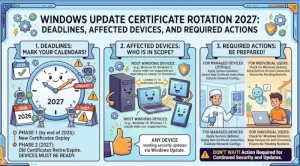
Microsoft is urging organizations to prepare for a Windows Update certificate rotation in 2027, warning that devices without the required replacement certificates could lose access to Windows Update services when existing certificates expire. The two key expiration dates are May 17, 2027, and June 19, 2027, with the applicable deadline depending on the Windows version in use.
The change affects how Windows devices establish trusted connections to Windows Update. Microsoft has already delivered replacement certificates through Windows security updates, meaning most supported devices that receive regular monthly updates should not require additional intervention.
However, organizations running outdated systems, managing older Windows Server installations, or maintaining devices that have fallen behind on patching should review their environments well before the deadlines.
What Is the Windows Update Certificate Rotation?
Digital certificates help establish trust between systems and the services they communicate with. In the case of Windows Update, the relevant certificates support trusted connections that allow devices to access Microsoft’s update infrastructure.
Certificates have defined validity periods. When an existing certificate expires, systems must have the appropriate replacement certificates to maintain the connections that depend on them.
Microsoft’s 2027 certificate rotation addresses this requirement by moving affected devices to replacement certificates before the current certificates expire. According to Microsoft’s guidance, the transition is designed to be straightforward for supported Windows installations that remain current with security updates.
The important distinction is that installing the required updates before the applicable deadline is essential. A device that misses the necessary update may encounter problems accessing Windows Update after its existing certificate expires.
Why the 2027 Deadlines Matter for IT Teams
The two expiration dates create separate preparation windows for organizations managing different Windows versions.
- May 17, 2027: The deadline for specified older but still supported Windows editions, including Windows 10 Enterprise 2019 LTSC, Windows Server 2019, and Windows Server 2016.
- June 19, 2027: The deadline for several other supported Windows client and server versions covered by Microsoft’s guidance.
These dates matter because update availability is closely tied to security maintenance. If a device loses access to Windows Update, administrators may face additional work to restore its ability to obtain updates, while the device risks missing subsequent security fixes.
The practical challenge is less about performing a complicated certificate replacement manually and more about identifying systems that have not received the required update.
For larger organizations, that means reviewing endpoint inventories, patch compliance reports, server maintenance records, and devices that rarely connect to the corporate network.
Which Windows Versions Need Action?
Microsoft’s recommendations vary by operating system. Administrators should match each device to its Windows version and confirm that it has received the required security update.
| Windows version | Required action | Deadline |
|---|---|---|
| Windows 11, version 25H2 and later | No additional action required under the published guidance | No action specified |
| Windows 11, version 24H2 | Install the September 2025 security update or a later update | June 19, 2027 |
| Windows Server 2025 | Install the September 2025 security update or a later update | June 19, 2027 |
| Other supported Windows 11 versions | Install the July 2026 security update or a later update | June 19, 2027 |
| Windows Server 2022 | Install the July 2026 security update or a later update | June 19, 2027 |
| Supported Windows 10 versions | Install the July 2026 security update or a later update | June 19, 2027 |
| Windows 10 Enterprise 2019 LTSC | Install the July 2026 security update or a later update | May 17, 2027 |
| Windows Server 2019 and Windows Server 2016 | Install the July 2026 security update or a later update | May 17, 2027 |
| Other Windows versions | Upgrade to a supported Windows client or Windows Server version | Before the applicable transition |
These recommendations reflect Microsoft’s published guidance for the certificate rotation. Organizations should consult the official advisory and relevant release information to confirm the requirements for their exact operating system edition and servicing configuration.
A key detail is that the listed update dates are minimum requirements in the advisory, not a recommendation to stop patching once that update is installed. Devices should continue receiving applicable security updates.
What Happens If an Organization Misses the Deadline?
Microsoft warns that supported devices that are not sufficiently updated may lose access to Windows Update services after the applicable certificate expires. Devices running unsupported Windows versions will also lose access to these services under the announced change and will not receive updates as a result.
That distinction has important operational consequences.
First, a device can remain powered on and usable while still having a problem obtaining future updates. The immediate issue is not necessarily that Windows will stop starting; it is that access to Windows Update may be interrupted.
Second, losing update access can complicate security maintenance. Administrators may need to investigate the device’s patch history, determine which updates are missing, and obtain the required package through an alternative route.
Third, older systems can be more difficult to remediate. They may require compatibility checks, maintenance windows, application testing, or a broader upgrade plan before administrators can bring them into compliance.
Organizations should therefore avoid treating the expiration dates as routine calendar reminders. They are deadlines for verifying that the devices responsible for business operations can continue receiving updates.
What Organizations Should Do Before 2027
A structured preparation plan can help IT teams reduce the risk of disruption without introducing unnecessary work.
1. Inventory Windows devices
Build a current inventory of Windows endpoints and servers, including their operating system editions, versions, servicing status, and most recent installed security updates.
Pay particular attention to systems that are intermittently connected, remotely managed, isolated from the corporate network, or excluded from routine patching.
2. Check update compliance
Use existing endpoint management and patch reporting tools to identify devices that have not installed the required update or a later one.
Compare the results with Microsoft’s version-specific recommendations. Do not assume that all devices running Windows 10 or Windows Server share the same deadline.
3. Prioritize the earlier deadline
Systems covered by the May 17, 2027, expiration date should receive particular attention because their preparation window closes before the June deadline.
Prioritizing these devices gives teams more time to investigate failed deployments, resolve application compatibility concerns, and schedule any necessary upgrades.
4. Deploy the required updates
Install the specified security update or a later applicable update on affected supported systems.
For Windows 11 version 25H2 and later, Microsoft’s guidance states that no additional action is required. Even so, organizations should continue their normal patching practices and verify the status of their managed devices.
5. Plan upgrades for unsupported versions
Where a device is running an unsupported Windows version, administrators should plan an upgrade to a supported Windows client or Windows Server release.
The appropriate path will depend on the device’s hardware, application dependencies, licensing, and business role. Systems that cannot be upgraded immediately should be identified early so that their risks and replacement timelines can be managed.
6. Prepare a recovery path
If a supported device is not current after the applicable expiration date, Microsoft advises obtaining the required update through the Microsoft Update Catalog or distributing it through the organization’s usual management tools.
IT teams should make sure their administrators know how to locate and deploy the appropriate package. Testing the recovery process in advance can reduce troubleshooting time if a device misses the deadline.
Does the Change Affect WSUS Environments?
Microsoft states that this certificate rotation does not apply to devices receiving updates from Windows Server Update Services (WSUS).
Organizations using WSUS should note this scope distinction when assessing which systems are affected. They should still maintain their normal update management and security practices, but they should not automatically apply the certificate-rotation requirements to devices covered by the stated WSUS exclusion.
Hybrid environments deserve particular attention. An organization may use WSUS for some computers while other endpoints obtain updates directly from Windows Update or through different management workflows. Administrators should verify the actual update source for each relevant device rather than relying solely on a broad organizational label.
Compliance and Security Considerations
Microsoft’s supplied advisory identifies no specific compliance considerations for this change. That does not remove the need for organizations to assess their own operational and security obligations.
Depending on internal policy, regulated workloads, contractual commitments, and audit requirements, teams may wish to document their device inventory, update deployments, exception approvals, and upgrade plans.
Maintaining that evidence can help demonstrate that the organization assessed the change and took appropriate steps to keep supported systems updated.
The broader lesson is straightforward: certificate expiration can become an operational issue when systems are not prepared for a change in the trust infrastructure they rely on. Regular patching and accurate asset records remain important safeguards.
What IT Administrators Should Watch Next
With the first deadline approaching in May 2027 and the second following in June, organizations have time to prepare—but they should not wait until the final weeks to begin.
The next steps are to review Microsoft’s official announcement, monitor Windows release health information for relevant updates, and verify support status for every affected operating system. Teams should also track update deployment failures and unresolved exceptions through their normal change-management processes.
Microsoft may publish additional release information as the dates approach, so administrators should rely on the official advisory for any changes to requirements.
The priority is to make sure every affected, supported device has received the required update before its certificate expiration date—and to move unsupported systems onto a supported release. Completing those checks well ahead of 2027 will give IT teams more time to address exceptions and help protect the continuity of Windows update services.
Extra posts:
 Microsoft Defender for Endpoint Android Update Required: What Organizations Need to Know Before September 2026
  Action Required New Power Apps Endpoint Requires Firewall Update by March 31, 2025
  Windows 10 Enterprise LTSC 2021 End of Support: What Businesses Need to Know Before January 2027
  Managing Bluetooth Devices and Settings in Windows 11: A Complete Guide
  Windows 11 26H2 Is Here: How to Get the 2026 Update and What Changes for Your PC
  Windows August 2026 Security Update Is Here: What You Need to Know Before You Restart