
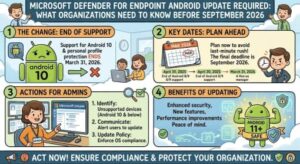
Microsoft is urging organizations to take action on the Android version of Microsoft Defender for Endpoint ahead of planned infrastructure changes that could affect mobile threat protection. Businesses using the security platform should make sure Android devices are running Microsoft Defender for Endpoint version 1.0.9107.0101 or later by mid-September 2026.
The update is important because devices running older versions of the Android app could experience disruption to their mobile threat protection capabilities once Microsoft completes the infrastructure changes.
For IT administrators, the message is relatively straightforward: check the versions installed across managed Android devices, update older installations, and make sure employees who manage their own application updates are aware of the requirement.
The good news is that Microsoft does not require organizations to make additional configuration changes. Updating the Android application to a supported release should be sufficient to maintain access to the relevant protection capabilities after the infrastructure update.
Microsoft Defender for Endpoint Android Update Has a Deadline
Microsoft Defender for Endpoint is widely used by organizations to protect endpoints against malware, suspicious activity, phishing attempts and other security threats. Its Android application extends protection and security capabilities to mobile devices that can otherwise become a weak point in an organization’s security environment.
According to Microsoft’s update notice, organizations need to ensure that Android devices are running version 1.0.9107.0101 or a later version.
The infrastructure changes are scheduled to begin rolling out in early August 2026, with Microsoft expecting the rollout to be completed by mid-September 2026.
The rollout applies across Microsoft’s stated environments, including Worldwide, GCC, GCC-High and DoD.
That timeline means organizations should not wait until the final days of the rollout to begin checking devices. IT teams with hundreds or thousands of Android endpoints may need time to identify devices running older versions, deploy updates and follow up with users whose devices are not centrally managed.
Why the Android App Update Matters
The requirement is connected to Microsoft’s upcoming Defender infrastructure changes rather than a routine application upgrade.
Devices using an older version of Microsoft Defender for Endpoint for Android may no longer work correctly with the updated infrastructure. The result could be a disruption to mobile threat protection capabilities.
For organizations, that makes the update more than a standard app maintenance task.
Mobile devices frequently contain corporate email, documents, authentication credentials, business applications and access to cloud services. If security protection on those devices is interrupted, the organization could potentially face a greater exposure to threats.
The Microsoft notice does not say that every device running an outdated version will immediately stop working. Instead, it warns that mobile threat protection capabilities may experience disruption following the infrastructure update.
That distinction is important, but it should not be interpreted as a reason to delay. The safest approach is to ensure all relevant Android devices are updated before Microsoft’s infrastructure rollout reaches completion.
What IT Administrators Should Do
The primary responsibility falls on administrators managing Microsoft Defender for Endpoint deployments.
The first step is to verify the installed application version on Android devices enrolled in the organization’s security environment.
Any device running a version older than 1.0.9107.0101 should be updated to the latest available release or at least to version 1.0.9107.0101 or later.
Organizations with centralized device management should use their existing management processes to identify and update affected devices. IT teams should also monitor deployment status to determine whether updates have reached the intended devices.
The second step is communication.
Not every organization manages application updates centrally. Some employees may have Android devices where app updates are handled by the user. In those cases, administrators should clearly communicate that updating Microsoft Defender for Endpoint is required to avoid a potential interruption in mobile threat protection.
A short internal notification can make a significant difference. Employees should know which application needs updating, the minimum supported version and the deadline for completing the update.
No Additional Configuration Changes Are Required
One of the more reassuring aspects of Microsoft’s announcement is that organizations do not need to redesign their Defender deployment or introduce new configuration settings as part of this change.
Microsoft says that no other configuration changes are required.
In practical terms, organizations should focus their preparation on application version management rather than changing security policies or rebuilding existing Defender configurations.
That makes the update relatively simple from an administrative perspective, although the scale of the device estate can still make the task time-consuming.
For smaller organizations, checking and updating devices may be relatively quick. Larger enterprises, government agencies and organizations operating in regulated environments may need to incorporate the work into established endpoint management and change-control processes.
Organizations Should Not Wait Until September
The mid-September 2026 completion target may appear to provide plenty of time, but large organizations should begin remediation as soon as possible.
Microsoft’s infrastructure rollout is expected to begin in early August and continue through mid-September. During a phased rollout, different environments or users may encounter changes at different times.
Waiting until September could create unnecessary pressure for IT teams, particularly if some devices are offline, rarely connected to corporate networks, subject to restricted update policies or controlled by employees themselves.
A proactive approach also gives administrators an opportunity to identify unusual deployment problems.
For example, an organization may discover that certain Android devices have not received recent application updates, that some users have disabled automatic updates, or that older devices require additional attention before the Defender application can be updated.
Finding those issues early is considerably easier than discovering them after a security capability has been disrupted.
What Users Need to Know
Employees do not necessarily need to understand the technical details behind Microsoft’s infrastructure changes.
The message to users can be simple: update Microsoft Defender for Endpoint on your Android device to version 1.0.9107.0101 or later before mid-September 2026.
Users who receive application updates automatically may not need to do anything beyond allowing the update to install.
However, employees who manually manage application updates should check the installed version and update the application through their organization’s approved process.
Organizations should also be cautious about encouraging employees to install software from unofficial sources. Security applications should be updated through approved and trusted distribution channels and according to the organization’s device-management policies.
A Small Update With a Security Impact
Application version changes can sometimes look like routine IT housekeeping. In this case, however, the update has a direct connection to maintaining mobile security protection.
The situation also highlights a broader challenge for modern organizations: cybersecurity increasingly depends on keeping software connected to constantly evolving cloud infrastructure.
A device can have security software installed and still be at risk if that software is too old to communicate properly with the services supporting it.
That is why endpoint security teams should treat vendor infrastructure-change notifications seriously. Even when the required action is as simple as installing an app update, failing to complete it can create an avoidable gap in protection.
The Bottom Line
Organizations using Microsoft Defender for Endpoint on Android should make the required update a priority before Microsoft’s infrastructure rollout is completed.
The key requirement is clear:
Android devices must run Microsoft Defender for Endpoint version 1.0.9107.0101 or later by mid-September 2026.
Administrators should verify device versions, update older installations and notify users who manage their own application updates. Microsoft says that no additional configuration changes are required.
With the infrastructure rollout already scheduled to begin in August, organizations have a strong reason to start checking their Android fleet now rather than treating the September deadline as a last-minute target.
For security teams, this is a relatively simple preventive measure: keep the Defender application current, confirm that devices are protected, and make sure users understand why the update matters.
Extra posts:
 Microsoft Defender for Endpoint End of Support for Android 8, 8.1, and 9 on April 30, 2025
  Action Required New Power Apps Endpoint Requires Firewall Update by March 31, 2025
  Microsoft Teams Mobile Calendar to Require Latest App Update by October 2026: Microsoft Announces Critical Change for iOS and Android Users