
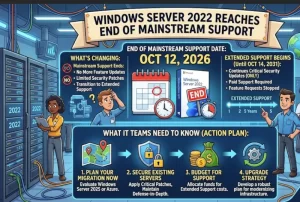
Microsoft has officially moved Windows Server 2022 from mainstream support to extended support as of October 13, 2026, marking a significant milestone for organizations that rely on the platform to run business-critical workloads. The October 2026 security update is the final update in its mainstream support phase, but the operating system will continue receiving monthly security updates during extended support.
The transition gives businesses additional time to maintain their existing server infrastructure while preparing for an upgrade. Microsoft identifies Windows Server 2025 as its latest Long-Term Servicing Channel (LTSC) release, making it the natural starting point for organizations evaluating their next operating system.
For administrators, the immediate priority is clear: understand what changes under extended support, confirm that security updates remain in place, and build an upgrade roadmap that accounts for application compatibility, infrastructure requirements, and operational risk.
Windows Server 2022 Support Changes: Key Dates and Details
Windows Server 2022 follows Microsoft’s Fixed Lifecycle Policy, which separates mainstream support from extended support. The transition does not immediately end security maintenance, but it changes the type of support organizations can expect.
According to Microsoft’s Windows Server 2022 lifecycle documentation, the product’s support timeline includes these important milestones:
- August 18, 2021: Windows Server 2022 entered its product lifecycle.
- October 13, 2026: Mainstream support ends.
- October 2026: The final mainstream support security update becomes available.
- October 2031: Extended support reaches its scheduled end, with Microsoft’s lifecycle page listing October 15, 2031, as the end date in Pacific Time.
These dates matter because an operating system’s support status affects long-term security planning, compliance assessments, and infrastructure investment decisions.
Organizations should verify the applicable lifecycle dates for their specific edition and deployment. Microsoft’s documentation covers editions including Standard, Datacenter, Essentials, and Datacenter: Azure Edition.
What Does Extended Support Mean for Windows Server 2022?
The most important distinction is that the end of mainstream support is not the same as the end of security updates.
During extended support, Windows Server 2022 continues to receive security updates at no additional cost under Microsoft’s published lifecycle policy. This allows organizations to address eligible security vulnerabilities without immediately replacing their existing server installations.
However, extended support is more limited than mainstream support. Microsoft generally stops providing new features and design changes during this phase, while non-security updates and technical support are subject to the applicable paid support arrangements.
For businesses, this creates a period in which the operating system can remain supported and secure while its feature development has effectively concluded.
The distinction is particularly important for organizations operating stable production environments. A server that performs a narrowly defined role may not need an immediate replacement, provided its applications remain compatible, updates are installed consistently, and the wider security controls remain effective.
Nevertheless, organizations should avoid treating the extended-support period as a reason to postpone planning indefinitely. Infrastructure migrations can take months, especially when they involve legacy applications, complex integrations, or strict availability requirements.
October 2026 Security Update Marks the Mainstream Support Milestone
The October 2026 security update is the final mainstream support update for Windows Server 2022. After the transition, eligible systems continue receiving monthly security updates through the extended-support period.
This distinction has practical implications for IT operations. Administrators should confirm that their patch-management systems are configured to detect and deploy applicable updates, and that reporting accurately reflects the operating system’s new lifecycle status.
Security maintenance should remain part of a broader process that includes vulnerability monitoring, access reviews, backup validation, and incident response preparation.
Organizations should also document which servers run Windows Server 2022, identify the applications and services hosted on each machine, and establish ownership for patching and upgrade decisions.
Microsoft provides ongoing information about servicing and known issues through its Windows Server 2022 release health page.
Windows Server 2022 Hotpatch Support Extended Through October 2027
A notable development for eligible Azure environments is Microsoft’s extension of hotpatch support for Windows Server 2022 Datacenter: Azure Edition through October 2027.
Hotpatching allows supported security updates to be applied without requiring a server restart for those updates. This can reduce planned maintenance interruptions and simplify patching for workloads that need high availability.
For organizations running supported Windows Server 2022 Azure Edition deployments, the extension offers additional operational flexibility beyond the mainstream support transition.
However, hotpatching should not be confused with a guarantee that a server will never need to restart. Eligibility depends on the supported edition, configuration, and update requirements, and some updates or system changes may still require a reboot.
IT teams should review their current hotpatch enrollment, verify which machines qualify, and confirm that update deployment and compliance reporting are working as expected.
The extension may be particularly useful for environments where maintenance windows are difficult to schedule. Even so, hotpatch availability does not eliminate the need to plan an eventual operating system migration.
Why Windows Server 2025 Should Be on the Upgrade Roadmap
Microsoft identifies Windows Server 2025 as its latest LTSC release. For organizations that want to move toward a newer Windows Server platform, it provides a clear option to evaluate while Windows Server 2022 remains under extended support.
The newer release introduces improvements across security, storage, virtualization, and hybrid infrastructure management. Depending on the deployment, these enhancements may provide additional reasons to upgrade beyond lifecycle considerations alone.
Microsoft’s Windows Server 2025 feature guide describes several areas worth reviewing:
- Security: Newer security capabilities and improvements to security configuration can help organizations strengthen their server environments.
- Storage and performance: Updated storage capabilities may benefit workloads that rely on demanding data operations.
- Virtualization: Improvements to Hyper-V and virtual machine infrastructure offer opportunities to assess existing workload requirements.
- Hybrid management: Azure-related integrations can help organizations manage infrastructure across supported environments.
- Connectivity: Updated networking and file-sharing capabilities may be relevant to organizations reviewing how servers connect across their environments.
These features do not automatically make an upgrade worthwhile for every server. The business case depends on workload requirements, application certification, licensing, hardware compatibility, and the cost of migration.
Organizations should therefore compare Windows Server 2025’s capabilities against their actual operational needs instead of treating the newer release as a mandatory immediate replacement.
How Organizations Should Prepare for the Transition
With extended support now underway, organizations have a window to plan their next steps. A structured approach can help reduce disruption and prevent important systems from being overlooked.
1. Audit the Windows Server Environment
Start by identifying every server running Windows Server 2022, including virtual machines, cloud deployments, and systems maintained by external service providers.
Record the edition, workload, business owner, dependencies, maintenance requirements, and current patch status. This inventory provides the foundation for prioritizing upgrades.
2. Assess Security and Compliance Requirements
Confirm that systems continue receiving applicable security updates and that patch deployment is monitored.
Review whether internal security policies, industry requirements, or contractual obligations impose deadlines that are earlier than Microsoft’s extended-support end date. A product remaining in extended support does not automatically mean every deployment satisfies a particular compliance framework.
3. Test Application Compatibility
Before migrating production servers, check whether business applications, databases, authentication services, backup tools, monitoring systems, and other dependencies support Windows Server 2025.
Use a test environment to identify potential compatibility issues and measure the impact on critical services. This is especially important for organizations running older applications that have not been updated recently.
4. Choose an Appropriate Migration Path
Microsoft provides guidance on supported in-place upgrade paths and migration options. The right approach depends on the existing operating system, server role, configuration, and workload.
Review Microsoft’s Windows Server installation, upgrade, and migration guidance before committing to a deployment plan.
Where practical, consider a staged migration that allows administrators to validate applications, test backups and recovery procedures, and move workloads in manageable groups.
5. Establish a Realistic Upgrade Schedule
Prioritize servers according to business criticality, security exposure, application support, and migration complexity.
Systems that support essential services or have complicated dependencies may require more preparation than straightforward file or utility servers. Assign owners and target dates so that the migration does not become an open-ended project.
Organizations that want to evaluate the newer release can also use Microsoft’s Windows Server 2025 Evaluation Center, which offers a free 180-day evaluation.
What Businesses Should Expect Next
The move to extended support gives Windows Server 2022 users time to make informed infrastructure decisions without abandoning a working environment overnight. Security updates remain available, but the absence of new features and the eventual end of extended support make long-term planning increasingly important.
For smaller IT teams, the priority may be maintaining reliable patching and identifying a manageable migration window. Larger enterprises may need to coordinate application certification, procurement, security reviews, and workload migrations across multiple departments.
The hotpatch extension through October 2027 also gives eligible Azure Edition deployments another opportunity to maintain security updates with fewer restart-related interruptions, although it does not change the broader lifecycle timetable.
The next milestone is not an immediate shutdown of Windows Server 2022. It is the point at which organizations must decide how long the existing platform fits their operational requirements and when a newer supported environment makes more sense.
Businesses that begin assessing compatibility and migration options now will have more flexibility to manage that transition on their own terms, rather than waiting until the final months of extended support.