
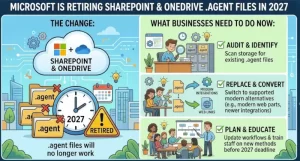
Microsoft is preparing to move SharePoint and OneDrive agents into its broader Copilot ecosystem, with a transition that will affect how organizations create, manage, deploy, and govern their AI-powered assistants. Beginning in mid-November 2026, new agents will be created through Microsoft Copilot Agent Builder rather than the existing .agent file format, and the older format is scheduled to stop working in April 2027.
For businesses that rely on these agents to help employees find information, answer questions, or interact with SharePoint content, the change calls for advance planning. Existing .agent files will remain usable during the transition period, but organizations will need to choose an appropriate upgrade path before the retirement deadline.
The shift is part of Microsoft’s wider effort to connect agents with a shared ecosystem for discovery, deployment, administration, and governance across Microsoft 365 and Copilot experiences.
Microsoft Sets Out a Two-Stage Transition
Microsoft’s rollout has two main milestones, each affecting a different part of the agent lifecycle.
The first phase focuses on agent creation and upgrading. Starting in mid-November 2026, users creating new agents in SharePoint and OneDrive will be directed to Microsoft Copilot Agent Builder. The rollout is expected to finish by early December 2026.
The second phase is the retirement of existing .agent file-based experiences. Microsoft plans to begin that rollout in early April 2027, with completion expected by mid-April.
Under the published schedule, legacy agents will continue to work across SharePoint, Teams, and the Copilot app through the end of March 2027. After that, agents using the old format will stop working in these experiences.
For IT leaders, the important distinction is that the creation experience changes first, while the legacy format stops working later. Organizations have a transition window, but they should not interpret that window as a reason to postpone assessing their existing agents.
Why Microsoft Is Changing Its Agent Strategy
The move is designed to bring SharePoint and OneDrive agents into Microsoft’s wider Copilot extensibility ecosystem.
The new approach connects agents with Microsoft Copilot Agent Builder and the Microsoft Plugin store, which serves as a shared catalog for discovering, publishing, and governing approved and custom-built plugins across supported Copilot experiences and Microsoft 365 applications.
This broader integration is intended to make agents easier to discover and manage while giving organizations more centralized oversight. Rather than treating each SharePoint or OneDrive agent as a standalone file-based experience, Microsoft is moving toward a more integrated model.
That matters as organizations deploy AI assistants across departments, business processes, and content repositories. As the number of agents grows, administrators need to know which tools exist, who owns them, what information they can access, and whether their use aligns with company policies.
The transition also introduces a clearer connection between agent functionality and the task it is intended to perform. A simple question-answering experience for a SharePoint site may need a different implementation from an agent designed to complete a specific business task or support conversations across Microsoft 365.
What Happens to Existing .agent Files?
Organizations do not need to convert every existing agent immediately when the rollout begins. Microsoft says current .agent files can continue to be edited during the transition period.
However, creating new agents will follow a different process. The existing creation entry points in SharePoint and OneDrive will open Microsoft Copilot Agent Builder, and newly created agents will be added to the Plugin store rather than saved as .agent files.
For existing agents, Microsoft is introducing an upgrade option in the SharePoint agent builder. Owners will also be able to use a dedicated convert-agent-file-to-skill skill in Copilot in SharePoint.
These options provide a route away from the legacy format, but organizations should evaluate the intended purpose of each agent before deciding how to migrate it.
The change also has a practical deployment consequence: upgraded agents must be added back to Teams chats or channels. Administrators and agent owners should account for this additional work when planning migration schedules and communicating changes to users.
After the retirement rollout, legacy agents will no longer function in SharePoint, Teams, or the Copilot app. Microsoft also identifies the Agent Link web part, immersive experience, and SharePoint chat pane among the affected experiences.
Choosing the Right Upgrade Path
Microsoft outlines three main approaches, depending on what an existing agent does and where users need it to operate.
1. Use Copilot in SharePoint for site-level questions
For users who mainly need answers about a particular SharePoint site, Copilot in SharePoint may be the most suitable option.
This approach is relevant when an agent’s primary purpose is helping people understand or locate information within their site’s content, rather than delivering a specialized workflow.
Copilot in SharePoint is already available worldwide, according to Microsoft’s announcement. Availability in government cloud environments is planned as part of the broader rollout.
2. Convert the agent into a skill
Some agents support a focused task or a specific business outcome tied to a SharePoint site.
For these cases, Microsoft recommends considering conversion of the .agent file into a skill for Copilot in SharePoint. This allows the focused capability to be used within the newer SharePoint Copilot experience.
Before converting, owners should identify the task the agent performs, confirm that the skill-based approach meets that requirement, and test the result with representative users and content.
3. Upgrade to a declarative agent or update a custom engine agent
Organizations that need a content-grounded conversational experience across Microsoft 365 may need a more advanced implementation.
Microsoft points to declarative agents and existing custom engine agents published to the SharePoint channel as options to consider. The appropriate choice depends on the agent’s architecture, capabilities, and intended scope.
This is particularly important for organizations that have built agents around more complex requirements. Migration planning should include functional testing rather than assuming that every legacy agent will behave identically after an upgrade.
New SharePoint Experiences Expand How Agents Reach Users
The transition is not limited to how agents are created. Microsoft is also preparing changes to how agents appear on SharePoint sites.
The upcoming Agent Chat web part will allow site owners and page authors to add agents from the Plugin store directly to SharePoint pages. This gives organizations more control over where agents appear and how employees discover them.
For example, a company could place a suitable agent on an internal department page so employees can access it in the context of their work. The value will depend on the agent’s purpose, the quality of its underlying content, and the controls applied to its use.
The web part is described as coming soon, so organizations should distinguish between announced capabilities and features that are already available in their environment.
These changes could make agent deployment more intentional. Rather than relying solely on employees to find an assistant, organizations can position approved agents within relevant SharePoint experiences.
Governance and Compliance Need Attention
The transition also has implications for data access, administration, and compliance.
Microsoft’s compliance information indicates that new and upgraded agents managed through Agent Builder, the Plugin store, Agent 365, and the Microsoft Admin Center may use SharePoint content and site context to provide conversational experiences.
The announcement also identifies changes to the locations where administrators can manage agents and analyze their usage. Agent Builder, the Microsoft Admin Center, and Agent 365 are identified as important parts of the new governance and management environment.
For administrators, this creates several areas to review:
- Access permissions: Confirm that agents can access only the information appropriate for their intended users and purpose.
- Ownership: Establish who is responsible for each agent’s functionality, maintenance, and lifecycle.
- Governance: Review the available centralized controls and determine how they fit existing policies.
- Usage monitoring: Understand where administrators can review activity and usage information.
- Data handling: Assess how SharePoint content and site context are used by upgraded agents.
Microsoft also identifies Agent 365 as a source of centralized controls, with applicable platform controls needing to be reviewed for each organization.
The exact governance requirements will depend on the chosen upgrade path, the data an agent can access, and the organization’s existing Microsoft 365 configuration. Teams should validate these details against their own security, compliance, and licensing requirements rather than assuming that migration automatically resolves governance concerns.
What Organizations Should Do Before March 2027
Although the deadline is several months away, starting early will give IT teams more time to test changes and avoid unnecessary disruption.
A practical preparation plan should include the following steps:
- Inventory existing agents. Identify
.agentfiles across SharePoint and OneDrive, including agents maintained by individual site owners or business teams. - Assign ownership. Record who maintains each agent, which teams use it, and what business need it supports.
- Classify agent functionality. Separate simple site-level question answering from focused task-based skills and cross-Microsoft 365 conversational experiences.
- Select the upgrade path. Determine whether each agent should move to Copilot in SharePoint, become a skill, or transition to a declarative or custom engine agent.
- Test before wider deployment. Validate answers, content access, permissions, and user workflows in the upgraded experience.
- Plan Teams redeployment. Include the work needed to add upgraded agents back to relevant Teams chats and channels.
- Review governance controls. Familiarize administrators with Agent Builder, the Plugin store, Agent 365, and the Microsoft Admin Center.
- Communicate the deadline. Inform site owners, agent creators, support teams, and affected employees that legacy agents are scheduled to stop working after March 2027.
Organizations should also review Microsoft’s official guidance on finding and upgrading existing agents before beginning large-scale migration work.
What Comes Next for Microsoft 365 Agents?
Microsoft’s transition signals a move toward a more integrated approach to AI assistants across its productivity ecosystem. The combination of a shared creation experience, a Plugin store, more deliberate placement on SharePoint pages, and centralized management could help organizations deploy agents more consistently.
The outcome, however, will depend on implementation. Businesses with many existing agents may need to invest time in auditing, testing, retraining users, and reviewing governance practices. Agents built for specialized tasks may also require more careful evaluation than those used for straightforward site questions.
For now, the immediate priority is preparation rather than emergency migration. Organizations can continue working with their existing .agent files during the transition window, but new agent development should account for the move to Copilot Agent Builder.
With the first rollout expected to begin in November 2026 and legacy agents scheduled to stop working in April 2027, businesses that start reviewing their agent inventories now will have more time to choose the right upgrade paths, validate access controls, and keep critical workflows running.
The deadline is fixed in Microsoft’s announced schedule; the amount of work required to meet it will depend on how many legacy agents an organization has and how deeply those agents are embedded in everyday operations.
Extra posts:
 Microsoft Is Retiring SharePoint Page Agent: What Users Need to Know Before November 2026
  Microsoft Expands Copilot in OneDrive: Smarter Ways to Find, Analyze and Create With Your Files
  Microsoft Teams and Google Calendar Sync Is Retiring: What Businesses Need to Know Before October 2026
  Microsoft SharePoint Gets a Powerful New Permission Report: Find Overshared Files Before They Become a Risk
  Microsoft OneDrive and SharePoint Are Getting AI-Powered PDF Navigation
  Windows 10 Enterprise LTSC 2021 End of Support: What Businesses Need to Know Before January 2027