
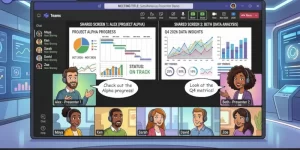
Microsoft Teams is preparing to make collaborative meetings more flexible by allowing two presenters to share their screens or application windows simultaneously. The feature, announced in a Microsoft 365 Message Center update published on October 27, 2026, is scheduled to begin rolling out worldwide in late November, with completion expected by mid-December.
Tracked under Microsoft 365 Roadmap ID 80239, the update will let meeting participants view two shared content streams at the same time, removing the need for one presenter to stop sharing before another can begin. The capability is expected to be enabled by default for meetings, while tenant administrators and meeting organizers will have controls over its availability.
For businesses that rely on Teams for presentations, training, demonstrations, and remote collaboration, the change could make it easier to compare information and work through complex topics without repeatedly interrupting the flow of a meeting.
What Is Changing in Microsoft Teams?
Today, meetings that require participants to examine information from multiple presenters can involve unnecessary switching between shared screens. When one person needs to show a document, dashboard, or application while another wants to present related information, the transition can disrupt the discussion.
Microsoft’s upcoming simultaneous screen-sharing feature is designed to address this limitation. Two presenters will be able to share a screen or window at the same time, allowing attendees to see both content streams simultaneously.
According to the update, the feature is intended to support activities such as comparing documents, presenting complementary information, and collaborating across multiple sources.
The important distinction is that this is a change to how shared content appears during a meeting. It does not mean that two separate meetings are required or that presenters must alternate control of a single shared screen.
Microsoft identifies desktop and web as supported platforms in the related Message Center notice. The worldwide general availability rollout is planned to start in late November 2026 and finish by mid-December, although individual organizations may see the feature become available at different times during that period.
Why Simultaneous Screen Sharing Matters
Screen sharing is central to how distributed teams communicate. Employees use it to demonstrate software, explain reports, review designs, discuss spreadsheets, and walk colleagues through unfamiliar processes.
Allowing two people to present at once could improve these activities by reducing the friction associated with switching between presenters.
1. Comparing Documents and Data
Consider a finance team reviewing two versions of a budget or a project team comparing an original design with a proposed revision. With both presenters sharing their content, participants can examine the relevant information side by side rather than relying on someone to stop sharing, start a new presentation, and then switch back.
This could make discussions more direct and help teams identify differences without losing track of the original material.
2. Improving Product Demonstrations
Product demonstrations often require a presenter to show an application while another team member explains supporting information, technical documentation, or related data.
Simultaneous sharing could help sales engineers, product specialists, and technical teams keep the demonstration and its supporting material visible together. That may be particularly useful when explaining a workflow that spans multiple applications.
3. Making Remote Training More Interactive
In a training session, an instructor might demonstrate a task while a second presenter shows reference material or an example of the expected result.
Keeping both streams visible could make it easier for participants to follow instructions and compare their understanding with the demonstration. Trainers may also find it useful for guided software walkthroughs and technical workshops.
4. Supporting Cross-Functional Collaboration
Meetings involving several departments often bring together people who use different tools and work with different information. A designer may need to explain a prototype while a project manager presents a timeline, for example.
The ability to view both sources at once could reduce the number of interruptions needed to connect those perspectives. The practical benefit will depend on the meeting layout, the content being shared, and how participants organize the discussion.
What Organizations Need to Know About the Rollout
Microsoft’s announcement outlines a rollout window rather than a single release date. Organizations should therefore prepare for a gradual introduction instead of assuming that the feature will appear for every user simultaneously.
The key details are:
- Feature: Two presenters can share screens or windows simultaneously in a Teams meeting.
- Roadmap reference: Microsoft 365 Roadmap ID 80239.
- Announcement: Microsoft 365 Message Center update published October 27, 2026.
- Rollout start: Late November 2026.
- Expected completion: Mid-December 2026.
- Geographic availability: Worldwide general availability.
- Default behavior: The capability is expected to be enabled for meetings by default.
- Administrative controls: Tenant administrators can manage availability, and meeting organizers can control the setting for individual meetings.
Admin Controls: What IT Teams Should Review
Although the feature is intended to be enabled by default, organizations will have tenant-level administrative control over whether simultaneous sharing is available to users. Meeting organizers will also have an option to enable or disable the capability for individual meetings.
That distinction gives IT teams an opportunity to align the feature with existing collaboration practices instead of treating the rollout as a purely technical change.
Microsoft already provides meeting-policy controls for content sharing through the Teams admin center. Its documentation explains how administrators can manage settings such as who can present, screen-sharing availability, and other content-sharing capabilities. The new feature’s specific control should be reviewed through the relevant Microsoft 365 Message Center guidance as the rollout approaches.
Administrators should consider the following preparation steps:
- Review meeting policies: Check existing rules governing who can present and which users can share their screens or application windows.
- Assess meeting requirements: Identify whether simultaneous sharing is appropriate for training, internal collaboration, customer demonstrations, and meetings involving sensitive material.
- Prepare help-desk teams: Explain the new behavior so support staff can answer questions when users encounter two active content streams.
- Update user guidance: Provide simple examples showing when dual sharing is useful and when a single shared screen may be easier to follow.
- Monitor the rollout: Verify availability in the organization’s environment before announcing that the feature is ready for everyone.
Security and Compliance Considerations
The announcement identifies no specific compliance considerations for this feature. That does not remove the need for organizations to assess how the new sharing experience fits their existing security requirements.
Two simultaneous content streams may expose more information to meeting participants at once. If one presenter shares a document containing confidential details while another displays an internal dashboard, attendees could have access to a broader view of organizational information than they would during a single-content presentation.
This is not evidence of a new security vulnerability. It is a practical consideration for organizations that already manage sensitive information through meeting permissions and content-sharing policies.
IT and security teams should continue to apply their existing rules for presenter permissions, confidential information, and external participants. They should also remind employees to share only the applications or windows required for the discussion, particularly when external guests are present.
For organizations with stricter requirements, meeting organizers can use the available meeting-level control to determine whether simultaneous sharing is appropriate for a particular session, subject to the organization’s administrative configuration.
How the Feature Could Change Meeting Habits
The most significant benefit may be a small change in how people structure meetings. Instead of planning presentations around a single person sharing at a time, teams may be able to design sessions in which two presenters contribute different but complementary information.
For example, a project review could feature a live demonstration alongside a project plan. A technical discussion could show an application’s behavior next to supporting diagnostic information. A training session could keep an example visible while an instructor walks participants through a task.
However, showing more information does not automatically make a meeting more effective. Two busy screens could overwhelm participants if the presenters talk over one another, switch content too frequently, or fail to explain where attendees should focus.
Teams will likely benefit most when the two presenters have clearly defined roles and each shared stream serves a distinct purpose. Meeting organizers should also consider screen size, accessibility, and whether participants can comfortably follow both sources.
The feature is best understood as an additional presentation option, not a reason to use two shared screens in every meeting.
What Happens Next?
Microsoft’s planned rollout gives organizations a short window to review their policies and prepare employees before the feature becomes broadly available. The next milestones are the start of worldwide general availability in late November 2026 and the expected completion of the rollout by mid-December.
As availability expands, organizations will need to confirm how the feature behaves in their own environments, determine whether their existing policies require changes, and decide which meeting formats benefit from simultaneous sharing.
The longer-term impact will depend on how naturally teams incorporate the capability into their working practices. If it reduces unnecessary screen-switching and helps participants compare information in real time, it could become a useful addition to everyday collaboration.
For IT administrators, the immediate priority is straightforward: review the announcement, check the relevant tenant controls, and prepare clear guidance for users. For everyone else, the practical change is simple—two presenters may soon be able to show their work at the same time, making it easier to connect information without breaking the conversation.
Extra posts:
 Microsoft Teams to Allow Custom Blocked File Extensions in November 2026
  Microsoft Teams Mobile Copilot Search Feature Rolls Out Worldwide in November 2026
  Microsoft Teams Introduces Private Chat for Organizers and Presenters: A Major Upgrade for Meetings, Webinars, and Town Halls
  Microsoft 365’s New Hero Link Is Changing How Teams Share Files
  Microsoft Teams PowerPoint Live Gets a Light Mode for Presenters
  Microsoft Teams Events Licensing Update 2026: Teams Enterprise, Premium and Attendee Limits Explained