
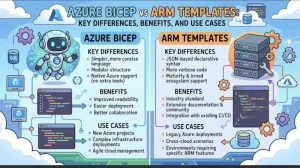
Infrastructure as code (IaC) has changed how cloud teams provision, manage, and scale Azure environments. Instead of manually configuring virtual networks, storage accounts, and virtual machines in the Azure portal, teams can define infrastructure in code and deploy it consistently across development, testing, and production.
But when choosing an IaC approach for Microsoft Azure, one question often comes up: Should you use Azure Bicep or ARM templates?
Both technologies let you define Azure infrastructure declaratively, automate deployments, and manage configurations through source control. The main difference is how you write and maintain that code. ARM templates use JSON, while Bicep provides a more concise, purpose-built language that compiles into ARM template JSON before deployment. Microsoft Learn+1
For solution architects, DevOps engineers, and developers, the choice affects more than syntax. It influences code readability, reuse, troubleshooting, and the long-term maintenance of cloud infrastructure.
What Are Azure Bicep and ARM Templates?
Understanding ARM templates
Azure Resource Manager (ARM) templates are JSON files that describe the Azure resources you want to deploy and their required configuration. They follow a declarative model: you specify the desired infrastructure, and Azure Resource Manager handles the deployment process.
An ARM template can define resources such as:
- Virtual machines and managed disks.
- Virtual networks, subnets, and network security groups.
- Azure Storage accounts.
- Azure App Service applications and related resources.
- Azure SQL databases and other managed services.
ARM templates can also include parameters, variables, expressions, resource dependencies, and outputs. These features allow teams to create reusable deployments and customize them for different environments.
For example, a team could maintain one template for a web application and use different parameter files to deploy it to development, staging, and production.
The drawback is that JSON can become verbose as infrastructure grows. Nested objects, lengthy expressions, and repeated structural elements can make large templates harder to read and review. Microsoft Learn+1
Understanding Azure Bicep
Azure Bicep is a domain-specific language designed specifically for deploying Azure resources. It offers the same core deployment capabilities as ARM templates but uses a more readable syntax.
Instead of manually writing the full JSON structure, developers describe resources using Bicep declarations. The Bicep CLI then compiles the source file into an ARM template that Azure Resource Manager can process.
Consider this simple storage account example.
Azure Bicep
param location string = resourceGroup().location

resource storage 'Microsoft.Storage/storageAccounts@2023-05-01' = {
  name: 'examplestorage123'
  location: location
  sku: {
    name: 'Standard_LRS'
  }
  kind: 'StorageV2'
}
The code defines a storage account, sets its location using a parameter, and specifies its redundancy tier and account kind.
The equivalent ARM template requires additional JSON structure, including resource arrays, property objects, and expression syntax. Bicep removes much of that overhead.
Bicep also supports type checking, symbolic resource references, modules, and automatic dependency inference when resources reference one another. These features help developers catch mistakes earlier and organize complex infrastructure more effectively. Microsoft Learn+1
Azure Bicep vs ARM Templates: Key Differences
The following comparison highlights the practical differences between the two approaches.
| Feature | Azure Bicep | ARM templates |
|---|---|---|
| Authoring language | Bicep DSL | JSON |
| Readability | Concise and developer-friendly | Can become verbose |
| Deployment engine | Azure Resource Manager | Azure Resource Manager |
| Compilation | Compiles into ARM JSON | Already in deployment format |
| Type checking | Strong editor and compiler validation | Schema validation and tooling support |
| Dependencies | Often inferred from symbolic references | Explicit dependencies may be required |
| Code reuse | Native modules and registries | Nested or linked templates and template specs |
| Comments | Native comment syntax | JSON does not support comments in standard JSON |
| Tooling | Bicep CLI and VS Code extensions | ARM tooling, VS Code, Azure CLI, and PowerShell |
| Best fit | New Azure IaC projects and maintainable infrastructure | Existing JSON-based workflows and compatibility requirements |
Both approaches support repeatable deployments, parameterization, and Azure resource management. Bicep is generally the easier authoring experience, while ARM templates remain useful when JSON is already embedded in established workflows. Microsoft Learn+2
1. Syntax and Readability: Bicep Keeps Code Manageable
The most noticeable difference between Bicep and ARM templates is their syntax.
In ARM JSON, expressions often appear inside strings enclosed in brackets. Developers may need to navigate multiple levels of nested objects to understand how a resource is configured.
Bicep uses a more natural declaration style. Resources have symbolic names, properties are easy to locate, and expressions can be written without the additional JSON expression wrappers.
This matters when a project contains dozens of resources. A network configuration, for example, might include virtual networks, subnets, route tables, security groups, and private endpoints. When all those resources are defined in a single template, readability directly affects how quickly engineers can troubleshoot and review changes.
Practical takeaway: If your team frequently edits infrastructure definitions, reviews pull requests, or investigates deployment failures, Bicep can reduce the time spent understanding the code.
ARM JSON is still valid and supported. However, for teams starting from scratch, Bicep generally provides a more comfortable authoring experience. Microsoft Learn+1
2. Deployment and Compilation: How Both Work
One common misconception is that Bicep uses a completely different deployment engine.
It does not.
Bicep is an abstraction over ARM templates, not a replacement for Azure Resource Manager. When you deploy a Bicep file, the tooling compiles it into ARM JSON, which Azure Resource Manager then uses to deploy the resources.
This means both approaches benefit from the same underlying Azure deployment capabilities, including deployment scopes, resource APIs, and deployment operations.
You can compile a Bicep file manually with the Azure CLI:
az bicep build --file main.bicepThis generates an ARM JSON file that you can inspect or use in workflows that require the compiled template. In normal deployments, explicit compilation is usually unnecessary because the tooling handles it automatically. Microsoft Learn+1
For teams migrating from JSON, this is particularly useful. You can introduce Bicep without changing the underlying Azure deployment model or abandoning ARM-based infrastructure practices.
3. Type Safety and Error Detection
Infrastructure errors can be expensive. A misspelled property, an invalid resource configuration, or a mismatch between expected and supplied values can interrupt a deployment pipeline.
Bicep provides compiler diagnostics and type-aware tooling that help identify many problems before deployment. Its resource definitions are checked against Azure resource type information, helping developers catch invalid property names, incompatible values, and other authoring mistakes earlier.
ARM templates also support validation through JSON schemas, editor tooling, and Azure deployment validation. However, their JSON structure and expression syntax can make some issues harder to identify during development.
Neither approach guarantees a successful deployment. Azure permissions, quota limits, policy restrictions, regional availability, and runtime configuration can still cause failures.
For a production workflow, combine authoring-time checks with deployment validation:
- Run compiler or template validation checks.
- Review changes through source control.
- Preview the expected infrastructure changes.
- Deploy to a nonproduction environment.
- Promote the tested configuration through your release pipeline.
Bicep’s compiler feedback makes the first step particularly convenient, but both approaches benefit from the same disciplined deployment process. Microsoft Learn+2
4. Code Reuse and Modularity
As Azure environments grow, infrastructure definitions need a clear structure. A single file containing every network, database, application, and monitoring resource can quickly become difficult to maintain.
Bicep addresses this through modules. A module is a separate Bicep file that another Bicep file deploys. You can create reusable components for common infrastructure patterns, such as:
- Virtual networks and subnet configurations.
- Storage accounts with standardized security settings.
- Application hosting environments.
- Monitoring and diagnostic settings.
- Shared resources used by multiple applications.
For example, a platform team could create a reusable networking module and use it across several application environments. Updates to that module can then be reviewed and tested centrally rather than duplicated across multiple files.
ARM templates also support reusable designs through nested and linked templates, as well as template specifications. The difference is that Bicep provides a more direct module-based authoring experience and supports a dedicated private module registry. Microsoft Learn+1
For organizations managing multiple subscriptions or application teams, this modularity can improve consistency and reduce duplicated configuration.
5. Tooling, Automation, and CI/CD Integration
Both Bicep and ARM templates work with Azure CLI, Azure PowerShell, source control systems, and CI/CD platforms such as GitHub Actions and Azure Pipelines.
Bicep is particularly convenient when developers use Visual Studio Code with the Bicep extension. The tooling provides syntax highlighting, resource completion, diagnostics, and other authoring features.
A typical Bicep workflow might look like this:
# Check the installed Bicep version
az bicep version

# Compile the template to ARM JSON
az bicep build --file main.bicep

# Preview changes before deployment
az deployment group what-if \
  --resource-group rg-app-dev \
  --template-file main.bicep

# Deploy after reviewing the proposed changes
az deployment group create \
  --resource-group rg-app-dev \
  --template-file main.bicep
The commands above assume that you are signed in to Azure, have permission to deploy to the resource group, and have an appropriate deployment configuration. The example also assumes a resource-group-scoped deployment.
The what-if operation previews anticipated changes without applying them. It helps teams identify unexpected resource creation, modification, or deletion before committing to a deployment. Microsoft Learn+1
ARM templates can use the same general deployment workflow, replacing --template-file main.bicep with the relevant JSON template file.
The key distinction is not deployment automation. It is the experience of authoring, validating, and maintaining the infrastructure code that automation consumes.
When Should You Choose Azure Bicep or ARM Templates?
The right choice depends on your existing infrastructure, team experience, and long-term maintenance goals.
Choose Azure Bicep for new Azure projects
Bicep is a strong default when you want readable infrastructure definitions, reusable modules, compiler feedback, and maintainable code for long-term Azure operations.
Keep ARM templates for established JSON workflows
Existing templates do not need to be rewritten simply because Bicep is available. JSON templates remain supported and may be the practical choice when existing tooling, generated artifacts, or organizational standards depend on them.
Consider gradual migration for larger environments
Start with a small, low-risk template, decompile it into Bicep, review the resulting code, and validate it before expanding the migration. You can also reference existing JSON templates from Bicep modules while transitioning.
Microsoft recommends Bicep for a better template authoring experience, while continuing to support ARM template JSON.
Practical Takeaways: A Sensible Path Forward
For most teams building new infrastructure specifically for Azure, Bicep is the better starting point. It makes resource definitions easier to read, encourages modular design, and integrates well with modern development workflows.
That does not mean you should immediately replace every existing ARM template. Migration takes time, and established deployments may already be reliable, tested, and integrated into production pipelines.
A sensible next step is to choose one representative deployment, such as a storage account or application environment, and implement it in Bicep. Compile the file, validate it, review its what-if output, and test the deployment in a nonproduction resource group.
Once the team is comfortable with the workflow, introduce reusable modules and automated checks into your CI/CD pipeline. For existing JSON templates, assess migration based on maintainability, business risk, and the effort required to test the resulting code.
The goal is not simply to choose a newer syntax. It is to make Azure infrastructure easier to understand, safer to change, and more consistent to deploy.
Extra posts:
 Architecture vs. Design Key Differences Explained
  GitHub Copilot vs. Amazon Q Developer Pros, Cons & Key Differences
  Azure Resource Manager (ARM) The Backbone of Cloud Resource Management
  Comparing Copilot in Microsoft 365 vs. GitHub Copilot: Key Differences
  Getting Started with Windows 365 Benefits, Use Cases, and Setup Guide
  Microsoft SharePoint: A Complete Guide to Features, Benefits, and Business Use Cases