
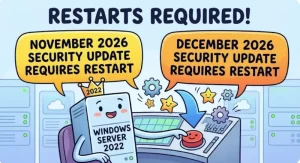
Microsoft’s November and December 2026 security updates for Windows Server 2022 will require system restarts, including on devices enrolled in hotpatching. IT administrators should plan maintenance windows accordingly, while organizations using Windows Server 2025 and Windows 11 can continue with their existing hotpatch schedules.
Microsoft’s planned security updates for November and December 2026 will temporarily change the usual restart expectations for hotpatch-enabled Windows Server 2022 systems. Instead of receiving hotpatch updates during these two months, affected devices will receive standard security updates that require a restart to complete installation.
The change is tied to the technical requirements of specific security improvements, rather than a requirement to abandon hotpatching. Devices will remain enrolled in the hotpatch program, with the next hotpatch update expected in February 2027 following a planned baseline update in January.
For IT teams managing production servers, the immediate priority is to prepare for two consecutive months of restart-required updates without disrupting business operations or delaying security maintenance.
Why Windows Server 2022 Hotpatch Updates Will Require Restarts
Hotpatching is designed to reduce the operational disruption associated with installing security updates. By allowing supported security fixes to be applied without restarting the operating system in many cases, it can help organizations maintain service availability while keeping systems protected.
However, hotpatching does not eliminate the need for every restart. Some operating system components cannot be updated using the hotpatch mechanism and require a conventional update installation process.
According to the supplied update guidance, certain security improvements scheduled for November and December 2026 affect components that cannot be updated without restarting the device. Microsoft will therefore distribute standard updates for Windows Server 2022 during both months.
This distinction matters because administrators should not assume that enrollment in hotpatching guarantees a restart-free installation every month. The maintenance requirements depend on the contents of the individual update.
The practical consequence is straightforward: organizations must schedule and complete the required restarts after deploying the November and December security updates.
Windows Server 2022 Update Schedule: November 2026 to February 2027
The announced schedule establishes a temporary departure from the expected hotpatch cadence before the program is expected to resume.
| Month | Update type | Restart required? |
|---|---|---|
| November 2026 | Standard security update | Yes |
| December 2026 | Standard security update | Yes |
| January 2027 | Planned baseline update | Yes |
| February 2027 | Expected hotpatch update | Not ordinarily required for hotpatch installation |
The February entry reflects the expected hotpatch schedule, not a guarantee that every device will remain restart-free under all circumstances. Other maintenance requirements, update prerequisites, or device-specific conditions may still necessitate a restart.
January is particularly important for capacity planning because the planned baseline update also requires a restart. As a result, administrators should prepare for restart-related maintenance in three consecutive months, from November 2026 through January 2027, before the next hotpatch update is expected in February.
Teams should confirm the precise deployment dates and applicable servicing instructions through Microsoft’s official Windows Server release information.
Which Devices Are Affected by the Change?
The change specifically concerns Windows Server 2022 devices enrolled in hotpatching. These systems will need a restart to complete installation of each month’s security update in November and December.
The impact varies according to the operating system and its existing update configuration.
Windows Server 2022 devices enrolled in hotpatching
These devices will receive standard security updates during November and December, and administrators must plan a restart for each update. Hotpatch enrollment remains active; no additional configuration is required simply to remain enrolled.
Windows Server 2022 devices not using hotpatching
There is no change to their existing restart expectations. These systems already receive standard updates that require a restart where applicable, so the temporary shift does not introduce a new hotpatch-related requirement.
Windows Server 2025 devices
The announced change does not affect Windows Server 2025 hotpatch updates. Their November and December hotpatch schedule remains unchanged.
Windows 11 devices
Hotpatch-enabled Windows 11 devices are also excluded from this change. Their November and December schedules remain as planned.
Administrators managing mixed environments should keep these distinctions clear. Applying a single restart policy to every Windows system could lead to unnecessary maintenance or incorrect assumptions about update behavior.
What IT Administrators Should Do Before November
The guidance does not call for additional configuration changes to maintain hotpatch enrollment. The work is primarily operational: planning, deployment, restart coordination, and verification.
IT teams should consider the following actions before the November update cycle begins.
- Review the affected server inventory. Identify Windows Server 2022 systems enrolled in hotpatching and distinguish them from Windows Server 2025 and Windows 11 devices.
- Schedule maintenance windows. Reserve time for the November and December security updates, including the required restarts and post-restart checks.
- Coordinate with application owners. Confirm acceptable downtime and identify workloads that need failover, traffic draining, or other availability measures before a server restarts.
- Check deployment sequencing. Align update rollout plans with application dependencies, clustered workloads, and existing change-management procedures.
- Verify recovery readiness. Ensure appropriate backups, recovery procedures, and monitoring are in place before performing maintenance on critical production systems.
- Confirm installation and restart completion. Review update history and organizational compliance reporting to verify that updates have installed successfully and required restarts have occurred.
For environments with many servers, a staged deployment can help teams identify problems before proceeding across the full estate. Where high availability is configured, administrators should follow their established procedures for updating and restarting individual nodes safely.
These steps are operational recommendations rather than new Microsoft configuration requirements. The central requirement remains to deploy the updates and complete the necessary restarts.
Security and Compliance Implications
The temporary change does not remove the obligation to apply security updates promptly. Instead, it changes how organizations must accommodate installation during the affected months.
Administrators who rely on hotpatching to minimize interruptions should account for the additional maintenance time when planning November and December deployments. Failing to schedule the restart could leave the installation incomplete, depending on the update’s installation state and requirements.
Organizations should also distinguish between installing an update and completing its installation. A deployment tool may report that an update has been delivered or staged, but administrators still need to verify that the required restart has occurred and that the system has returned to a healthy operating state.
The supplied guidance states that no additional compliance action is required. Update installation and restart behavior will continue to appear in update history and compliance reports as usual.
Even so, IT teams should continue monitoring their normal compliance dashboards and investigate any devices that remain pending a restart or fail to report successful installation. Existing reporting processes remain useful for identifying systems that need attention.
Why the Change Matters for Server Availability
The operational impact will depend on how each organization manages its Windows Server 2022 environment. A single server supporting a non-critical internal application may be straightforward to restart, while a large production environment may require coordinated maintenance across several teams.
For business-critical workloads, the main challenge is balancing timely security patching with service availability. Administrators may need to account for application shutdown procedures, workload migration, cluster failover, and validation after reboot.
The two-month change also affects maintenance planning beyond the immediate update cycle. With a baseline update planned for January 2027, organizations should avoid treating December as the final restart-related maintenance event of the period.
Reviewing the November-to-February schedule now can help infrastructure teams reserve appropriate maintenance windows, communicate expected service interruptions, and reduce the risk of rushed changes during busy operational periods.
What Happens After December 2026?
The announced roadmap points to a planned baseline update in January 2027, followed by the next expected hotpatch update in February.
This means hotpatch-enabled Windows Server 2022 systems will remain part of the program despite receiving standard updates during November and December. Administrators do not need to remove devices from hotpatch enrollment solely because the upcoming updates require restarts.
The February schedule should nevertheless be treated as an expectation that administrators must confirm against Microsoft’s subsequent release information. Update contents and servicing requirements can vary, so teams should not assume that future updates will always follow the same restart pattern.
The most useful next step is to monitor the official Windows Server release information page and hotpatch calendar for updates to the schedule and deployment guidance.
For now, Windows Server 2022 administrators should focus on getting the November and December maintenance windows into their change calendars, confirming affected devices, and ensuring that each required restart is completed and verified. Planning ahead will help organizations maintain security coverage while managing the temporary return to restart-required updates.