
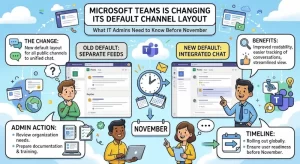
Microsoft is preparing to change how new Microsoft Teams channels are created through its Microsoft Graph API, with the Threads layout set to become the default when developers do not explicitly specify a channel layout. The change is scheduled to begin rolling out worldwide in late November 2026, giving IT administrators and development teams a limited window to review their existing automation.
Announced in Microsoft 365 Message Center update MC1530957 on October 29, 2026, the change affects organizations that use Microsoft Graph to provision Teams channels through scripts, applications, or automated workflows. Instead of automatically creating new channels with the traditional Posts layout, Microsoft will use Threads whenever the layoutType property is omitted from a channel creation request.
Importantly, existing Teams channels will not be affected. However, organizations that depend on the Posts layout will need to make a small but important adjustment to their API requests before the rollout begins.
Microsoft Teams Threads Layout Becomes the New Default
The upcoming change concerns the Microsoft Graph v1.0 Create channel API, specifically the following endpoint:
POST /v1.0/teams/{team-id}/channels
This endpoint allows developers and applications to create channels within Microsoft Teams programmatically. It is commonly used in automated provisioning processes, enterprise applications, and custom solutions designed to manage collaboration environments.
Until now, requests that omitted the layoutType property would create channels using the Posts layout by default. Under Microsoft’s updated behavior, those same requests will create channels using the Threads layout instead.
The distinction is important because the two layouts provide different experiences for organizing conversations.
Microsoft’s change does not remove the Posts layout or force every organization to adopt Threads. Instead, it changes the default behavior for API requests that leave the layout unspecified.
Here is how the updated behavior will work:
- Property omitted: The channel will use the Threads layout.
"layoutType": "post": The channel will use the Posts layout."layoutType": "chat": The channel will use the Threads layout.
One detail developers should remember is that Microsoft’s API uses "chat" as the technical value for the Threads layout. The value is not "threads".
Understanding the Difference Between Threads and Posts
The change makes more sense when looking at how the two Microsoft Teams channel layouts organize conversations.
The Posts layout follows a traditional post-and-reply structure. It is particularly useful for announcements, structured discussions, and communications where a main message needs to remain visible while members respond underneath it.
The Threads layout offers a more chat-like experience, encouraging ongoing conversations and side discussions without relying on the same traditional post-and-reply presentation.
According to Microsoft’s guidance on channel layouts, the two formats serve different collaboration needs.
Posts layout is generally suitable for:
- Company-wide or department announcements.
- Formal updates that need a clear main message.
- Discussions organized around individual posts.
- Teams that prefer a traditional message-and-reply structure.
Threads layout is generally suitable for:
- Active project discussions.
- Day-to-day team collaboration.
- Conversations involving multiple related topics.
- Faster back-and-forth communication between team members.
Neither layout is universally better. The appropriate choice depends on how an organization structures its communication and how employees use individual channels.
Microsoft’s decision to make Threads the default for Graph-created channels means developers and administrators should pay closer attention to the assumptions built into their provisioning processes.
When Will the Microsoft Teams Channel Layout Change Happen?
Microsoft has scheduled the change for late November 2026.
According to Message Center announcement MC1530957, the rollout will cover the following environments:
- Worldwide commercial environments.
- Government Community Cloud (GCC).
- GCC High.
- Department of Defense (DoD).
The general availability rollout is expected to begin and finish in late November 2026.
As of October 31, 2026, the change is still upcoming, giving organizations an opportunity to inspect their existing integrations before the new default takes effect.
Although the rollout window is relatively short, the technical adjustment is straightforward for organizations that manage their own Microsoft Graph integrations.
The more challenging part may be identifying every application, script, and third-party service that creates Teams channels without explicitly defining the layout.
Which Organizations Will Be Affected?
This update primarily affects organizations that create Microsoft Teams channels programmatically through Microsoft Graph.
Regular Teams users who manually create channels are not the primary audience for this particular API change. Organizations that rely on automated provisioning, however, should examine their channel creation processes.
Potentially affected solutions include:
1. Custom provisioning applications
Organizations may use internal applications to automatically create Teams channels for new projects, departments, clients, or business initiatives.
If these applications omit layoutType, newly created channels will use Threads after the change.
2. PowerShell scripts and automation
IT administrators often use scripts to create and configure Teams environments. Any scripts that call the Microsoft Graph Create channel API without specifying a layout should be reviewed.
3. Third-party provisioning platforms
Some organizations use external applications to manage Microsoft 365 environments and automate Teams administration.
Administrators should contact their solution providers to establish whether their products explicitly specify the channel layout or rely on Microsoft’s default behavior.
4. Enterprise integrations
Custom business applications may create Teams channels as part of broader workflows, such as onboarding employees, launching projects, or establishing customer collaboration spaces.
Even if channel creation represents only one step in a larger process, an unexpected layout change could affect the user experience and associated workflows.
What IT Administrators and Developers Should Do
Microsoft recommends that organizations notify developers and application owners responsible for creating Teams channels through Microsoft Graph.
The most important action is to identify whether existing integrations depend on the Posts layout being selected automatically.
If Posts must remain the default for newly created channels, developers should explicitly include the appropriate property in their API requests.
For example, a channel creation request that preserves the Posts layout should look like this:
POST https://graph.microsoft.com/v1.0/teams/{team-id}/channels
Content-Type: application/json

{
  "displayName": "Project Collaboration",
  "description": "Project discussion and updates",
  "membershipType": "standard",
  "layoutType": "post"
}
By explicitly setting layoutType to post, the application will continue creating channels with the traditional Posts layout, regardless of the new default.
Organizations that prefer Threads can also specify the layout explicitly:
{
  "displayName": "Project Collaboration",
  "description": "Project discussion and updates",
  "membershipType": "standard",
  "layoutType": "chat"
}
This makes the intended channel layout clear within the application code and reduces reliance on default API behavior.
A Practical Checklist Before the Rollout
IT teams can use the following checklist to prepare:
- Identify applications and scripts that create Teams channels through Microsoft Graph.
- Search API request bodies for missing
layoutTypeproperties. - Determine whether individual workflows require Posts or Threads.
- Add
"layoutType": "post"wherever the Posts layout must be preserved. - Confirm how third-party provisioning tools handle channel layouts.
- Test newly created channels in a suitable environment.
- Review dependent workflows for compatibility with Threads.
- Notify developers, application owners, and relevant IT administrators.
These steps should help organizations avoid unexpected changes when the updated default becomes available.
Will Existing Microsoft Teams Channels Change?
No. Microsoft has explicitly confirmed that this update applies only to newly created channels.
Existing channels will retain their current layouts. Organizations do not need to migrate existing channels or modify their current Teams environments simply because the Graph API default is changing.
This distinction significantly limits the immediate impact of the announcement.
For example, if an organization currently has hundreds of channels using the Posts layout, those channels will remain unchanged after the rollout.
However, any new channels created through API requests that omit layoutType will use Threads.
There is also an important distinction between preserving existing channels and controlling future channel creation. Organizations that want consistent layouts across old and new channels should review their provisioning policies rather than assume the previous default will continue.
Microsoft also documents an API method for changing a channel’s layout after creation. Developers can use the Microsoft Graph Update channel API to switch a channel between the supported layouts by updating its layoutType property.
This provides an additional management option if a newly created channel needs to be adjusted later.
Why This Change Matters for Microsoft 365 Automation
At first glance, changing a default API property may appear to be a relatively minor Microsoft Teams update.
However, default values play an important role in enterprise automation. Applications often rely on them to simplify request payloads and avoid specifying configuration options that appear unnecessary.
When a platform changes one of those defaults, applications can continue working technically while producing different results.
That is the main consideration for this Microsoft Teams update.
A channel creation request may still return a successful response, but the resulting channel could have a different conversation layout than the application owner originally intended.
This can create inconsistencies across departments and projects, particularly in organizations where automated provisioning is widely used.
For example, an organization might configure its project management processes around the Posts layout, using individual posts for announcements and structured updates. If an automated application begins creating Threads channels instead, employees may encounter a different communication experience when joining newly established projects.
The API request itself may not fail, making this type of issue less obvious than a conventional integration error.
This is why testing the actual channel creation outcome is just as important as reviewing the request payload.
Microsoft Teams Channel Layouts: What Happens Next?
The late-November rollout is a useful reminder that Microsoft 365 administrators should regularly review changes to the services and APIs their organizations depend on.
For developers, the immediate priority is simple: avoid leaving important configuration decisions to an API default when the desired outcome is already known.
For IT administrators, the focus should be on identifying dependencies, communicating the change, and confirming that automated provisioning continues to create channels in the expected format.
Organizations that already prefer Threads may not need to change their existing requests. Those that want to preserve Posts should explicitly specify "layoutType": "post" before the rollout begins.
The longer-term consideration is whether organizations should standardize channel layouts across their automated provisioning processes. Making layout preferences explicit can help prevent future inconsistencies and make integrations easier to maintain.
With Microsoft’s rollout expected to begin in late November 2026, developers and administrators should use the remaining preparation window to audit their integrations and test their configurations.
The key takeaway is straightforward: Microsoft Teams is not changing existing channels, but the default layout for newly created Graph-based channels is changing. Organizations that rely on Posts should update their API requests before the new behavior takes effect.
Extra posts:
 Microsoft Teams Is Getting a Smarter Way to Manage Channel Notifications
  Microsoft Entra Users May Soon Create AI Agents by Default: What IT Admins Need to Know
  Microsoft Teams to Blur QR Codes From External Users by Default in New Security Update
  Microsoft Teams Is Getting a Smarter Meeting Assistant: Facilitator Can Now Join Channel Meetings
  Microsoft Teams Is Changing How Users Join Private Teams With a Code
  Microsoft Teams Mobile Gets a Fresh Look: New Chat and Channel Dashboard Makes Navigation Easier