
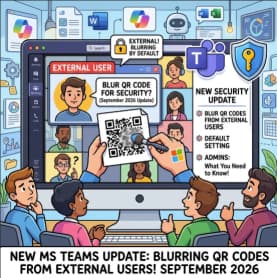
Microsoft Teams is preparing a new security feature designed to give users an extra layer of protection against phishing, scams, and other online threats. Starting in October 2026, Teams will automatically blur images containing QR codes when those images are sent by external users.
The change is part of Microsoft’s ongoing effort to make collaboration tools safer, particularly as QR codes have become increasingly common in phishing campaigns and online fraud.
The new protection will apply across Microsoft Teams desktop, web, and mobile platforms. Users will still be able to view a QR code when they trust the sender, but they will need to deliberately reveal the blurred image before they can see or scan it.
For organizations that regularly communicate with customers, suppliers, contractors, partners, or other external contacts through Teams, the change is worth understanding before the rollout begins.
Why Is Microsoft Teams Blurring External QR Codes?
QR codes are convenient, but they can also create security challenges.
A QR code can send someone to a website without making the destination immediately obvious. Attackers can take advantage of this by placing malicious links inside QR code images and distributing them through email, messaging platforms, documents, or collaboration tools.
This type of attack is sometimes referred to as QR phishing, or “quishing.”
The problem is particularly relevant in workplace environments. Employees may receive messages from external users that appear legitimate, especially when they are involved in business conversations with vendors, customers, or partners.
A QR code could potentially direct a user to a fake Microsoft login page, a fraudulent payment website, a malicious download, or another scam designed to steal information.
Microsoft’s new Teams feature is intended to introduce a moment of friction before users interact with these potentially risky images.
Instead of immediately displaying a QR code received from an external sender, Teams will obscure it. The recipient can then decide whether the sender and message are trustworthy before choosing to reveal the image.
What Will Happen When Users Receive a QR Code?
Once the feature rolls out, users may notice a different experience when receiving messages containing QR code images from people outside their organization.
The QR code image will be blurred by default.
This does not mean Microsoft has identified the QR code as malicious. Instead, the protection is based on the fact that the image came from an external sender.
Users who recognize and trust the sender can choose to reveal the image. After revealing it, they can view the QR code and decide whether they want to scan it.
That distinction is important.
The blurred image should not be interpreted as a warning that the particular QR code has been analyzed and found to be dangerous. Rather, Microsoft is taking a precautionary approach to content received from outside the organization.
In other words, the feature is designed to encourage users to stop and think before scanning.
When Will the New Teams Security Feature Roll Out?
Microsoft has outlined a rollout beginning in October 2026.
The Targeted Release is scheduled to begin in early October 2026 and is expected to complete during the same period.
The Worldwide General Availability rollout is scheduled to begin in mid-October 2026, with completion also expected in mid-October.
This means organizations should begin preparing users ahead of the general rollout, particularly businesses that rely heavily on external collaboration through Teams.
Because the feature is being enabled by default, employees may encounter blurred QR code images without any change being made by their IT department.
Which Teams Users and Platforms Are Affected?
The update is relevant to organizations that allow communication between internal employees and external users through Microsoft Teams.
That includes employees who communicate with:
- Customers
- Suppliers
- Contractors
- Business partners
- Consultants
- External service providers
- Other guest or external users
The protection will be available across the major Teams experiences, including:
- Microsoft Teams desktop
- Microsoft Teams web
- Microsoft Teams mobile
As a result, organizations should not assume that the change only affects employees using Teams on company computers. Someone working from a smartphone or browser could encounter the same behavior.
No Administrator Configuration Is Required
One of the simpler aspects of the update is that administrators do not need to make configuration or policy changes before the feature is introduced.
Microsoft will enable the protection automatically as part of the rollout.
For IT teams, this means there is no new setting that needs to be deployed across the organization simply to activate the feature.
However, “no action required” does not necessarily mean “nothing to do.”
The most valuable preparation may actually involve user education.
Employees who suddenly see a blurred QR code could be confused about why the image is hidden. Others might assume that Microsoft has detected malware or determined that the QR code is fraudulent.
IT and security teams can reduce that confusion by explaining the change in advance.
Microsoft Recommends User Education
Organizations are encouraged to remind employees that QR codes received from external users should be treated carefully.
Users should verify who sent the message before revealing or scanning the QR code.
This is especially important when a QR code is accompanied by urgent or unusual instructions.
For example, employees should be cautious if an external contact suddenly sends a QR code asking them to:
- Sign in to an account
- Verify their identity
- Reset a password
- Review an unexpected payment
- Download software
- Confirm financial information
- Access an unfamiliar website
A trusted sender does not automatically make every message safe. External accounts can themselves be compromised, and attackers may impersonate people or organizations that employees recognize.
The new Teams feature therefore works best as one part of a broader security awareness strategy, rather than as a replacement for phishing training.
What Should IT and Security Teams Do?
Although there is no mandatory administrative action, organizations can take a few practical steps before the rollout.
First, update internal security awareness materials to mention QR-code-based phishing.
Many employees are familiar with traditional phishing emails but may not recognize QR codes as a potential attack method. Training should explain that a QR code can ultimately lead to the same types of malicious websites as a suspicious hyperlink.
Second, help desk teams should be prepared for questions about blurred QR codes.
Employees may contact IT asking why an image is hidden or whether Teams has detected a security threat. A short internal knowledge-base article or help desk script can make those questions easier to handle.
Third, organizations should reinforce their external collaboration policies.
Employees who frequently work with external users should understand when it is appropriate to reveal and scan QR codes and when they should verify the request through another trusted communication channel.
A Small Change With a Bigger Security Message
At first glance, automatically blurring a QR code might seem like a relatively minor Teams interface change.
But the broader security principle is significant.
Modern phishing attacks increasingly rely on social engineering rather than obvious technical exploits. Attackers want users to make the decision for them — clicking a link, scanning a QR code, opening an attachment, or entering credentials into a convincing fake website.
By hiding QR codes from external senders until the user deliberately reveals them, Microsoft is introducing a simple checkpoint into that process.
It does not eliminate the threat, and it does not guarantee that a revealed QR code is safe. Instead, it encourages users to consider the source before taking the next step.
That extra moment of attention can be valuable in preventing accidental interaction with fraudulent content.
What Businesses Should Expect in October 2026
For most organizations, the October rollout should require little technical preparation.
The feature will be enabled by default, and there is no administrator configuration required to activate it. The primary impact will be on the user experience.
Employees may see QR code images from external users appear blurred. They will have the option to reveal those images when they trust the sender and need to view the code.
Businesses should therefore focus their preparation on communication rather than configuration.
A brief announcement to employees, an update to phishing-awareness training, and revised help desk guidance may be enough to ensure a smooth transition.
Most importantly, users should understand that a blurred QR code is not necessarily malicious. It simply means Teams is taking an extra precaution because the content originated outside the organization.
Microsoft Teams’ upcoming QR code protection is a practical security enhancement at a time when QR-based phishing attacks are becoming a growing concern for businesses and consumers.
Beginning in October 2026, QR code images sent by external users will be blurred by default across Teams desktop, web, and mobile. Users can still reveal the images when they trust the sender, preserving flexibility for legitimate business communications.
There is no administrator action required, but organizations should take the opportunity to strengthen their security awareness programs.
The biggest lesson for employees is simple: don’t scan first and investigate later. Check who sent the message, consider why the QR code was provided, and verify unexpected requests before interacting with them.
Microsoft’s update does not replace good security habits, but it adds another useful layer between users and potentially dangerous content.
Extra posts:
 Microsoft Teams Mobile Calendar to Require Latest App Update by October 2026: Microsoft Announces Critical Change for iOS and Android Users
  Microsoft Teams Is Changing How Users Join Private Teams With a Code
  Microsoft Teams Adds In-Meeting AI Toggle: Users Gain More Control Over Copilot and Facilitator
  Microsoft Teams: Users Can Temporarily Pause All Notifications
  What’s New in Microsoft Teams – May 2025 Update (With How-To Guide)
  Microsoft Teams Rooms app update and Content Camera