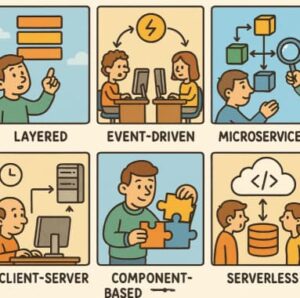
Choosing the right software architecture is one of the most important decisions you’ll make when designing a system. Architecture isn’t just about how code is structured—it shapes how teams collaborate, how easily the system scales, how reliable it is under pressure, and how expensive it will be to maintain over time. A good architectural choice can make future changes feel manageable, while a poor one can turn even small updates into major headaches.
There’s no single “best” architecture that works for every project. Each architectural style comes with its own strengths, weaknesses, and ideal use cases. The key is understanding these trade-offs and matching them to your business goals, team experience, and technical requirements. Below, we’ll explore some of the most common architectural styles, explain how they work, and discuss when each one makes the most sense.
1. Layered (N-Tier) Architecture
Overview
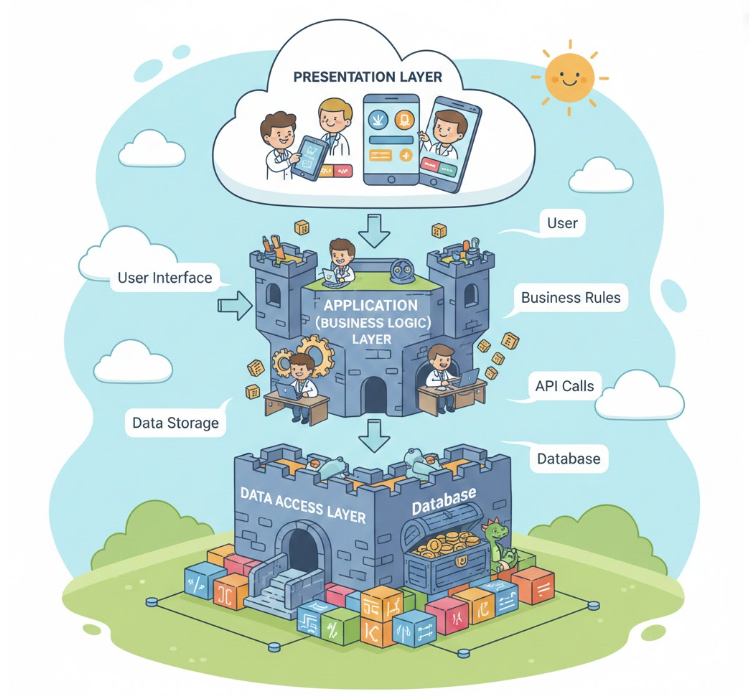
Layered architecture—often called N-tier architecture—is one of the most traditional and widely used approaches in software design. It organizes an application into distinct layers, each responsible for a specific concern. The most common layers include presentation (UI), business logic, persistence, and the database.
Each layer communicates only with the layer directly below it, which helps keep responsibilities clearly defined. This structure has been taught in computer science courses for decades and remains popular in enterprise environments.
When to Use
Layered architecture works best for relatively straightforward applications where clarity and maintainability matter more than extreme scalability. It’s a solid choice for internal tools, administrative systems, and classic enterprise applications.
It’s also a good starting point for teams that are new to architectural design or for projects with moderate complexity and predictable workloads.
Pros
- Clear separation of concerns
- Easy to understand, test, and maintain
- Well supported by traditional frameworks and tools
Cons
- Can become rigid over time
- Performance may suffer due to multiple layers
- Scaling individual parts of the system is difficult
2. Event-Driven Architecture
Overview
Event-driven architecture centers around the idea of events—things that happen within the system, such as a user placing an order or a sensor reporting new data. Instead of services calling each other directly, they communicate by publishing and consuming events through message brokers or event buses.
This asynchronous communication style allows systems to react to changes without tight coupling between components.
When to Use
Event-driven architecture is ideal for systems that need to respond in real time or handle high volumes of activity. Common use cases include e-commerce platforms, IoT systems, financial trading applications, and notification systems.
It’s especially useful in distributed systems where services must remain loosely coupled and resilient to failure.
Pros
- Highly scalable and flexible
- Loosely coupled components
- Better fault tolerance
Cons
- Debugging can be challenging
- Requires careful event design and monitoring
- Increased complexity compared to synchronous models
3. Microservices Architecture
Overview
Microservices architecture breaks an application into many small, independent services. Each service focuses on a single business capability, owns its own data, and can be developed, deployed, and scaled independently.
This style became popular as organizations moved toward cloud computing and DevOps practices.
When to Use
Microservices are well suited for large, complex systems that need to evolve rapidly. They work best when multiple teams are developing different parts of the system simultaneously and when frequent deployments are required.
They are particularly effective for cloud-native applications using containers, orchestration tools, and continuous delivery pipelines.
Pros
- Independent deployment and scaling
- Improved fault isolation
- Flexibility in technology choices
Cons
- High operational complexity
- Requires mature DevOps practices
- Increased networking and monitoring overhead
4. Service-Oriented Architecture (SOA)
Overview
Service-Oriented Architecture predates microservices and focuses on building reusable services that can be shared across multiple applications. These services typically communicate through standardized protocols and are often coordinated via an enterprise service bus (ESB).
While SOA and microservices share similar goals, SOA tends to be more centralized and heavyweight.
When to Use
SOA is commonly used in large enterprises with many legacy systems that need to integrate with one another. It’s useful when multiple departments rely on shared services and consistent data models.
Pros
- Promotes service reuse
- Standardized communication
- Good for integrating diverse systems
Cons
- Can become complex and rigid
- Centralized ESBs may create bottlenecks
- Slower to adapt to change
5. Client-Server Architecture
Overview
Client-server architecture is one of the oldest and simplest architectural styles. It divides the system into two main roles: clients that request services and servers that provide them. Most web and desktop applications are built on this model in some form.
When to Use
This architecture works well for applications with clear request-and-response patterns and centralized data management. It’s commonly used for web apps, mobile apps, and enterprise systems.
Pros
- Simple and well understood
- Centralized control over data and security
- Easy to implement
Cons
- Server can become a performance bottleneck
- Limited scalability without additional layers
6. Microkernel (Plug-in) Architecture
Overview
The microkernel, or plug-in, architecture consists of a minimal core system that provides essential functionality. Additional features are added through plug-ins or modules, allowing the system to be extended without modifying the core.
This approach is common in product-based software.
When to Use
Microkernel architecture is ideal when you expect frequent customization or third-party extensions. Examples include IDEs, content management systems, and operating systems.
Pros
- Highly extensible and customizable
- Core system remains stable
- Easier long-term maintenance
Cons
- Plugin dependency management can be complex
- Compatibility issues may arise over time
7. Serverless Architecture
Overview
Serverless architecture removes the need to manage servers directly. Developers write small, event-triggered functions and rely on cloud providers to handle scaling, availability, and infrastructure management.
When to Use
Serverless is a great fit for lightweight, event-driven workloads with unpredictable traffic. It’s often used by startups, for rapid prototyping, or for background tasks like data processing and automation.
Pros
- No infrastructure management
- Cost-effective pay-per-use pricing
- Automatic scaling
Cons
- Cold start latency
- Vendor lock-in risks
- Limited support for long-running tasks
Choosing the Right Architecture
Selecting an architecture depends on business goals, team maturity, system complexity, and scalability needs. For example:
- Startups might begin with layered or serverless approaches for simplicity.
- Enterprises often adopt microservices or SOA to handle scale and modularity.
- Real-time applications benefit most from event-driven systems.
A hybrid approach often works best—many modern architectures combine elements of multiple styles to balance agility, reliability, and performance.
Architecture is not one-size-fits-all. The best choice evolves alongside your product, organization, and users. Start with simplicity, understand trade-offs, and design for change. After all, the best architecture is one that grows gracefully with your needs.
Extra posts:
 Understanding Architectural Layers in Software Systems
  Technical Debt and Its Solution Understanding the Architectural Impact
  Patterns vs. Anti-Patterns: The Architectural Compass
  Common Pitfalls in Software Architecture Design
  Troubleshooting Common Windows 11 Issues
  Troubleshooting Common Issues in SharePoint Online