

Modern software doesn’t live in a simple world anymore. Today’s applications are expected to serve thousands—or even millions—of users, integrate with external services, evolve quickly as business needs change, and remain stable and secure over time. Managing all of that complexity in a single, tangled codebase would be a nightmare. This is where architectural layers come into play.
Layered architecture is one of the most widely used approaches in software design because it provides structure, clarity, and discipline. By organizing a system into clearly defined layers, developers can separate responsibilities, reduce coupling, and make applications easier to understand, maintain, and scale.
In this blog, we’ll take a closer look at what architectural layers are, why they matter so much in real-world systems, and how the different layers typically work together in a software application.
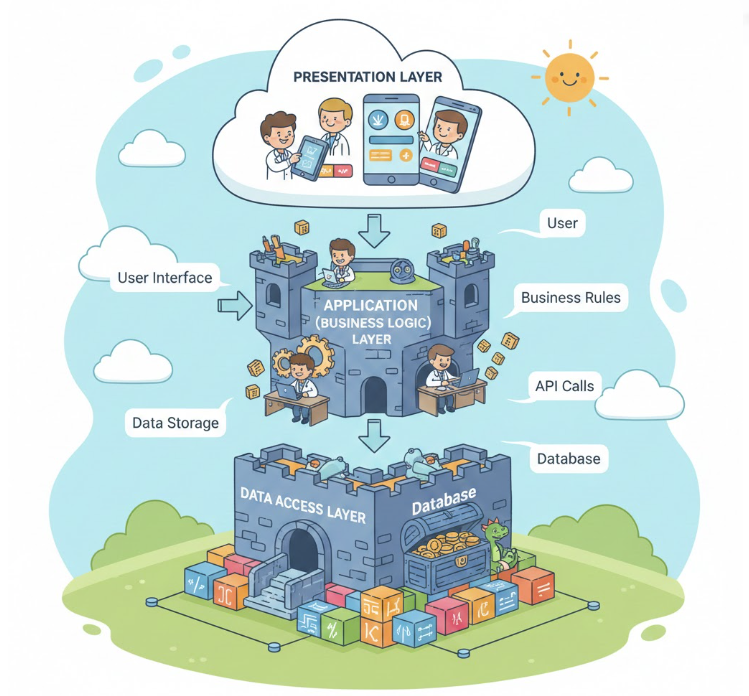
What Are Architectural Layers?
At its core, an architectural layer is a logical grouping of components that share similar responsibilities within a software system. Each layer focuses on a specific concern and communicates with other layers through well-defined interfaces.
You can think of layers as levels in a building. Each floor has a purpose, and while they work together to support the entire structure, they don’t all try to do the same job. Similarly, in software, layers allow different parts of the system to specialize instead of overlapping responsibilities.
Another useful way to think about layers is as levels of abstraction. Higher layers deal with user-facing or business-related concerns, while lower layers handle technical details such as data storage or infrastructure. By hiding complexity behind clean interfaces, layers help developers focus on one problem at a time.
For example, a typical web application might be divided into:
- A Presentation Layer for handling user interaction
- A Business Logic Layer for enforcing rules and workflows
- A Data Access Layer for working with databases or external systems
This separation ensures that a change in one area—such as replacing a database or redesigning the UI—doesn’t require rewriting the entire application.
Why Layered Architecture Matters
Layered architecture isn’t just about neat organization. It solves very real problems that teams face as software grows over time.
Without layers, applications often become tightly coupled, meaning changes in one part of the system ripple unpredictably through the rest. This makes debugging harder, testing more fragile, and onboarding new developers far more difficult.
Layers introduce boundaries. These boundaries create clarity around what belongs where and who is responsible for what. When done well, they allow teams to move faster while reducing long-term risk.
Common Layers in Software Architecture
Although the exact structure of layers can vary depending on the system, most layered architectures follow a familiar pattern. Let’s walk through the most common ones.
1. Presentation Layer (UI Layer)
Purpose: Handle user interaction
The presentation layer is the part of the system that users see and interact with directly. Its main responsibility is to display information in a clear and usable way, and to collect user input for processing.
This layer should not contain complex business rules. Instead, it focuses on layout, formatting, validation of basic input, and sending requests to the business logic layer.
Examples of presentation layer components include:
- Web pages built with HTML, CSS, and JavaScript
- React, Angular, or Vue components
- Mobile app screens in Android or iOS
- Desktop application forms
- Command-line interfaces
A well-designed presentation layer is replaceable. For instance, the same backend system could support a web app, a mobile app, and an API without changing its core logic.
2. Business Logic Layer (Domain Layer)
Purpose: Enforce business rules and system behavior
This layer is often considered the heart of the application. It defines how the system behaves and enforces the rules that govern the business domain.
The business logic layer processes requests coming from the presentation layer, applies rules, performs calculations, and determines what should happen next. It does not care how data is displayed or where it is stored—only that it follows the correct rules.
Examples include:
- Validating orders and applying discounts
- Processing payments
- Managing user permissions
- Handling workflows and state transitions
Because this layer represents the core value of the system, it should be as independent as possible from external technologies. When business logic is cleanly separated, it becomes easier to test, reuse, and evolve as requirements change.
3. Data Access Layer (Persistence Layer)
Purpose: Manage data storage and retrieval
The data access layer acts as a bridge between the business logic and the underlying data stores. Its job is to abstract away the details of how data is stored, queried, or retrieved.
Instead of letting the business layer interact directly with SQL queries or database drivers, the data access layer provides a consistent interface for saving and loading data.
Common examples include:
- Repository classes
- Data access objects (DAOs)
- ORM frameworks like Hibernate, Entity Framework, or Sequelize
- API clients for external services
This abstraction makes it easier to switch databases, refactor schemas, or introduce caching without impacting business logic.
4. Database Layer (Storage Layer)
Purpose: Store and organize data
The database layer is where data physically lives. It includes relational databases such as MySQL or PostgreSQL, NoSQL databases like MongoDB, file systems, cloud storage services, or even in-memory data stores.
While developers don’t typically write application logic directly in this layer, its design still has a huge impact on performance, scalability, and reliability.
A clean separation ensures that database concerns—indexes, schemas, replication—do not leak into higher layers of the application.
Benefits of Layered Architecture
Layered architecture offers several key advantages that explain why it remains so popular:
- Separation of concerns: Each layer has a clear responsibility, reducing mental overhead.
- Maintainability: Changes are localized, making systems easier to evolve.
- Reusability: Layers or components can often be reused across applications.
- Scalability: Individual layers can be scaled independently to meet demand.
- Testability: Clear boundaries make unit and integration testing more straightforward.
- Team collaboration: Different teams can work on different layers with minimal conflict.
Challenges and Things to Watch Out For
Despite its strengths, layered architecture is not a silver bullet.
Some common challenges include:
- Performance overhead: Excessive layering can introduce latency due to repeated transformations and calls.
- Rigidity: Strict rules can make it hard to handle cross-cutting concerns like logging or security.
- Leaky abstractions: Poorly designed layers may expose internal details, defeating the purpose.
- Overengineering: Small systems may not need many layers and can suffer from unnecessary complexity.
To address these issues, many modern systems adapt layered principles into more flexible approaches, such as modular architecture, hexagonal architecture, or clean architecture.
Architectural layers form the backbone of structured software design. They help tame complexity by breaking large systems into manageable, understandable pieces. When applied thoughtfully, layered architecture enables teams to build software that is robust, scalable, and easier to maintain over time.
Whether you’re working on a small application or a large enterprise platform, understanding how architectural layers work—and why they matter—will help you make better design decisions and write cleaner, more sustainable code.
Extra posts:
 Technical Debt and Its Solution Understanding the Architectural Impact
  Software Architecture Frameworks and Artificial Intelligence Building Smarter Systems
  Understanding Architecture Patterns A Guide for Software Architects
  Common Architectural Styles and When to Use Them
  MLOps Architectures Building Scalable AI Systems
  Patterns vs. Anti-Patterns: The Architectural Compass