
In today’s fast-paced digital landscape, applications need to be agile, responsive, and scalable. Traditional request-response architectures, where one service directly calls another, often fall short in meeting these demands. This is where event-driven architecture (EDA) shines. By focusing on events—changes in state or significant actions within a system—EDA enables applications to react in real time, leading to more resilient, loosely coupled, and scalable solutions.
When implemented in the cloud, especially on platforms like Microsoft Azure, event-based design patterns become even more powerful. Azure provides a rich set of services that make it easy to build, manage, and monitor event-driven systems, whether you are handling high-volume IoT data streams, orchestrating business workflows, or integrating multiple microservices.
In this blog, we’ll explore the core concepts of event-based architecture, the Azure services that support it, and the practical steps to implement it effectively.
Core Concepts of Event-Based Architecture
Understanding the key components of an event-driven system is critical before diving into implementation. The main concepts include events, messages, event producers and consumers, and event brokers.
Events and Messages
- Event: An event is a signal indicating that something notable has occurred in the system. For example, when a customer places an order in an e-commerce application, that action can generate an event called
OrderPlaced. - Message: While events indicate that something has happened, messages carry the actual data required to process the event. Messages can include details like order ID, customer information, and timestamps.
Event Producers and Consumers
- Event Producer: The component or service that generates an event. For instance, an e-commerce application producing an
OrderPlacedevent when a new order is created. - Event Consumer: The component that listens to or processes the event. Using the previous example, an inventory management system can consume the
OrderPlacedevent to update stock levels automatically.
Event Brokers
Event brokers act as intermediaries that route events from producers to consumers. In Azure, the primary event broker services include:
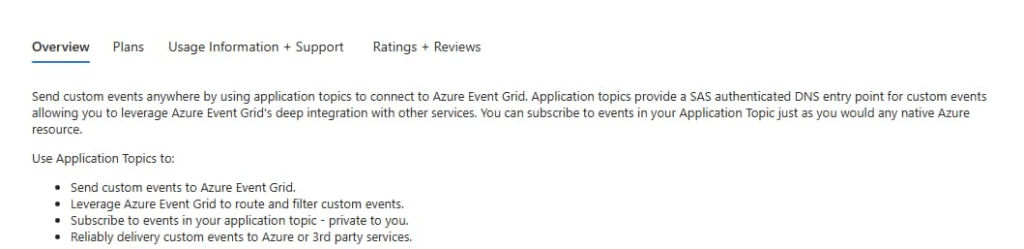
- Azure Event Grid: A fully managed event routing service that can handle millions of events per second from multiple sources. It’s ideal for reactive, serverless scenarios.
- Azure Service Bus: A reliable messaging service for complex communication patterns such as publish-subscribe or FIFO queues.
- Azure Event Hubs: A high-throughput event ingestion service designed for streaming massive amounts of data in real time, often used for analytics or telemetry processing.
Implementing Event-Based Architecture in Azure
Azure provides multiple services to implement event-driven systems, each optimized for specific use cases. Here’s a detailed look at how to leverage these services.
1. Using Azure Event Grid
Azure Event Grid enables applications to react to events in near real-time, making it a perfect fit for serverless, event-driven scenarios.
Example Scenario:
- Event Producer: Azure Blob Storage triggers an event whenever a new file is uploaded.
- Event Broker: Azure Event Grid routes this event to all subscribed consumers.
- Event Consumer: An Azure Function automatically processes the uploaded file.
Configuration Steps:
- Create an Event Grid Topic in the Azure Portal.
- Define an event subscription for the topic.
- Configure an Azure Function as the event handler to process incoming events.
- Deploy and verify the event flow using Azure Monitor to track event delivery and processing.
Event Grid simplifies event management by providing features like filtering, dead-lettering, and retry policies, making your system more robust and reliable.
2. Using Azure Service Bus
Azure Service Bus is designed for more structured messaging patterns, supporting features like publish-subscribe, FIFO queues, and transactional messaging.
Example Scenario:
- Publisher: A web application sends order messages to a queue.
- Broker: Service Bus ensures the messages are reliably delivered even if the consumer is temporarily unavailable.
- Subscriber: Azure Functions or Logic Apps consume the messages to update inventory, send notifications, or trigger further workflows.
Configuration Steps:
- Create an Azure Service Bus Namespace.
- Add a Queue or Topic depending on your messaging requirements.
- Configure message producers to send events into the queue.
- Implement message consumers using Azure Functions or Logic Apps.
- Use Service Bus Explorer and Azure Monitor to track message flow and manage queues.
Service Bus is particularly useful for mission-critical systems where guaranteed message delivery and complex workflows are essential.
3. Using Azure Event Hubs
Azure Event Hubs is optimized for high-volume event ingestion, making it ideal for IoT, telemetry, and real-time analytics.
Example Scenario:
- Event Source: IoT devices streaming sensor data from a manufacturing plant.
- Event Broker: Event Hubs ingests the data in real time.
- Consumers: Stream Analytics jobs and Azure Data Explorer analyze the data to detect anomalies or generate dashboards.
Configuration Steps:
- Create an Event Hub Namespace in the Azure Portal.
- Define an Event Hub within the namespace.
- Configure the event producer, such as IoT devices, applications, or other services, to send data.
- Set up an event consumer, for example, Azure Stream Analytics or Azure Functions, to process incoming events.
- Monitor event flow using Azure Monitor and Log Analytics to ensure smooth processing.
Event Hubs excels at handling millions of events per second, making it a go-to solution for streaming data pipelines.
Benefits of Event-Based Architecture in Azure
Implementing an event-driven design in Azure offers several significant advantages:
- Scalability: Automatically handles spikes in traffic without overloading services.
- Loose Coupling: Services are independent, reducing dependencies and simplifying maintenance.
- Resilience: Asynchronous processing improves fault tolerance, ensuring failures in one component don’t cascade.
- Flexibility: Multiple Azure services provide diverse integration patterns, from serverless workflows to real-time analytics pipelines.
By leveraging event-driven architecture in Azure, organizations can build highly responsive applications that can adapt to real-time business needs while maintaining reliability and efficiency.
Event-driven design is no longer optional; it’s becoming a standard for modern cloud-native applications. By understanding the core concepts and leveraging Azure’s robust event services—Event Grid, Service Bus, and Event Hubs—you can design systems that are scalable, flexible, and resilient, capable of reacting to events as they happen.
Extra posts:
 Service Mesh Architecture Pattern in Azure Handling Service-to-Service Communication, Security, and Observability
  Architecture vs. Design Key Differences Explained
  Common Pitfalls in Software Architecture Design
  How to Design a Future-Proof SharePoint Information Architecture
  Token-Based Authentication in Azure Using JWT for Stateless Security
  Azure Governance Tools Policies, Blueprints, and Role-Based Access Control (RBAC)