
An architect’s perspective on grounding, orchestration, and the real engine behind AI productivity
If you’ve used Microsoft 365 Copilot, you’ve probably had that moment: “How is this thing actually doing all of this?” It reads your emails, summarizes meetings, drafts documents, and somehow feels aware of your work context. But beneath the polished UX lies a system that’s far more structured—and deliberate—than a simple chatbot.
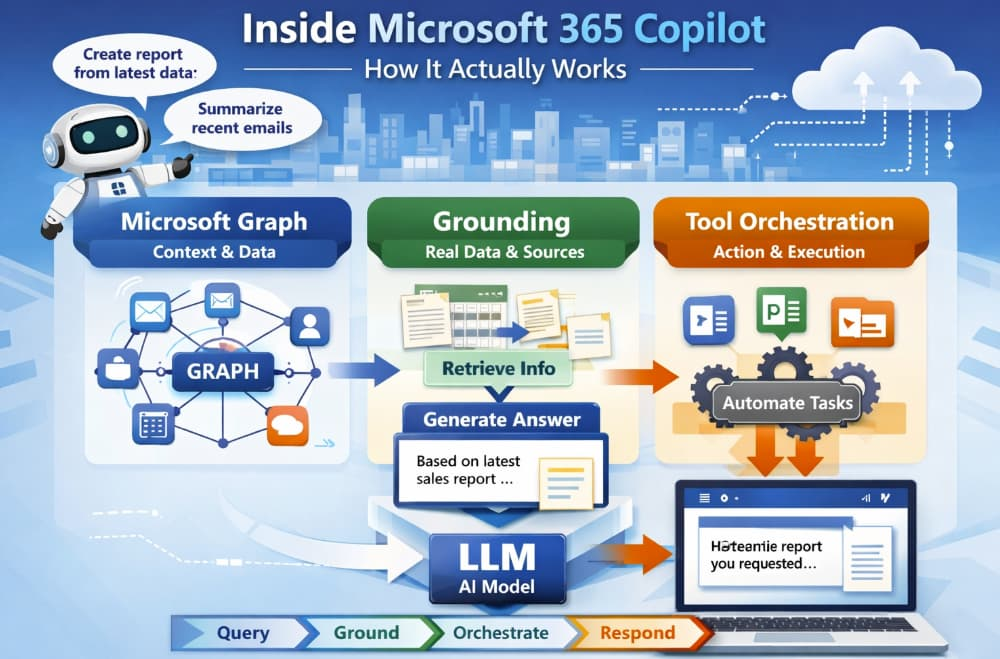
As architects, we tend to peel systems apart to understand their moving pieces. So let’s reverse-engineer what’s really happening inside Microsoft 365 Copilot and break it into three core layers:
- The Microsoft Graph (its memory and context engine)
- Grounding (how it avoids hallucinations)
- Tool orchestration (how it actually gets work done)
By the end, you’ll see that Copilot isn’t just “an LLM plugged into Office.” It’s a carefully orchestrated system that turns raw AI into something enterprise-ready.
1. The Foundation: Microsoft Graph as the Context Engine
At the heart of Copilot sits Microsoft Graph. Think of it as the system’s organizational brain.
Microsoft Graph isn’t new—it’s been around as a unified API layer connecting:
- Emails (Outlook)
- Documents (SharePoint, OneDrive)
- Meetings (Teams)
- Chats, calendars, and organizational structure
But with Copilot, Graph becomes something more: a real-time context provider.
What Graph Actually Does for Copilot
When you ask Copilot something like:
“Summarize the proposal I shared with the team last week and highlight feedback.”
The system doesn’t just guess. It queries Graph to:
- Identify the relevant document
- Pull associated conversations (Teams, email threads)
- Understand participants and timelines
- Fetch the latest version of the file
In other words, Graph transforms vague human intent into structured, retrievable enterprise data.
Why This Matters
Without Graph, the LLM would be blind. It would rely only on its training data—which is static and outdated. Graph gives Copilot:
- Fresh data
- Permission-aware access
- Organizational context
This is the first key insight: Copilot doesn’t “know” your work—it retrieves it.
2. Grounding: The Secret to Trustworthy AI
Let’s talk about the most important concept in Copilot’s architecture: grounding.
What Is Grounding?
Grounding is the process of anchoring AI responses in real, verifiable data—instead of letting the model generate answers purely from its training.
In simple terms:
- Pure LLM → “I’ll generate the most likely answer.”
- Grounded AI → “I’ll generate an answer based on actual data I just retrieved.”
How Grounding Works in Practice
Here’s a simplified pipeline:
- User prompt
“Summarize last quarter’s sales performance.” - Context retrieval (via Graph)
- Sales reports
- Excel sheets
- Meeting notes
- Prompt augmentation
The system builds a new prompt that includes:- Your original request
- Relevant extracted data
- Instructions for the model
- LLM generation
The model produces a response based on that injected context
Why Grounding Changes Everything
This approach solves one of the biggest problems with LLMs: hallucination.
Instead of guessing:
- Copilot cites real documents
- It reflects your organization’s truth
- It respects access permissions
As architects, we recognize this pattern immediately: it’s essentially retrieval-augmented generation (RAG) implemented at enterprise scale.
A Simple Analogy
Think of a pure LLM as a very smart person answering from memory.
Now imagine giving that person:
- Your company files
- Recent emails
- Meeting transcripts
…and asking them to answer using only those sources.
That’s grounding.
3. Tool Orchestration: Where Copilot Becomes an Operator
This is where things get really interesting.
Copilot doesn’t just generate text—it actually uses tools.
What Does “Orchestration” Mean?
Orchestration is the system’s ability to:
- Decide what tools are needed
- Execute actions across applications
- Combine results into a coherent response
Instead of being a passive assistant, Copilot becomes an active workflow engine.
Examples of Tool Use
When you ask:
“Create a presentation based on this document and include recent sales data.”
Copilot might:
- Extract content from Word
- Pull data from Excel
- Generate slides in PowerPoint
- Format everything according to best practices
Each of these steps involves different services—and Copilot coordinates them.
Behind the Scenes
Architecturally, this looks like:
- Planner: Breaks down the task
- Tool selector: Chooses which APIs/services to call
- Execution layer: Runs those operations
- LLM layer: Generates natural language output
This is often referred to as an agentic system—where the AI doesn’t just respond, but acts.
4. Putting It All Together: The Copilot Pipeline
Let’s zoom out and connect the dots.
When you interact with Copilot, here’s what actually happens:
- Intent Understanding
Your prompt is parsed and interpreted - Graph Querying
Relevant enterprise data is retrieved - Grounding Layer
Context is injected into the prompt - LLM Processing
The model generates a response based on that context - Tool Orchestration (if needed)
Actions are executed across Microsoft 365 apps - Response Delivery
You receive a polished, contextual answer
This layered architecture is what makes Copilot feel “smart”—but in reality, it’s structured intelligence, not magic.
5. Grounding vs. Pure LLM: A Clear Comparison
Let’s make this distinction crystal clear.
Pure LLM Systems
- Trained on public data
- Static knowledge
- Prone to hallucinations
- No awareness of your organization
Grounded Systems (like Copilot)
- Pull real-time enterprise data
- Respect permissions and security
- Provide context-aware responses
- Enable actionable workflows
The difference is not incremental—it’s foundational.
If pure LLMs are “smart text generators,” grounded systems are context-aware digital collaborators.
6. Why This Architecture Is So Powerful
From an architectural standpoint, Microsoft 365 Copilot succeeds because it separates concerns:
- LLM = reasoning and language
- Graph = context and data
- Orchestration = action and execution
This modular design allows:
- Scalability across apps
- Enterprise-grade security
- Continuous improvement without retraining the model
It’s a textbook example of how to productionize AI in complex environments.
7. Final Thoughts: It’s Not Just AI—It’s System Design
What makes Microsoft 365 Copilot impressive isn’t just the model—it’s the system around it.
The real innovation lies in:
- Grounding AI in real data
- Integrating deeply with workflows
- Turning passive intelligence into active assistance
As architects, this is the key takeaway:
The future of AI isn’t bigger models—it’s better systems.
And Copilot is one of the clearest blueprints we have today.
Extra posts:
 Comparing Copilot in Microsoft 365 vs. GitHub Copilot: Key Differences
  Best Prompts to Use with Microsoft 365 Copilot for Maximum Efficiency
  GPT‑5 Finally Arrives in Microsoft 365 Copilot
  Managing Access and Permissions for Copilot in Microsoft 365
  Writing Effective Prompts for Microsoft 365 Copilot
  How Microsoft 365 Copilot Is Changing Project Management in Teams