
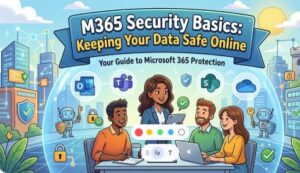
In today’s digital-first world, data is one of the most valuable assets a business or individual can have. Whether it’s emails, documents, spreadsheets, or sensitive customer information, protecting that data is critical. With Microsoft 365 (M365) being one of the most widely used productivity platforms globally, understanding its security basics is no longer optional it’s essential.
The good news? Microsoft 365 comes with powerful built-in security features. The challenge is knowing how to use them effectively.
Let’s break down the fundamentals of M365 security and how you can keep your data safe online without needing to be a cybersecurity expert.
Why M365 Security Matters
Cyber threats are constantly evolving. Phishing attacks, ransomware, and data breaches are no longer rare events they’re everyday risks. Since M365 is cloud-based and accessible from anywhere, it becomes a prime target for attackers.
However, this accessibility is also its strength. With the right configurations, M365 can be more secure than traditional on-premise systems. The key lies in understanding and applying basic security practices.
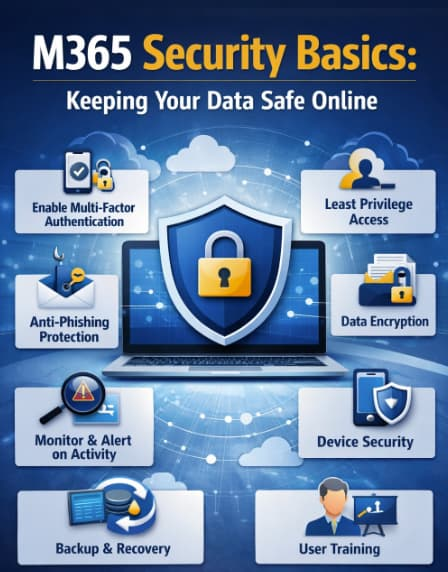
1. Strong Authentication: Your First Line of Defense
The simplest way attackers gain access to accounts is through weak or stolen passwords. That’s why strong authentication is the foundation of M365 security.
Best practices include:
- Using complex, unique passwords
- Avoiding password reuse across platforms
- Enabling Multi-Factor Authentication (MFA)
MFA adds an extra layer of protection by requiring a second form of verification, such as a mobile app notification or a one-time code. Even if a password is compromised, MFA can stop unauthorized access.
2. Manage Access with Least Privilege
Not every user needs access to everything. One of the most effective ways to reduce risk is by applying the principle of least privilege.
This means:
- Users only get access to what they need
- Admin roles are limited to a few trusted individuals
- Permissions are reviewed regularly
By minimizing access, you reduce the chances of accidental data leaks or malicious misuse.
3. Protect Against Phishing and Malware
Email remains one of the most common entry points for cyberattacks. M365 includes built-in protection through tools like Microsoft Defender for Office 365.
To enhance protection:
- Enable anti-phishing policies
- Use Safe Links and Safe Attachments
- Train users to recognize suspicious emails
Technology helps, but user awareness is equally important. A well-trained team can spot threats before they cause damage.
4. Secure Your Data with Encryption
Data encryption ensures that even if data is intercepted, it cannot be read without proper authorization.
M365 provides:
- Encryption for emails
- Data protection policies
- Sensitivity labels for classifying information
For example, you can label documents as “Confidential” and restrict sharing or downloading. This adds an extra layer of control over how data is handled.
5. Monitor Activity and Respond Quickly
You can’t protect what you can’t see. Monitoring user activity and system logs helps detect unusual behavior early.
Key actions:
- Enable audit logging
- Set up alerts for suspicious activity
- Regularly review reports
If an account suddenly logs in from a different country or downloads large amounts of data, that’s a red flag worth investigating.
6. Keep Devices Secure
M365 is often accessed from multiple devices laptops, phones, tablets. Each device is a potential entry point.
To secure endpoints:
- Use device management tools like Intune
- Enforce device compliance policies
- Require PINs or biometric authentication
Lost or stolen devices should be remotely wiped to prevent unauthorized access.
7. Backup and Recovery Planning
Even with strong security, incidents can happen. That’s why backup and recovery planning is critical.
While M365 offers data redundancy, you should:
- Understand retention policies
- Use additional backup solutions if needed
- Test recovery processes regularly
Being prepared ensures business continuity even in worst-case scenarios.
8. Stay Updated and Educated
Security is not a one-time setup it’s an ongoing process. Microsoft frequently updates M365 with new features and security improvements.
To stay ahead:
- Keep up with updates and best practices
- Conduct regular security assessments
- Provide ongoing training for users
A culture of security awareness can make a significant difference.
M365 offers a robust security framework, but it’s only as effective as how you use it. By focusing on basic principles strong authentication, controlled access, user awareness, and continuous monitoring you can significantly reduce your risk.
You don’t need to implement everything at once. Start with the essentials, build gradually, and make security a part of your daily operations.
In a world where data breaches can cost millions and damage reputations, taking proactive steps today can save you from major problems tomorrow.
Keeping your data safe online isn’t just about technology it’s about mindset, habits, and consistency.
Extra posts:
 How Microsoft Keeps Your Data Safe in the Cloud – A Deep Dive into Cloud Security Practices
  Exchange Online Basics – How Email Works in Microsoft 365
  Azure Security Basics Network Security Groups, Firewalls, and Defender for Cloud
  How to Integrate M365 with Third-Party SaaS Tools (Slack, Trello, Google Services) Without Breaking Security
  Microsoft Purview Data Security Posture Management (DSPM) for AI
  Enhancing Data Security with Microsoft Purview Insider Risk Management