
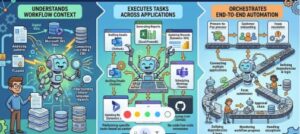
In today’s enterprise landscape, automation is no longer just a competitive advantage it’s a necessity. However, traditional automation approaches like RPA (Robotic Process Automation) and custom scripting often require significant development effort, rigid rule definitions, and ongoing maintenance.
Enter Microsoft Copilot a generative AI-powered assistant that transforms enterprise workflow automation by combining natural language processing, contextual understanding, and deep integration with business systems.
This article goes beyond surface-level benefits and explores the technical architecture, real-world scenarios, and implementation strategies that make Copilot a powerful automation engine.
Understanding the Technical Foundation of Microsoft Copilot
Microsoft Copilot is not a standalone tool it is an orchestration layer built on top of several enterprise-grade technologies:
1. Large Language Models (LLMs)
Copilot uses advanced models (like GPT-based systems) to:
- Interpret natural language prompts
- Generate responses and content
- Understand business context
2. Microsoft Graph Integration
At its core, Copilot connects to Microsoft Graph, which provides access to:
- Emails (Outlook)
- Documents (SharePoint, OneDrive)
- Meetings (Teams)
- Calendar data
This allows Copilot to work with real organizational data, not just generic inputs.
3. Semantic Indexing & Contextual Retrieval
Copilot uses semantic search to:
- Retrieve relevant documents
- Understand relationships between data
- Maintain context across workflows
4. Copilot Studio + Power Platform
Using Microsoft Copilot Studio and Microsoft Power Automate, enterprises can:
- Build custom copilots
- Design automated workflows
- Integrate APIs and third-party services
How Copilot Automates Enterprise Workflows (Technical Breakdown)
1. Event-Driven Automation with AI Decisioning
Traditional automation:
- Trigger → predefined action
Copilot-driven automation:
- Trigger → AI interprets context → dynamic action
Example Architecture:
- Trigger: Email received in Outlook
- Copilot:
- Classifies email intent using NLP
- Extracts entities (client name, urgency, request type)
- Action:
- Creates task in Planner
- Drafts response
- Assigns to relevant department
2. Natural Language to Workflow Execution
Copilot allows users to define workflows using plain English instead of code.
Example Prompt:
“When a high-value customer submits a complaint, escalate it and notify the sales manager.”
Behind the Scenes:
- Intent parsed using LLM
- Workflow created in Power Automate
- Conditions mapped dynamically
- Actions connected via APIs
Real Enterprise Scenarios (With Technical Detail)
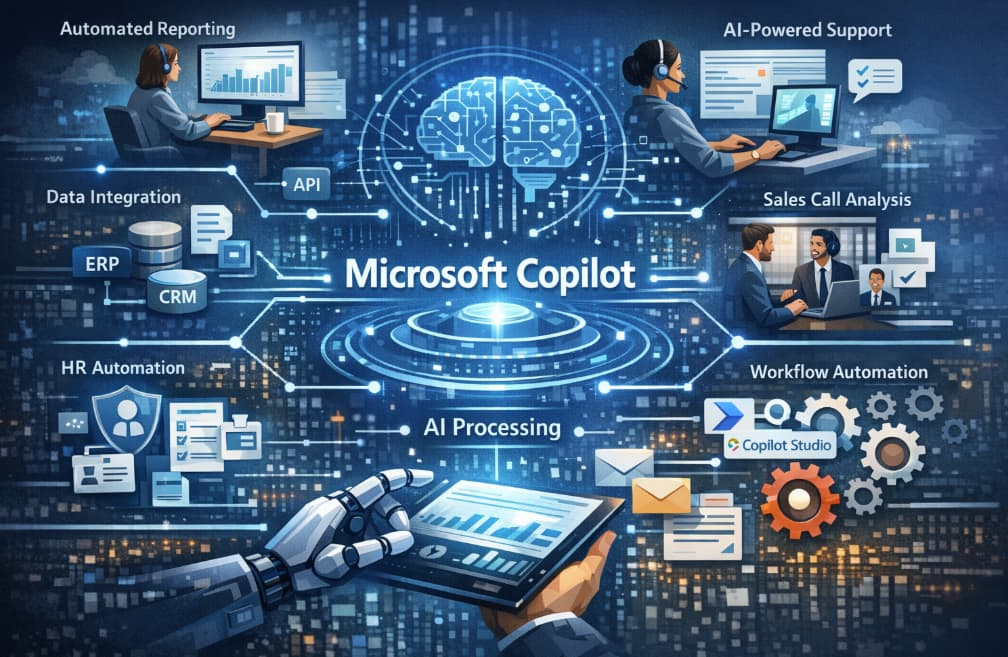
Scenario 1: Automated Financial Reporting
Problem:
Finance teams spend days compiling reports from multiple systems.
Solution with Copilot:
Workflow:
- Copilot pulls data from ERP (via API integration)
- Uses Excel Copilot to:
- Aggregate data
- Apply formulas dynamically
- Generates summary using LLM
- Exports report to PowerPoint
Technical Flow:
- Data Source → API → Power Query
- Copilot → semantic analysis
- Output → structured + narrative report
Result:
- 80% reduction in reporting time
- Real-time insights instead of static reports
Scenario 2: Customer Support Automation
Problem:
Support agents handle repetitive queries manually.
Copilot Implementation:
Workflow:
- Customer submits ticket
- Copilot:
- Classifies issue using NLP
- Searches knowledge base
- Suggests resolution
- If confidence > threshold:
- Auto-generates response
- Sends to customer
- Else:
- Escalates to human agent
Technical Components:
- Azure Cognitive Services (NLP)
- Knowledge base embedding
- Confidence scoring model
Result:
- Faster response times
- Reduced agent workload
Scenario 3: Sales Pipeline Automation
Problem:
Sales teams manually update CRM and follow up with leads.
Copilot in Microsoft Dynamics 365:
Workflow:
- Sales call recorded in Teams
- Copilot:
- Transcribes conversation
- Extracts key insights
- Updates CRM fields
- Automatically:
- Creates follow-up email
- Schedules next meeting
Technical Flow:
- Speech-to-text → NLP → entity extraction
- CRM API update
- Email generation
Result:
- Increased sales efficiency
- Improved data accuracy
Scenario 4: HR Onboarding Automation
Problem:
HR teams manually manage onboarding workflows.
Copilot Workflow:
- New employee added to system
- Copilot triggers:
- Document generation (contracts)
- Task assignments
- IT provisioning requests
- Sends personalized onboarding email
Technical Stack:
- Power Automate triggers
- Document templates + LLM generation
- Identity system integration
Result:
- Fully automated onboarding pipeline
- Consistent employee experience
Scenario 5: Intelligent Meeting Automation
Problem:
Meetings generate insights, but follow-ups are manual.
Copilot in Teams:
Workflow:
- Records meeting
- Transcribes content
- Identifies:
- Decisions
- Action items
- Owners
- Automatically:
- Updates task systems
- Sends summary email
Result:
- No missed tasks
- Improved accountability
Advanced Capabilities
1. AI Agents (Autonomous Workflows)
With Copilot Studio, organizations can build AI agents that:
- Monitor systems continuously
- Take proactive actions
- Learn from outcomes
Example:
- Detect supply chain delays
- Automatically notify vendors
- Suggest alternative suppliers
2. Multi-System Integration
Copilot integrates with:
- SAP
- Salesforce
- Custom APIs
Using:
- REST APIs
- Connectors
- Azure Logic Apps
3. Security & Compliance
Enterprise-grade security includes:
- Role-based access control
- Data encryption
- Compliance with regulations (GDPR, etc.)
Copilot respects organizational permissions via Microsoft Graph.
Benefits with Technical Perspective
1. Reduced Development Overhead
- No need for complex scripts
- Low-code/no-code automation
2. Context-Aware Automation
- Unlike RPA, Copilot understands meaning
- Handles unstructured data
3. Real-Time Processing
- Live data integration
- Instant decision-making
4. Continuous Learning
- Improves based on user interactions
- Adaptive workflows
Implementation Best Practices
1. Start with High-Impact Workflows
Focus on:
- Repetitive tasks
- Data-heavy processes
2. Use Hybrid Automation
Combine:
- Rule-based automation
- AI-driven decisioning
3. Train Users
- Prompt engineering basics
- Workflow validation
4. Monitor and Optimize
- Track automation performance
- Adjust AI thresholds
The Future of Enterprise Automation with Copilot
We are moving toward autonomous enterprises, where:
- AI agents handle operations
- Humans focus on strategy
- Workflows are self-optimizing
Microsoft Copilot is a major step in that direction bridging the gap between human intent and machine execution.
Microsoft Copilot is not just a productivity tool it is a workflow automation engine powered by AI. By combining LLMs, enterprise data access, and low-code platforms, it enables organizations to automate complex processes with unprecedented ease.
From finance and HR to sales and customer support, Copilot delivers measurable efficiency gains while reducing technical barriers.
Enterprises that leverage Copilot effectively will not only save time but redefine how work gets done.
Extra posts:
 Security and Compliance Considerations When Using Copilot in Enterprise Environments
  How to Use Copilot in Microsoft Edge for Web Based Workflows
  Exploring the Copilot Prompt Gallery A Game-Changer for AI-Assisted Workflows
  Building an Enterprise ServiceNow AI Copilot Agent with Microsoft Copilot Studio: A Complete Guide to IT Operations Automation, Ticket Auditing, and Engineer Performance Intelligence
  Microsoft Copilot and the AI-First Enterprise A Strategic Perspective
  Automating Technical Proposal Drafts Using Copilot: The Future of Smarter Proposal Writing