Microsoft is giving organizations more control over how Microsoft 365 Copilot creates PowerPoint presentations with two new Brand Kit template settings: Strict Brand Adherence and Allow Note Instructions.
The new capabilities are designed for organizations that want AI-generated presentations to stay closely aligned with approved brand templates, layouts, messaging, and presentation standards. Instead of relying entirely on users to provide detailed instructions in every Copilot prompt, Brand Managers can now build some of that guidance directly into PowerPoint templates.
The features are available now and can be used independently or together.
For companies already using Copilot to create presentations, the change could make AI-generated slides more predictable and reduce the amount of manual formatting and brand correction required after a presentation is generated.
What Is Changing in Microsoft 365 Copilot for PowerPoint?
Copilot in PowerPoint can help users create presentations from prompts and existing content. However, organizations with strict brand guidelines can face a familiar challenge: AI-generated content may need additional editing to bring it back in line with approved layouts and presentation standards.
Microsoft’s new Brand Kit settings are intended to address that challenge.
The two settings are:
- Strict Brand Adherence (Strict Mode)
- Allow Note Instructions (Notes Steering)
They address different parts of the presentation-generation process.
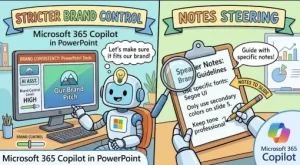
Strict Mode focuses primarily on which layouts and slide structures Copilot can use, while Notes Steering allows organizations to provide instructions inside template speaker notes that influence how Copilot generates content.
Used together, the settings give Brand Managers more control over both the visual structure and content-generation guidance behind AI-created presentations.
Strict Brand Adherence Keeps Copilot Within Approved Layouts
One of the most important additions is Strict Brand Adherence, also referred to as Strict Mode.
When Strict Mode is enabled, Brand Managers can require Copilot to use only the approved layouts and slide master layouts included in an organization’s template.
That means Copilot cannot freely create new layouts to accommodate the content it is generating.
Under this approach, Copilot follows the existing template more closely. It does not add or remove placeholders or create new layouts outside the approved presentation structure.
For organizations with detailed corporate presentation standards, this can be particularly useful.
A company’s PowerPoint template might contain carefully designed layouts for executive summaries, financial information, product announcements, customer presentations, section dividers, or other recurring content. Allowing an AI system to create a different layout could undermine those standards even if the resulting slide looks visually acceptable.
Strict Mode provides a mechanism for organizations to keep Copilot within those predefined boundaries.
Why Strict Mode Matters for Brand Teams
Brand consistency can be difficult to maintain when hundreds or thousands of employees create presentations.
Even when an organization provides an official template, users may accidentally modify layouts, change spacing, use alternative designs, or introduce elements that are not part of the company’s approved visual identity.
AI-generated presentations add another variable because the system has to determine how requested information should be presented.
With Strict Brand Adherence enabled, the organization can establish clearer boundaries around that process.
Instead of allowing Copilot to generate a new slide structure when existing layouts do not appear to fit, the system is instructed to work within the approved template and slide master layouts.
That can help reduce the number of presentation changes required before a deck is ready for internal or external use.
Notes Steering Brings Instructions Directly Into Templates
The second feature, Allow Note Instructions, takes a different approach.
Notes Steering allows Brand Managers to add instructions to speaker notes within a template. Those instructions can then guide Copilot when it generates presentations using that template.
This is significant because the guidance becomes reusable.
Without template-based instructions, users may need to repeat requirements in their prompts. For example, an employee might tell Copilot to preserve a particular slide, maintain a specific sequence, avoid excessive text, or include certain information.
With Notes Steering, Brand Managers can put those instructions directly into the template’s speaker notes.
The goal is to make those requirements part of the template itself rather than something employees have to remember every time they ask Copilot to create a presentation.
What Can Organizations Tell Copilot?
Microsoft describes several potential uses for Notes Steering.
Organizations can provide instructions that tell Copilot to:
- Always include a specific slide
- Preserve branded content
- Maintain a particular slide order
- Control the amount of text on slides
- Tailor presentation content for a particular audience
- Follow specific content-generation requirements
This gives Brand Managers another way to translate presentation guidelines into reusable instructions.
For example, an organization could have a branded customer presentation template with guidance telling Copilot to preserve specific approved messaging and maintain a particular sequence of slides.
Another template could be designed for executive presentations, with instructions around concise content and text density.
The important point is that the guidance can live alongside the template rather than being recreated by individual users.
Strict Mode and Notes Steering Can Work Together
The two settings are independent, meaning organizations can use either one without necessarily enabling the other.
However, Microsoft says they can also be used together.
This combination is where the capabilities become especially interesting for organizations with strict presentation requirements.
Strict Mode controls the presentation structure by restricting Copilot to approved layouts and slide masters.
Notes Steering provides reusable instructions for how Copilot should approach the content.
Together, they can provide a more controlled framework for AI-assisted PowerPoint creation.
Consider a company preparing customer-facing presentations.
The Brand Manager could configure a template with approved layouts and enable Strict Mode. The same template could include speaker-note instructions explaining which branded elements should remain intact, what order certain slides should follow, and how much text should appear on each slide.
When employees use Copilot with that template, the AI has both structural and instructional boundaries to follow.
That does not eliminate the need for human review, but it can reduce the number of corrections required afterward.
Who Can Configure These Settings?
The new capabilities are primarily aimed at Brand Managers and Brand Kit owners, rather than ordinary PowerPoint users.
Organizations that want to use these controls should designate appropriate Brand Managers and make sure they have the permissions required to manage Brand Kits.
Only Brand Kit owners and Brand Managers can configure template settings such as Strict Brand Adherence and Allow Note Instructions.
This distinction is important because the features are essentially administrative controls over how branded templates behave when used with Copilot.
Employees using the resulting templates do not need to perform additional setup simply to benefit from the configuration.
No Action Is Required for Users
Microsoft says no action is required to use these capabilities.
That means organizations do not need to ask individual employees to change PowerPoint settings before using templates configured with the new controls.
The main action is on the administrative and brand-management side.
Organizations that want tighter control can update existing Brand Kit templates or upload new templates configured with Strict Mode, Notes Steering, or both.
Once the templates are configured, users can continue working with PowerPoint and Copilot without needing to manually repeat the underlying brand instructions.
Why This Could Matter for Enterprise Presentations
The value of these features extends beyond aesthetics.
For many organizations, presentations are part of formal business communication. A deck might be shown to customers, executives, partners, regulators, investors, or other important audiences.
In those situations, inconsistent layouts or unintended changes to branded content can create additional review work.
The new controls are intended to make AI-generated presentations more predictable.
That can be particularly relevant for:
Customer-facing presentations: Sales and account teams can work from approved templates while reducing unnecessary layout variations.
Executive presentations: Leadership decks can follow predefined structures and content guidance.
Regulated environments: Organizations with formal communication requirements can place additional controls around presentation generation.
Large enterprises: Brand teams can distribute reusable presentation guidance without relying entirely on employees remembering every rule.
High-volume content creation: Teams producing many presentations may spend less time correcting recurring formatting and structural issues.
A Shift Toward More Governed AI Content Creation
The broader significance of the update is that Microsoft is giving organizations more ways to put governance into the templates themselves.
Generative AI is often flexible by design. That flexibility is useful when users want creative or open-ended results, but it can become a challenge when an organization needs consistency.
Brand Kit controls provide a middle ground.
Instead of preventing users from using Copilot, organizations can establish boundaries around how Copilot works with approved presentation assets.
Strict Mode addresses the visual and structural side of the equation, while Notes Steering provides a way to communicate reusable content-generation instructions.
This approach could become increasingly important as businesses move from experimenting with generative AI to using it for routine, customer-facing work.
What Organizations Should Do Next
Although Microsoft does not require organizations to take action, companies that want tighter control over Copilot-generated presentations may want to review their existing Brand Kit setup.
Brand and Microsoft 365 administrators can consider:
- Reviewing existing PowerPoint templates to identify which ones should have stricter controls.
- Designating Brand Managers who can manage Brand Kits and template settings.
- Identifying recurring presentation requirements that could be placed into speaker-note instructions.
- Enabling Strict Brand Adherence for templates where deviations from approved layouts are undesirable.
- Using Notes Steering to capture reusable guidance around slide order, messaging, content density, and audience requirements.
- Testing both settings together before rolling configured templates out broadly.
The goal is not simply to make presentations look more consistent. It is to make the process of generating presentations with AI more predictable.
Microsoft 365 Copilot PowerPoint Update: The Bottom Line
The introduction of Strict Brand Adherence and Notes Steering gives organizations additional control over AI-assisted PowerPoint creation.
Strict Mode helps ensure Copilot stays within approved template layouts and slide masters, while Notes Steering allows Brand Managers to embed reusable instructions in template speaker notes.
For users, there is no special action required. The configuration happens at the Brand Kit and template level.
For Brand Managers, however, the update provides a new opportunity to turn corporate presentation standards into reusable guidance that can work alongside Copilot.
As organizations increasingly use AI to create business presentations, the ability to combine generative assistance with brand governance could become an important part of maintaining consistency at scale.
With both capabilities now available, organizations can begin updating their Brand Kit templates and determine where stricter presentation controls make sense.