
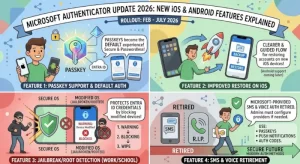
Microsoft is rolling out usability improvements to Microsoft Authenticator for iOS and Android beginning in October 2026, bringing a refreshed home screen, clearer account recovery guidance, and changes designed to make authentication more reliable. The updates will reach users in stages through November 2026, with selected Android improvements scheduled for January 2027.
The changes are intended to help users manage their accounts more easily, understand when account restoration is required, and maintain access to work or school authentication services. Microsoft says organizations do not need to make configuration changes to accommodate the rollout, although IT teams should prepare support staff and update existing user documentation.
What Is Changing in Microsoft Authenticator?
Microsoft Authenticator is widely used to verify sign-ins, approve authentication requests, and support passwordless access to accounts. For organizations that rely on Microsoft authentication services, the app is an important part of everyday access to workplace applications and resources.
The upcoming update focuses primarily on usability rather than introducing a completely new authentication system. Microsoft is refining the app’s home experience, improving account restoration guidance, and adding prompts intended to help users avoid common issues.
The main changes include:
- A refreshed home screen: Account viewing and management will receive a redesigned experience.
- Clearer account restoration notifications: Users will see a banner when accounts require restoration.
- Improved setup guidance: First-time restoration screens will explain more clearly which accounts need attention.
- Better restoration for push notifications and passwordless sign-in: The updated process will arrive on iOS first, followed by Android in January 2027.
- An optional app rating prompt on iOS: Users may be invited to rate Authenticator during sign-in.
- A battery optimization prompt on Android: Users may be encouraged to exclude Authenticator from battery optimization to help maintain reliable notifications.
Although these changes may appear modest individually, they address several points where unclear instructions or device settings can complicate the authentication experience.
Microsoft Authenticator Update 2026: Rollout Schedule
Microsoft plans to distribute the improvements across its supported environments, including Worldwide, Government Community Cloud (GCC), GCC High, and Department of Defense (DoD).
The general availability rollout begins in October 2026 and is expected to finish in November 2026. Not every feature will arrive on every platform at the same time.
| Update | iOS | Android |
|---|---|---|
| Refreshed home experience | Beginning October 2026 | November 2026 |
| Account restoration notifications | Included in the rollout | Included in the rollout |
| Improved first-run restoration guidance | Included in the rollout | Included in the rollout |
| App rating prompt during sign-in | May appear | Not specified |
| Improved push notification and passwordless restoration | First | Planned for January 2027 |
| Battery optimization prompt | Not applicable | Included in the update |
Organizations should note that these dates describe the planned rollout, not a guarantee that every user will receive every feature on the same day. Availability can vary by platform and rollout stage.
For administrators managing a mixed-device workforce, the staggered release also means that iPhone and Android users may temporarily see different versions of the Authenticator experience.
A Refreshed Home Screen Makes Account Management Easier
One of the central changes is an updated Authenticator home page designed to improve how users view and manage their accounts.
For employees who use multiple work, school, or personal accounts, a clear home screen can make it easier to understand the accounts available in the app. The redesign is part of Microsoft’s broader effort to make routine authentication tasks more straightforward.
The updated home experience will arrive on iOS as part of the initial rollout, while Android users are scheduled to receive it in November 2026.
For IT support teams, the interface change has a practical implication: existing training materials may no longer accurately reflect what users see on their devices.
Organizations should review screenshots in help desk articles, onboarding documents, and internal knowledge bases before the rollout reaches their workforce.
Clearer Account Restoration Guidance Addresses a Common Source of Confusion
Account restoration is another major focus of the update.
When an Authenticator account has not been restored, users will see a banner indicating that the account requires attention. Microsoft is also improving the first-run restoration experience so that users receive clearer information about which accounts need to be restored during setup.
These changes could help reduce uncertainty when users configure Authenticator on a new device or return to the app after a restoration process.
Without clear guidance, users may not immediately understand why an account appears to be missing or why additional setup is necessary. More visible notifications and better first-run instructions can make it easier to identify the next step.
The distinction matters in workplace environments, where users may depend on Authenticator to access email, collaboration platforms, and other protected services.
However, improved guidance should not be confused with a guarantee that every restoration issue will resolve automatically. Users may still need to complete the required restoration steps, and some account access issues may require assistance from their organization’s IT team.
Improved Push Notification and Passwordless Sign-In Restoration
Microsoft is also improving the restoration flow for users who rely on push notifications and passwordless sign-in.
These capabilities allow users to authenticate without repeatedly entering a password, depending on the account and sign-in method. When restoration is incomplete, the ability to use those authentication methods may be affected.
The updated restoration experience will be available on iOS first, with Android availability planned for January 2027.
For organizations encouraging passwordless authentication, this timing is worth monitoring. The restoration process is an important part of maintaining access when employees replace devices, reinstall applications, or otherwise need to set up Authenticator again.
IT teams should ensure that existing recovery instructions remain available throughout the transition. They should also avoid promising users that the updated experience will eliminate every authentication or recovery problem.
Android Users May See a Battery Optimization Prompt
Android users will receive a platform-specific prompt related to battery optimization.
After successfully completing an interactive authentication, users may be asked to exclude Microsoft Authenticator from Android’s battery optimization settings. The prompt is designed to help the app continue delivering work or school notifications reliably.
Battery optimization can limit background activity for applications, depending on the device and its configuration. For an authentication app that users rely on for timely approval requests, background restrictions can become a practical usability concern.
Microsoft’s planned prompt is non-blocking, meaning it will not prevent users from completing authentication if they choose not to act on it.
This is an important distinction for organizations: the prompt is intended to guide users toward a potentially helpful setting rather than impose an additional mandatory authentication step.
Support teams should be prepared to explain why the prompt appears and how users can review the relevant device settings. Since Android manufacturers can customize their settings menus, the exact steps may differ between devices.
iOS Users May Be Asked to Rate the App
The iOS version will also introduce an optional app rating prompt during the sign-in experience.
Users may receive an opportunity to rate Microsoft Authenticator and provide feedback about the application. The source announcement does not specify how frequently the prompt will appear or whether it will be shown to every user.
For organizations, this is a relatively minor change compared with account restoration and notification reliability. Nevertheless, help desk staff should recognize that a rating prompt may appear during a sign-in-related interaction so they can distinguish it from an unexpected authentication request.
Users should continue to evaluate authentication requests carefully and follow their organization’s established security guidance.
What Organizations Need to Do Before the Rollout
Microsoft states that no configuration action is required for this update. Administrators do not need to plan a mandatory tenant reconfiguration solely to accommodate the announced usability improvements.
That does not mean organizations should ignore the release. A small amount of preparation can help prevent avoidable support questions as the updated interfaces reach users.
Recommended steps include:
- Brief the help desk: Explain the new home screen, account restoration banners, and platform-specific prompts.
- Update internal documentation: Replace outdated screenshots and revise setup instructions where the interface or restoration flow changes.
- Prepare Android guidance: Give support teams a clear explanation of the battery optimization prompt and device-specific settings.
- Review account recovery instructions: Ensure employees know what to do if an account requires restoration.
- Monitor rollout-related support requests: Track recurring questions and update internal guidance when necessary.
Security operations teams should also understand the difference between these usability changes and any separate security policy or authentication configuration changes their organization may implement.
The announcement identifies no additional compliance considerations associated with the update. Organizations should continue to follow their existing security, identity management, and account recovery policies.
What the Update Means for Businesses and Everyday Users
The most immediate benefit is likely to be a clearer experience when managing accounts and restoring access. More visible notifications can help users recognize that an account needs attention, while improved first-run guidance may reduce confusion during setup.
The Android battery optimization prompt addresses a different issue: helping users maintain the background behavior needed for reliable authentication notifications.
For businesses, the broader value lies in making a frequently used security application easier to navigate without requiring a separate configuration project. Still, the impact will depend on how users encounter the new screens and whether the revised instructions address their actual problems.
The staggered rollout also creates a temporary support challenge. Organizations with both iOS and Android users may need to maintain slightly different instructions until the relevant improvements reach both platforms.
What Happens Next?
The next milestones are the general availability rollout beginning in October 2026, the expected completion of the initial rollout in November, and the planned arrival of improved push notification and passwordless restoration on Android in January 2027.
Organizations should watch for the updated experience on their users’ devices rather than assume that every feature will appear simultaneously. Reviewing internal documentation and preparing support teams now should make the transition easier.
For users, the key takeaway is straightforward: Microsoft Authenticator is receiving usability improvements intended to make account management, restoration, and notification reliability easier to understand. No organization-side configuration changes are specified, but users may encounter new screens and prompts as the updates become available.
The longer-term test will be whether these changes reduce confusion during device transitions and help users maintain dependable access to protected accounts. Until the rollout is complete, clear recovery instructions and responsive IT support will remain essential parts of that experience.
Extra posts:
 Microsoft Teams Mobile Calendar to Require Latest App Update by October 2026: Microsoft Announces Critical Change for iOS and Android Users
  Microsoft Outlook for Android and iOS Restores Send Availability Feature Worldwide
  Microsoft Defender for Endpoint Android Update Required: What Organizations Need to Know Before September 2026
  Microsoft Teams Events Licensing Update 2026: Teams Enterprise, Premium and Attendee Limits Explained
  Microsoft Stream mobile app is now available for Android & iOS
  Microsoft Teams Channel Meetings Update: New Calendar, Outlook, and Delegate Scheduling Features