
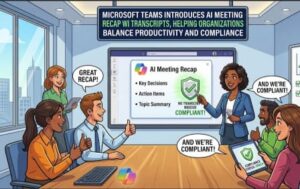
Microsoft is taking another major step in the evolution of AI-powered workplace collaboration by introducing a new Microsoft Teams capability that allows organizations to generate AI meeting recaps without saving meeting transcripts or recordings. The update is designed specifically for businesses operating under strict compliance, privacy, and data retention requirements, enabling them to leverage the power of Microsoft 365 Copilot while minimizing stored meeting data.
The feature, announced as part of the Microsoft 365 roadmap (Roadmap ID: 558286), gives organizations greater flexibility in adopting generative AI without compromising internal governance policies. Originally expected to arrive in August 2026, Microsoft has revised the rollout schedule, with Targeted Release beginning in early October 2026 and worldwide General Availability expected by late October 2026.
A New Approach to AI-Powered Meeting Intelligence
Artificial intelligence has become an essential productivity tool in modern workplaces, helping employees summarize meetings, capture action items, and identify key discussion points. However, many organizations—particularly those operating in finance, healthcare, government, legal services, and other regulated industries—have been hesitant to fully embrace AI-powered meeting recaps because of concerns surrounding transcript storage and long-term retention of sensitive conversations.
Microsoft’s latest enhancement directly addresses those concerns.
Instead of relying on a saved transcript or meeting recording, Microsoft Teams will now generate Intelligent Recap using the live context of the meeting. Once the meeting concludes, eligible users receive an AI-generated summary without any transcript or recording being stored.
This approach offers businesses the productivity benefits of AI-generated meeting insights while significantly reducing the amount of meeting content retained for compliance purposes.
Designed for Compliance-First Organizations
For many enterprises, compliance policies prohibit storing recordings or transcripts due to regulatory obligations or internal governance standards. Until now, organizations often had to choose between using AI meeting summaries or complying with strict data retention requirements.
Microsoft’s new capability aims to remove that trade-off.
Organizations can now enable AI-generated recaps while continuing to disable meeting recordings and transcription. If the feature itself is disabled, no AI-generated recap will be created, ensuring administrators maintain complete control over AI usage.
This makes the feature particularly attractive for industries where confidential discussions occur regularly and minimizing stored information is considered a security best practice.
Who Will Be Able to Use the Feature?
The new capability is available exclusively for users licensed with Microsoft 365 Copilot (Premium).
Supported platforms include:
- Microsoft Teams for Windows
- Microsoft Teams for macOS
- Teams on the web
- Teams mobile applications
The feature impacts several groups across an organization, including:
- Meeting organizers using Microsoft 365 Copilot
- Meeting participants with Copilot licenses
- Microsoft 365 administrators responsible for AI governance and tenant settings
Tenant-Level Controls Give IT Full Authority
One of the most important aspects of this rollout is Microsoft’s continued emphasis on administrative governance.
Tenant administrators retain complete control over whether AI-powered meeting experiences are available within their Microsoft 365 environment.
The new capability is governed through the existing AI toggle inside the Teams Admin Center.
If AI services are disabled at the tenant level:
- Recap without transcript will not be available.
- Intelligent Recap will not be generated.
- Users cannot bypass organizational AI policies.
This centralized control ensures IT departments can maintain consistent governance across the organization without introducing separate policy frameworks.
Meeting Organizers Control AI Before and During Meetings
Microsoft is also giving meeting organizers flexibility over how AI is used on a meeting-by-meeting basis.
Before the Meeting
Organizers who hold a Microsoft 365 Copilot license can choose whether to enable or disable “Recap without saving transcript” directly within Meeting Options under the Copilot and AI settings.
This allows different meetings to follow different governance approaches depending on the nature of the discussion.
During the Meeting
The AI experience remains flexible even after a meeting begins.
Organizers can enable or disable the AI recap feature at any time during the meeting through an AI toggle displayed in the meeting interface.
Participants are notified whenever AI is switched on or off, providing transparency regarding AI usage throughout the meeting.
Although attendees can see the AI status, only meeting organizers can modify the setting.
AI Summary Without Recording or Transcription
Perhaps the most significant innovation is what happens after the meeting concludes.
When AI recap is enabled:
- Intelligent Recap automatically generates a meeting summary.
- Recording remains disabled if desired.
- Transcription remains disabled.
- No transcript is saved.
- No recording is stored.
Eligible meeting attendees with Microsoft 365 Copilot licenses can access the AI-generated summary after the meeting ends.
For organizations that previously prohibited meeting transcription entirely, this opens new opportunities to improve productivity without increasing compliance risks.
Storage and Retention Policies Remain Configurable
Although transcripts and recordings are not stored, Microsoft still retains the AI-generated recap document.
By default:
- The recap document is stored in the meeting organizer’s OneDrive.
- Default retention is 120 days.
Administrators can customize this retention period according to organizational policies, choosing either shorter or longer retention windows.
This flexibility allows businesses to align AI-generated content with existing document retention standards.
Easy Deletion and Lifecycle Management
Microsoft has also simplified content lifecycle management.
Meeting organizers can delete the AI-generated recap directly from the Recap page.
Deleting the recap automatically removes the associated document from the organizer’s OneDrive.
Likewise, deleting the document from OneDrive removes it from the meeting recap experience, ensuring consistency across Microsoft 365 services.
This bidirectional deletion process helps organizations maintain cleaner records while simplifying compliance workflows.
What Organizations Should Do Before Rollout
Microsoft recommends that organizations begin preparing before the feature reaches general availability.
Several actions are advised:
Review AI governance policies
Organizations should evaluate whether AI-generated meeting recaps without transcript storage align with internal security, compliance, and legal requirements.
Decide whether to enable or disable the feature
Businesses that prefer not to use this functionality can simply disable the tenant-level AI toggle, preventing users from accessing Recap without saving transcripts.
Update IT documentation
Helpdesk teams should revise internal support documentation to explain how meeting recaps now function without recordings or transcripts.
Educate employees
Meeting organizers should understand when and how to enable the feature, particularly if they conduct meetings involving regulated information or confidential discussions.
Balancing AI Innovation with Responsible Governance
The latest Microsoft Teams enhancement reflects a broader trend across enterprise software: enabling AI innovation while respecting increasingly complex compliance obligations.
Many organizations have delayed AI adoption because traditional meeting intelligence often depended on storing transcripts indefinitely. Microsoft’s new approach demonstrates that productivity gains do not necessarily require permanent storage of sensitive meeting data.
By separating AI summarization from transcript retention, Microsoft is addressing one of the largest barriers preventing enterprise AI adoption.
This capability is expected to be particularly valuable for multinational organizations that must comply with varying privacy regulations across jurisdictions while still providing employees with AI-powered productivity tools.
Rollout Timeline Updated
Microsoft has adjusted the deployment schedule for this feature.
Targeted Release
- Rollout begins: Early October 2026
- Expected completion: Mid-October 2026
General Availability (Worldwide)
- Rollout begins: Mid-October 2026
- Expected completion: Late October 2026
Organizations should use this additional preparation time to evaluate governance policies, educate administrators, and determine whether the new AI recap experience aligns with their compliance framework.
The Bigger Picture
Microsoft continues to expand Microsoft 365 Copilot with capabilities that address both productivity and enterprise governance. Rather than forcing organizations to choose between AI-powered collaboration and compliance requirements, the company is introducing more granular controls that allow businesses to tailor AI experiences to their specific policies.
The introduction of AI meeting recap without transcripts signals Microsoft’s ongoing commitment to enterprise-ready artificial intelligence—one that prioritizes transparency, administrative control, configurable retention, and responsible data handling alongside intelligent automation.
For organizations seeking to unlock the benefits of AI while maintaining strict compliance standards, this new Microsoft Teams capability could represent an important milestone in enterprise collaboration.
Extra posts:
 Microsoft Teams Introduces Private Chat for Organizers and Presenters: A Major Upgrade for Meetings, Webinars, and Town Halls
  Microsoft Teams Rooms Gets Smarter: AI-Powered Facilitator Brings Real-Time Meeting Notes to Physical Meeting Rooms
  Microsoft Introduces Scout: The Always-On Personal AI Agent That Could Redefine Workplace Productivity