

Microsoft is making a small but potentially important improvement to the OneDrive for Business experience on Windows. Starting in mid-September 2026, the company will begin rolling out clearer and more actionable error messages for users who encounter file and folder paths that exceed OneDrive’s supported 520-character limit.
The update, associated with Microsoft 365 Roadmap ID 557563, is designed to address one of the more frustrating OneDrive sync problems: excessively long file and folder paths. Rather than simply telling users that a path is too long and leaving them to figure out what to do next, the updated OneDrive sync client will explain the problem in greater detail and guide users through fixing it.
Microsoft updated the rollout schedule on August 17, 2026. The worldwide rollout is now expected to begin by mid-September and finish by mid-October, replacing the company’s previous target of mid-August through mid-September.
For organizations that rely heavily on OneDrive and SharePoint for everyday document management, the change could make a noticeable difference to both end users and IT support teams.
Why Long File Paths Have Been a Problem for OneDrive Users
Long file paths are not a new issue in Windows environments. As organizations move more of their documents into cloud-based collaboration platforms, however, deeply nested folders and descriptive filenames can become increasingly common.
Consider a typical corporate document structure. A file might sit inside a department folder, followed by a project folder, a customer folder, a year folder, and several additional subfolders. Add a lengthy filename to that structure, and the total path can quickly become very large.
OneDrive currently supports synchronization of paths up to 520 characters. When a path exceeds that limit, synchronization can fail.
The problem becomes more complicated because Windows and File Explorer have historically imposed their own path-length limitations in certain situations. Microsoft notes that File Explorer limitations can prevent users from renaming paths that exceed 260 characters.
That means a user could be told that a file path needs to be shortened but then discover that Windows does not make it easy to rename the affected item.
For a non-technical employee, this can be confusing. For an IT helpdesk, it can become another support ticket that requires troubleshooting, explaining path structures and sometimes manually reorganizing folders.
Microsoft’s latest OneDrive improvement is aimed directly at this experience.
OneDrive Will Give Users More Useful Error Messages
The biggest change is not a new synchronization limit. Instead, Microsoft is improving what happens when users hit the existing limit.
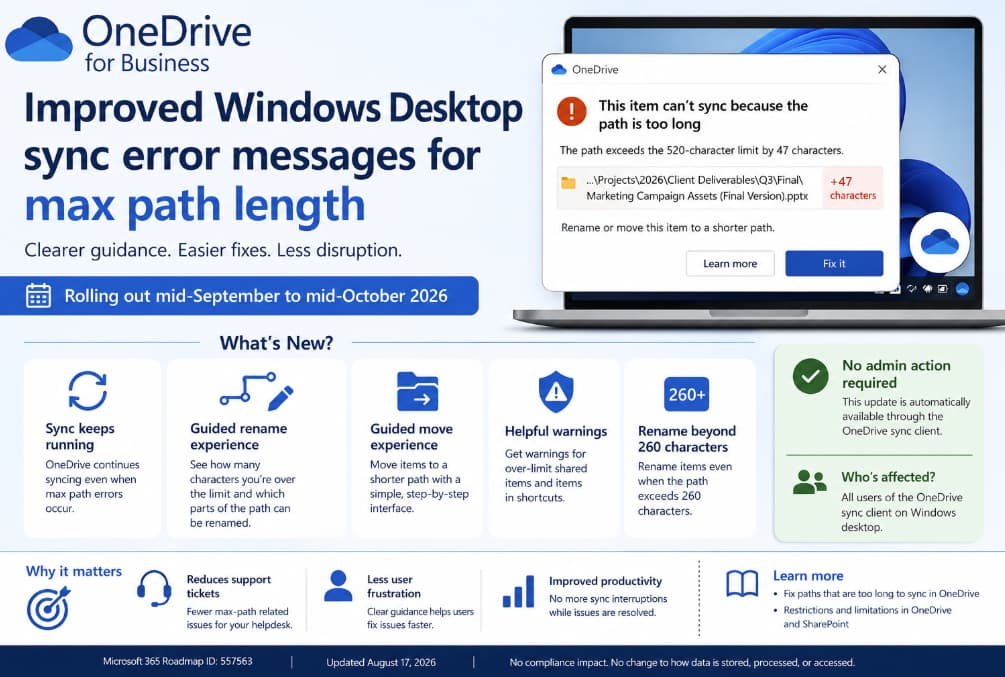
Under the new experience, OneDrive will show users exactly how many characters the problematic path exceeds the supported limit. That provides more useful information than a generic message asking the user to shorten the path.
For example, instead of simply indicating that a path is too long, the updated experience can explain the size of the overage and identify which parts of the path can be changed.
The OneDrive client will also provide a guided rename and move experience.
This is important because users will no longer have to figure out the solution entirely on their own. The interface is intended to point them toward the specific items that can be renamed or moved to bring the path back within the supported limit.
Microsoft says the custom rename experience will be able to handle paths that exceed the 260-character File Explorer limitation, making it easier to resolve some situations that were previously difficult to fix through Windows Explorer.
The OneDrive Sync Client Will Keep Running
Another notable improvement is that the OneDrive sync client will continue running when it encounters a maximum-path error.
Previously, these errors could interrupt synchronization until the underlying problem was resolved. That could create additional frustration for users because a single problematic file or folder could have a broader impact on their perception of whether OneDrive was working correctly.
With the new approach, the sync client can continue operating while the affected item is addressed.
This distinction matters in business environments.
Employees often work with large numbers of documents simultaneously. If one file has an excessively long path, stopping broader synchronization can disrupt unrelated work. Allowing the client to continue syncing while presenting a guided solution for the problematic item should help reduce that disruption.
In practical terms, Microsoft is moving toward a more resilient and user-friendly error-handling model.
Guided Rename and Move Tools Are the Real Highlight
The improved rename experience is particularly useful because it will identify which items in the path can be renamed.
Users will see the number of characters that need to be removed and receive guidance on the available changes. The experience is designed to make the problem understandable rather than simply reporting that something has gone wrong.
The move experience follows a similar approach.
When an item needs to be moved to a different location to reduce the overall path length, OneDrive will provide a guided interface showing the over-limit character count. Microsoft also says users will see warning dialogs for over-limit shared items in OneDrive and for items contained in shortcuts.
This could be especially helpful in organizations where employees collaborate on shared folders and documents. A path that appears manageable to one person can become problematic as additional folders and shared locations are introduced.
By explaining the issue within the OneDrive experience itself, Microsoft hopes to reduce the amount of manual troubleshooting required.
What This Means for IT Departments
For IT administrators, the update is relatively straightforward because Microsoft does not require any administrative action.
The feature will be delivered automatically through the OneDrive sync client. Administrators do not need to deploy a separate configuration or enable a new policy simply to receive the improved error experience.
However, Microsoft recommends that organizations consider informing their helpdesk and support teams about the change.
That is a sensible recommendation.
When employees begin seeing a new interface for long-path errors, support staff should know what the new experience looks like and understand that users can resolve many of these issues directly through OneDrive.
Organizations may also want to update internal documentation covering OneDrive troubleshooting.
Existing documentation that tells employees to manually shorten paths through File Explorer may no longer represent the best workflow once the new guided experience becomes available.
For helpdesks, the likely benefit is fewer repetitive tickets involving questions such as “Why isn’t this file syncing?” or “How do I rename a folder when Windows won’t let me?”
No Change to Data Storage or Compliance
Microsoft says there are no compliance considerations associated with this update.
The change affects the user experience around synchronization errors. It does not change how customer data is stored, processed or accessed.
That means organizations should not need to undertake a new compliance review simply because the improved path-length experience is being introduced.
For regulated businesses and organizations with strict IT change-management processes, this is useful context: the update is primarily a usability and troubleshooting improvement rather than a change to the underlying data-handling model.
Who Will Receive the Update?
The improvement applies to users running the OneDrive sync client on Windows desktop.
Microsoft’s rollout is worldwide and is scheduled to begin by mid-September 2026, with completion expected by mid-October 2026.
The revised schedule is worth noting because Microsoft previously planned to start the rollout in mid-August. The company updated the timeline on August 17, asking customers for patience as the rollout moves to the new window.
Because this is a client-side improvement delivered through OneDrive, users and administrators should not need to take special action to obtain it.
A Small Change That Could Have a Big Support Impact
At first glance, improved error messages may not sound like a major Microsoft 365 update. There is no new storage capacity, dramatic interface redesign or headline-grabbing AI feature involved.
But these smaller improvements can have a significant impact on everyday productivity.
A good error message can be the difference between a user fixing a problem in two minutes and an employee contacting the IT helpdesk, waiting for assistance and potentially losing productive time.
Microsoft is effectively turning a frustrating technical limitation into a guided workflow.
Instead of saying, “Your path is too long,” OneDrive will increasingly explain how far over the limit the user is, identify what can be changed and help the user rename or move the affected content.
For businesses with large SharePoint and OneDrive environments, that could translate into fewer support tickets and less confusion around synchronization failures.
What Organizations Should Do Now
There is no mandatory administrative action, but organizations can still prepare for the change.
IT teams should consider notifying helpdesk staff about the updated OneDrive experience. Support documentation can also be reviewed to make sure instructions reflect the new rename and move workflows.
Organizations may additionally want to remind employees about good file-management practices. Keeping folder structures reasonably shallow and avoiding unnecessarily long filenames can help prevent path-length problems in the first place.
The Microsoft Support documentation on fixing lengthy OneDrive paths and the company’s guidance on OneDrive and SharePoint restrictions can also be useful references for support teams.
Microsoft’s upcoming OneDrive for Business update tackles a surprisingly persistent source of user frustration: files and folders with paths that are simply too long to sync.
Beginning in mid-September 2026 and continuing through mid-October, Windows desktop users will start receiving clearer maximum-path error messages, character-overage information and guided rename and move tools.
Perhaps most importantly, OneDrive will continue syncing rather than stopping entirely when it encounters a maximum-path problem.
There is no admin action required, no change to how customer data is handled and no new compliance impact identified by Microsoft.
For users, the change should mean clearer instructions and faster fixes. For IT teams, it could mean fewer support tickets and less time spent explaining Windows and OneDrive path limitations.
It is a relatively modest Microsoft 365 update, but one that addresses a real-world problem in a practical way. And for anyone who has ever stared at a OneDrive sync error wondering which folder needs to be renamed, that simplicity could be very welcome.
Extra posts:
 Microsoft Makes Copilot Easier to Try: Free 30-Day Microsoft 365 Copilot Trial Arrives for SMBs Without Payment Details
  How to Fix OneDrive Stuck on Processing Changes: 10 Easy Solutions
  How to Recover from OneDrive Sync Nightmares
  Troubleshooting OneDrive Sync Issues: A Step-by-Step Guide
  OneDrive file sync and backups
  OneDrive Gets a Smarter Makeover: Microsoft Replaces More Places With a New Libraries View