Skip to content

Why Businesses Are Moving to the Cloud Top 5 Benefits Driving Digital Transformation

In the past decade, cloud computing has shifted from being a trendy tech term to an essential business strategy. From startups to global enterprises, organizations across industries are migrating to the cloud to enhance agility,… 

Public vs Private vs Hybrid Cloud Models Explained

Cloud computing has revolutionized the way businesses store, manage, and process data. But as organizations shift from traditional IT infrastructures to the cloud, one crucial question arises: which cloud deployment model is right for you?… 

Understanding the Different Types of Cloud Services (IaaS, PaaS, SaaS)

Cloud computing has revolutionized the way businesses and individuals access and manage technology resources. Instead of owning and maintaining physical servers or software, cloud services allow users to rent computing power, storage, and applications over… 

What Is the Cloud? A Beginner’s Guide for Microsoft 365 Learners

If you’ve ever saved a document in OneDrive, joined a Teams meeting, or collaborated on a Word file in real time, you’ve already experienced the cloud. But what exactly is “the cloud,” and why does… 

Windows 11 Out-of-Box Experience (OOBE) Guide

When you power on a new Windows 11 PC for the first time—or after a clean installation—you’ll go through what Microsoft calls the Out-of-Box Experience (OOBE). This process helps you set up your device, personalize… 

Setting Up Windows Hello Face and Fingerprint Sign-In A Step-by-Step Guide

In today’s world of increasing cybersecurity threats, relying solely on passwords is no longer enough. Microsoft’s Windows Hello offers a faster, safer, and more personal way to sign in to your Windows device — using… 

How to Transfer Files and Apps from Old PC to Windows 11

Upgrading to a new Windows 11 PC is exciting — faster performance, smoother design, and enhanced security features. But before you can fully enjoy your new setup, you’ll likely want to bring over your files,… 

Unlocking the Future of Productivity Unique Copilot+ PC Features in Windows 11

The next evolution of Windows 11 is here with Copilot+ PCs, bringing a new level of intelligence to your everyday computing. Powered by advanced AI capabilities and a Neural Processing Unit (NPU) capable of 40+… 

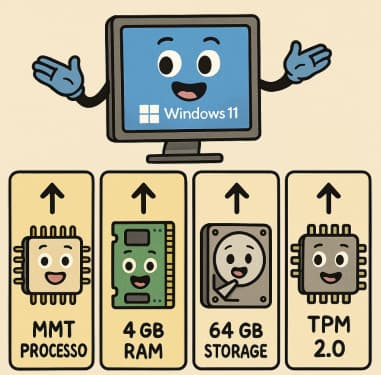
Windows 11 System Requirements Explained Simply

When Microsoft announced Windows 11, one of the biggest talking points wasn’t its sleek design or new features—it was the system requirements. Many users were left wondering: Will my PC run it? Let’s break down… 

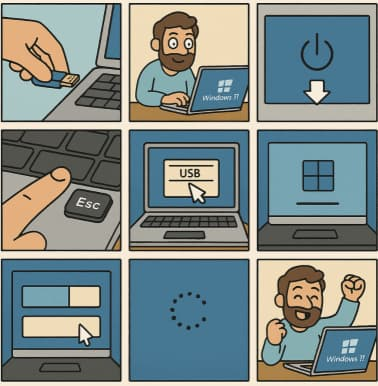
How to Clean Install Windows 11 — Step-by-Step (The Friendly, No-Nonsense Guide)

Want to wipe your PC and start fresh with Windows 11? Good call. Below is a complete, practical, up-to-date walkthrough that covers preparation, creating boot media, BIOS/UEFI settings, the actual clean install, and post-install tips.… 

Litigation Hold in Seconds Using Copilot to Identify Relevant Communication Threads

In modern enterprises, the volume and velocity of digital communication have made litigation response a complex and resource-intensive process. When a legal hold is triggered, organizations must rapidly identify, preserve, and manage all potentially relevant… 

The Copilot Impact Report Turning Usage Telemetry into Actionable Governance Insights

When organizations adopt Microsoft Copilot for Microsoft 365, the initial focus often centers on usage metrics — MAU (Monthly Active Users), DAU (Daily Active Users), and overall engagement trends. These metrics are essential for understanding…