
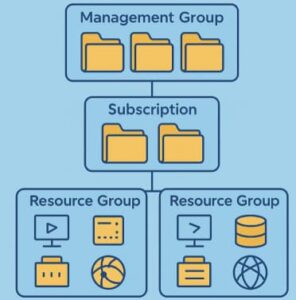
When you start using Microsoft Azure for deploying applications or managing cloud infrastructure, understanding how Azure organizes its resources is fundamental. Azure provides a structured hierarchy—Management Groups, Subscriptions, and Resource Groups—that helps you manage, secure, and govern your resources effectively.
Think of it like this: your Azure environment is a large, well-organized digital enterprise. Management Groups are the corporate headquarters, Subscriptions are individual departments, and Resource Groups are teams within those departments working on specific projects.
In this blog, we’ll explore in detail how each of these levels functions, how they relate to each other, and how you can use them to streamline governance, billing, and access management in Azure.
The Azure Resource Organization Hierarchy
Azure organizes resources in a logical hierarchy designed to help organizations maintain order, control costs, and enforce policies efficiently. The structure looks like this:
Management Groups
   └── Subscriptions
          └── Resource Groups
                 └── Resources (VMs, Databases, Storage, etc.)
Let’s break down each layer.
1. Azure Management Groups
What Are Management Groups?
Azure Management Groups are containers used to manage access, policies, and compliance across multiple Azure subscriptions. They are the top level of the hierarchy, sitting above subscriptions.
If your organization has multiple departments or environments—like development, testing, and production—management groups help you apply consistent governance across all of them.
For example:
- You can create a management group for each department (e.g., Finance, HR, IT).
- Apply an Azure Policy that restricts resource deployment to specific regions.
- Enforce compliance standards like ISO 27001 or SOC 2 across all subscriptions in that management group.
Benefits of Management Groups
- Centralized Governance: Apply RBAC (Role-Based Access Control) and policies across subscriptions.
- Hierarchical Inheritance: Child subscriptions automatically inherit rules from parent management groups.
- Scalability: Easily scale governance across hundreds or thousands of subscriptions.
Real-World Example
A global enterprise might have a parent management group called “Contoso Global”, with child management groups like “Contoso Europe” and “Contoso North America”. Each of these could contain multiple subscriptions related to different business units.
2. Azure Subscriptions
What Is a Subscription?
A Subscription is a logical container for resources and services in Azure. It represents a billing boundary, meaning all usage and costs of resources within a subscription are billed together.
Every resource you create in Azure—whether it’s a virtual machine, database, or storage account—must belong to a subscription.
Why Subscriptions Matter
Subscriptions serve several key purposes:
- Billing Segmentation: Helps separate costs for departments, projects, or clients.
- Access Control: Defines boundaries for role-based access and permissions.
- Quota Management: Each subscription has limits on the number of resources, which helps manage workloads.
Types of Subscriptions
Azure offers several types of subscriptions, including:
- Free Trial – Great for beginners exploring Azure.
- Pay-As-You-Go – Flexible for small businesses or startups.
- Enterprise Agreement (EA) – Designed for large organizations with volume licensing.
- Microsoft Customer Agreement (MCA) – A modern replacement for EA, offering streamlined management and billing.
Example
Imagine you’re running a software company with three products—Product A, B, and C. You can create three subscriptions, one for each product, to track and manage costs separately.
3. Azure Resource Groups
What Are Resource Groups?
A Resource Group (RG) is a logical container that holds related Azure resources for a project or workload. It provides a convenient way to manage and organize resources such as virtual machines, databases, networks, and storage accounts that share a common lifecycle.
You can think of a Resource Group as a “folder” inside a subscription.
Key Characteristics of Resource Groups
- Unified Management: You can deploy, update, or delete all resources in a group together.
- Tagging Support: Add tags like environment=production or department=finance to track usage and costs.
- Role-Based Access: Assign permissions at the resource group level for team-based control.
- Lifecycle Management: Deleting a resource group deletes all resources within it, ensuring cleanup is easy.
Example Scenario
For a web application, you might have:
- A Virtual Machine for the backend server
- An Azure SQL Database for storage
- An Azure Storage Account for static content
All these resources could live inside a single resource group named “WebApp-Production”.
How They Work Together
Here’s how these components interact:
- Management Groups – Define global policies and compliance for the organization.
- Subscriptions – Represent billing and access boundaries.
- Resource Groups – Organize actual resources used in applications or services.
When you apply an Azure Policy at the management group level, it automatically cascades down to all subscriptions and their resource groups. This hierarchical inheritance ensures consistency and simplifies compliance management.
Best Practices for Organizing Azure Resources
- Use Management Groups for Governance
- Group subscriptions by department or environment.
- Apply compliance and security policies at the management group level.
- Use Subscriptions for Billing and Access Control
- Separate subscriptions by project, department, or cost center.
- Avoid putting unrelated workloads in the same subscription.
- Use Resource Groups for Lifecycle Management
- Group resources that share the same lifecycle (deploy, manage, delete together).
- Don’t mix production and development resources in the same group.
- Apply Consistent Naming Conventions
- Example:
rg-prod-webapp-eastus - Helps with automation, monitoring, and governance.
- Example:
- Leverage Azure Tags
- Tag resources with metadata like costCenter=1234 or environment=dev to simplify cost tracking and automation.
Understanding how Azure organizes resources through Management Groups, Subscriptions, and Resource Groups is key to building a scalable, secure, and well-governed cloud environment.
This layered approach allows you to manage policies globally, control billing locally, and organize resources efficiently. Whether you’re a small startup or a large enterprise, structuring your Azure environment properly from the start will save time, reduce costs, and enhance governance in the long run.
Extra posts:
 Azure Resource Manager (ARM) The Backbone of Cloud Resource Management
  Azure Free Tier & Cost Management Learn Azure Without Spending a Dime
  Understanding Azure AD Tenants, Users, Groups, and Roles: A Practical Guide
  Azure Security Basics Network Security Groups, Firewalls, and Defender for Cloud
  Azure Functions vs. Azure Container Apps Choosing Your Serverless Compute
  Azure AI Studio / Azure AI Foundry A Powerful Platform for Generative AI