
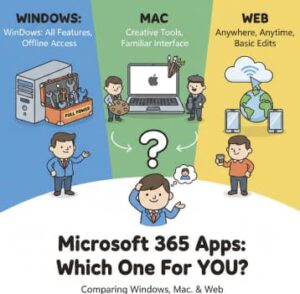
Microsoft 365 has become a central productivity suite for individuals, students, and businesses of all sizes. With apps like Word, Excel, PowerPoint, OneNote, Outlook, Teams, and more, the platform is designed to let users work consistently across different devices and operating systems.
However, not all Microsoft 365 experiences are identical. The suite behaves differently depending on whether you’re using it on Windows, macOS, or the web browser version. Each environment offers unique features, limitations, and advantages that can significantly influence productivity, workflow, and overall value.
In this guide, we’ll take a detailed look at how Microsoft 365 compares across Windows, Mac, and web platforms to help you choose the best setup for your needs.
Microsoft 365 on Windows
For many years, Windows has been the flagship platform for Microsoft’s Office suite, and it still offers the most complete and powerful Microsoft 365 experience.
Top Advantages
1. Full Feature Set
Windows versions of Word, Excel, PowerPoint, and other apps generally have the broadest functionality. Advanced features like Excel Power Pivot, VBA-based automation, advanced styling options, and full Outlook integration are typically most powerful on Windows.
2. Deep System Integration
Microsoft 365 apps integrate tightly with Windows features such as:
- File Explorer quick actions
- System-wide search
- Windows authentication
- OneDrive auto-sync
This makes it especially smooth for enterprise environments.
3. Best for Legacy Business Workflows
Many organizations run long-standing workflows using macros, advanced Excel formulas, or internal templates created specifically for Windows versions. If your work depends on these, Windows is often the best platform.
Limitations
While powerful, Microsoft 365 on Windows can feel heavier, especially on older machines. Large files, add-ins, and background syncing may slow performance compared to lighter setups.
Still, for power users, Windows remains the most complete version of the suite.
Microsoft 365 on Mac
Microsoft has invested heavily in the macOS version in recent years. It now feels increasingly modern and polished, fitting naturally into a Mac user’s ecosystem.
Top Advantages
1. Sleek, Modern Design
The macOS Microsoft 365 apps follow Apple’s design principles, offering a cleaner interface that often feels smoother and more minimalist.
2. Strong iCloud and macOS Integration
Microsoft 365 supports:
- macOS Spotlight search
- iCloud document interaction
- Continuity features
- Automatic system-level backups
This makes Microsoft 365 feel right at home in Apple’s ecosystem.
3. Great for Creative and Mobile Users
Many creators and professionals who work in visual or design fields appreciate the seamless multi-device experience between MacBooks, iPhones, and iPads. PowerPoint and Word on Mac support advanced media capabilities that appeal to presentation-heavy users.
Where It Falls Short
1. Some Features Still Missing vs. Windows
While the gap has closed, certain advanced features—especially in Excel—are still Windows-only. Examples include:
- Some advanced data modeling tools
- Power Pivot
- Some VBA integrations
This can be a dealbreaker for data analysts or finance professionals.
2. Slightly Less Optimized for Corporate IT
Enterprise environments often standardize around Windows-based management tools and authentication systems. Microsoft 365 for Mac does support enterprise features, but sometimes the setup is not as straightforward.
Still, for day-to-day productivity, the Mac version is polished, reliable, and excellent for most users.
Microsoft 365 on the Web
Microsoft 365 Web Apps are designed for accessibility, collaboration, and simplicity. They run in the browser without needing any installation and are included even in the free Microsoft account tier.
Top Advantages
1. Use Anywhere, on Any Device
All you need is a browser. This makes it ideal for:
- Chromebook users
- Public or shared computers
- Quick edits from desktop or mobile
- Students who can’t install apps on school machines
2. Real-Time Collaboration
While desktop apps also support collaboration, the web version is built from the ground up for shared editing. Multiple people can edit documents, spreadsheets, and presentations simultaneously with updates appearing instantly.
3. Lightweight and Fast
Because everything runs online, you don’t have to worry about slow installations, updates, or offline file version conflicts.
Limitations
1. Not as Feature-Rich
Web versions often lack advanced formatting, scripting, and integration tools. Heavy Excel users especially may find limitations in formulas, pivot tables, offline access, and macros.
2. Requires Internet
Without a connection, productivity stalls unless you’re using cached files in supported browsers. This is a drawback compared to desktop apps, which can work fully offline.
3. Limited Local Integration
Features like publishing local templates, deep system automation, and connecting directly to file systems don’t work as fluidly in a browser environment.
Still, the web version is fantastic for light to medium productivity tasks, team collaboration, and mobility.
Which Version Should You Choose?
Choose Microsoft 365 for Windows if:
- You rely on advanced business or financial tools
- You use macros, VBA, and custom add-ins
- Your IT environment is Windows-based
- You need the full professional suite
Choose Microsoft 365 for Mac if:
- You live in the Apple ecosystem
- You want a modern design and clean interface
- You need powerful productivity tools but not extreme Excel modeling
- You value smooth workflows across macOS and iOS
Choose Microsoft 365 for Web if:
- You need lightweight, on-the-go access
- Your device has limited storage or installation permissions
- You value real-time collaboration
- Your work requires cross-platform flexibility
Many users benefit from combining versions—for example, using desktop apps for deep work and the web version for fast collaboration.
Microsoft 365 has evolved into a flexible ecosystem that adapts to the device you’re using. Windows users get the strongest and most comprehensive productivity experience, Mac users get a polished, optimized interface that blends beautifully with Apple hardware, and web users get unmatched accessibility and collaboration.
No single version is “best”—they’re simply suited for different workflows. By understanding the strengths of each platform, you can choose the one that helps you work smarter, not harder.
Extra posts:
 Microsoft 365 Companion Apps for Windows 11 A New Way to Stay Productive
  Introduction to Microsoft 365 Apps for Business and Enterprise
  Comparing Microsoft 365 to Google Workspace in 2025: Which Productivity Suite Is Right for You?
  Supercharge Customer Experiences Integrate Microsoft 365 with Customer Engagement Apps
  Office for Mac is available on the Mac App Store
  Microsoft Office 365 Power Apps