

Artificial Intelligence is rapidly evolving from simple prompt-response systems into goal-driven autonomous agents capable of planning, acting, and adapting in dynamic environments. One of the most prominent examples of this transformation is Microsoft Copilot, especially through Microsoft Copilot Studio, where organizations can build AI agents that automate workflows, interact with enterprise data, and execute tasks independently.
As a solution architect designing enterprise AI systems, understanding how Copilot agents “think” is critical for building reliable, secure, and scalable automation. Behind the scenes, Copilot agents follow a structured architecture based on four core components:
- Goals
- Memory
- Tools
- Autonomy
Together, these elements transform a large language model into an agentic system capable of reasoning and executing tasks across enterprise environments.
In this article, we’ll break down how these components work together and how architects can design production-grade Copilot agents.
The Evolution from Chatbots to AI Agents
Traditional chatbots operate using a simple request-response model. A user asks a question, the chatbot processes it, and returns an answer. Once the interaction ends, the process stops.
AI agents operate differently.
Instead of responding once, agents operate in a continuous reasoning loop where they:
- Understand a goal
- Plan actions
- Use tools
- Evaluate results
- Continue until the task is completed
This design allows Copilot agents to perform tasks such as:
- Monitoring systems
- Automating workflows
- Generating reports
- Managing tickets
- Supporting developers
- Assisting with enterprise decision-making
Rather than acting as passive assistants, Copilot agents function like digital coworkers capable of performing multi-step operations.
1. Goals: The Driving Force Behind the Agent
Every Copilot agent begins with a goal.
A goal defines what the agent is trying to accomplish. Without a clear goal, the agent cannot determine which actions to take or when a task is complete.
Examples of agent goals include:
- Generate a weekly sales report
- Monitor customer support tickets
- Automate employee onboarding
- Analyze financial data
- Assist developers with code generation
In most enterprise architectures, goals are broken down into smaller sub-tasks that the agent can execute sequentially.
For example:
Goal: Generate weekly sales report.
Possible task breakdown:
- Retrieve sales data from CRM
- Aggregate and analyze the data
- Identify trends and insights
- Generate charts and summaries
- Deliver the report via email or Teams
Many AI agents use reasoning frameworks such as Plan-and-Execute or Reasoning and Acting (ReAct) to dynamically decide the next step.
From a solution architecture perspective, clearly defining goals and boundaries is critical. This ensures the agent performs only approved tasks and stays aligned with business rules and compliance requirements.
2. Memory: The Context That Enables Intelligence
Memory allows Copilot agents to retain context, learn from interactions, and improve decision-making over time.
Without memory, every interaction would start from scratch, making it impossible to maintain continuity.
Copilot agents typically rely on two types of memory.
Short-Term Memory (Working Context)
Short-term memory contains information related to the current interaction or task.
Examples include:
- Current conversation messages
- Recent tool outputs
- Temporary reasoning steps
- Intermediate results during task execution
This information usually resides within the model context window, allowing the agent to reason about the immediate situation.
Short-term memory is critical for maintaining coherent conversations and managing multi-step workflows.
Long-Term Memory (Persistent Knowledge)
Long-term memory stores information beyond a single interaction.
Examples include:
- User preferences
- Historical interactions
- Organizational knowledge
- Process documentation
- Past task results
In enterprise environments, long-term memory may be stored in systems such as:
- Vector databases
- Knowledge bases
- CRM systems
- ERP systems
- Document repositories like SharePoint
Long-term memory enables Copilot agents to provide personalized experiences and maintain institutional knowledge.
From an architecture standpoint, designing memory systems requires careful attention to:
- Data governance
- Access control
- Security policies
- Data lifecycle management
Improper memory design can introduce risks such as data leakage, privacy violations, or regulatory compliance issues.
3. Tools: Enabling Real-World Actions
Large language models are powerful at generating text, but they cannot interact with external systems without tools.
Tools provide the capabilities that allow agents to take action.
A tool is typically an API or service that the agent can invoke to perform a task.
Common types of tools include:
Data Retrieval Tools
Used to fetch information from systems such as databases, APIs, or enterprise knowledge sources.
Communication Tools
Allow the agent to send messages through channels like email, Teams, or Slack.
File Management Tools
Enable reading, writing, or updating documents and files.
Workflow Automation Tools
Trigger business processes such as approvals, notifications, or system updates.
Code Execution Tools
Allow the agent to run scripts, queries, or analytical operations.
For example, an IT support Copilot agent might use tools to:
- Retrieve incident tickets
- Reset user passwords
- Update support records
- Notify administrators
From an architecture perspective, tools must be designed with:
- Secure authentication
- Permission boundaries
- Monitoring and logging
- Rate limits and safeguards
Providing agents with too many tools increases risk and complexity. A best practice is to expose only the minimum required capabilities.
4. Autonomy: The Ability to Operate Independently
Autonomy defines how independently an agent can operate without human intervention.
Traditional assistants require users to initiate every action. Autonomous agents can trigger and execute workflows on their own.
Examples of autonomous behavior include:
- Monitoring systems for anomalies
- Triggering alerts when thresholds are exceeded
- Automatically generating reports on schedule
- Responding to operational incidents
- Updating systems when conditions change
In enterprise environments, agents can be triggered by events such as:
- Database updates
- Workflow completions
- Scheduled jobs
- System alerts
Autonomy significantly increases productivity but also introduces risk. Therefore, enterprise solutions often include human-in-the-loop controls.
For sensitive actions such as financial approvals or compliance reporting, agents may:
- Generate recommendations
- Request human approval
- Execute actions only after confirmation
This hybrid model balances automation with oversight.
The Agent Thinking Loop
When goals, memory, tools, and autonomy are combined, Copilot agents operate in a continuous decision loop.
A simplified version looks like this:
- Receive a goal or trigger
- Retrieve context from memory
- Analyze the situation
- Plan the next action
- Select the appropriate tool
- Execute the action
- Store results in memory
- Evaluate progress toward the goal
- Repeat until the task is complete
This loop allows the agent to adapt dynamically to new information and changing conditions.
Many modern architectures describe this as the Perceive → Reason → Act → Learn cycle.
Enterprise Architecture Considerations
When deploying Copilot agents in production environments, solution architects must address several critical design considerations.
Governance
Agents must respect enterprise policies, identity systems, and access control rules.
Observability
Every agent action should be logged and monitored for auditing, troubleshooting, and compliance.
Tool Security
External tools must be protected with authentication, authorization, and usage limits.
Cost Optimization
Autonomous agent loops can increase compute usage. Efficient design helps manage operational costs.
Safety Guardrails
Agents must include safeguards that prevent harmful or unintended actions.
Enterprise Copilot solutions should integrate with existing platforms such as:
- Identity and access management systems
- Security monitoring platforms
- Data governance frameworks
- Logging and observability tools
Designing these integrations correctly ensures AI systems remain secure, compliant, and scalable.
The Future of Copilot Agents
Copilot agents represent a significant shift in how enterprise software operates.
Instead of building isolated automation scripts, organizations are moving toward intelligent agent ecosystems where AI systems collaborate with humans and other agents.
Future advancements will likely include:
- Multi-agent collaboration systems
- AI orchestration across enterprise platforms
- Agent marketplaces and reusable capabilities
- Adaptive memory and learning systems
For solution architects, the role will evolve from building applications to designing intelligent digital workforces.
Understanding how Copilot agents think is essential for designing modern enterprise AI solutions.
At the core of every agent are four architectural pillars:
- Goals – define what the agent must accomplish
- Memory – provide context and learning capabilities
- Tools – enable interaction with real systems
- Autonomy – allow independent operation
When these components are carefully designed, Copilot agents become more than assistants—they become autonomous problem-solving systems capable of transforming enterprise workflows.
For architects and developers, mastering this architecture is key to building the next generation of intelligent applications.
Extra posts:
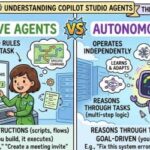 The Difference Between Declarative Agents and Autonomous Agents in Copilot Studio
 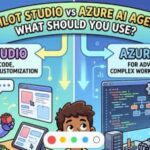 Copilot Studio vs Azure AI Agents: What Should You Use?
  Cost Optimization for Copilot and AI Agents on Azure
  How to Introduce Copilot Agents Without Disrupting Your Organization
  Human-in-the-Loop: Where Copilot Agents Should (and Shouldn’t) Act Alone
  Copilot vs ChatGPT vs Custom Agents: What Should Companies Choose?