Choosing the right Windows 11 edition can make a big difference in performance, security, productivity, and overall user experience. Whether you are a student, gamer, remote worker, business owner, or IT administrator, understanding the differences between Windows 11 Home, Pro, Enterprise, and SE helps you avoid paying for features you do not need while ensuring you get the tools that matter most.
Microsoft designed each Windows 11 edition for a specific audience. While they all share the same modern interface and core Windows 11 experience, the available features, management tools, and security capabilities vary significantly.
In this guide, we will compare Windows 11 Home, Pro, Enterprise, and SE in detail, including features, pricing considerations, security tools, business functionality, and ideal use cases.
What Is Windows 11?
Windows 11 is Microsoft’s latest desktop operating system designed to deliver better productivity, stronger security, improved gaming, and enhanced hybrid work experiences.
Key improvements include:
- A redesigned Start Menu
- Snap Layouts for multitasking
- Better gaming performance
- Enhanced security architecture
- Integration with Microsoft Teams
- Improved touch and pen support
- AI-powered productivity features
However, not every edition includes the same level of functionality.
Windows 11 Home
Windows 11 Home is the standard version aimed at everyday users and families.
Best For
- Casual users
- Students
- Gamers
- Home offices
- Personal laptops and desktops
Key Features
Windows 11 Home includes all the essential features most users need:
- Modern Windows 11 interface
- Microsoft Store access
- Gaming enhancements like DirectStorage and Auto HDR
- Windows Hello biometric login
- Built-in antivirus with Microsoft Defender
- Parental controls
- Virtual desktops
- Touch and pen support
Advantages
Easy to Use
Home edition focuses on simplicity and user-friendly navigation, making it ideal for non-technical users.
Great for Gaming
Gamers benefit from Xbox integration, Game Pass support, DirectX 12 Ultimate, and advanced graphics optimization.
Lower Cost
It is the most affordable Windows 11 edition.
Limitations
Windows 11 Home lacks several advanced business and IT management tools, including:
- BitLocker encryption
- Remote Desktop hosting
- Group Policy Editor
- Hyper-V virtualization
- Domain joining
- Advanced device management
For personal use, these missing features may not matter. But for professionals and businesses, they can become essential.
Windows 11 Pro
Windows 11 Pro is designed for professionals, freelancers, small businesses, and power users who need more control and security.
Best For
- Small businesses
- Remote workers
- Developers
- Freelancers
- IT professionals
Key Features
Windows 11 Pro includes everything in Home plus advanced tools such as:
- BitLocker device encryption
- Remote Desktop
- Hyper-V virtualization
- Group Policy management
- Azure Active Directory support
- Windows Sandbox
- Business-grade security
- Domain join capability
Advantages
Enhanced Security
BitLocker encryption protects sensitive business data if a device is lost or stolen.
Better Remote Work Support
Remote Desktop enables users to connect to their PC from another location, which is ideal for hybrid and remote work environments.
Virtualization Tools
Developers and IT professionals benefit from Hyper-V and Windows Sandbox for testing applications securely.
Business Management
Small businesses can manage devices more efficiently through policies and centralized settings.
Limitations
While Pro is excellent for small and medium-sized businesses, it lacks the large-scale deployment and advanced security capabilities found in Enterprise edition.
Windows 11 Enterprise
Windows 11 Enterprise is built for large organizations requiring enterprise-grade security, deployment, and device management.
Best For
- Large enterprises
- Government organizations
- Healthcare institutions
- Financial companies
- IT-managed environments
Key Features
Enterprise includes everything in Pro plus advanced enterprise capabilities:
- Advanced threat protection
- AppLocker
- Credential Guard
- DirectAccess
- Windows Autopilot
- Endpoint analytics
- Enterprise state roaming
- Advanced deployment tools
- Microsoft Endpoint Manager integration
Advantages
Maximum Security
Enterprise offers Microsoft’s highest level of endpoint protection, helping organizations defend against cyberattacks, ransomware, and credential theft.
Centralized IT Management
IT administrators can manage thousands of devices from a centralized system.
Advanced Compliance
Large organizations with regulatory requirements benefit from stronger compliance and auditing tools.
Optimized for Hybrid Work
Enterprise supports modern cloud management and secure remote access for distributed workforces.
Limitations
Higher Cost
Enterprise licensing is significantly more expensive and usually requires volume licensing agreements.
Overkill for Personal Users
Most home users and small businesses will never use Enterprise-only features.
Windows 11 SE
Windows 11 SE is Microsoft’s cloud-first education-focused version designed for low-cost school devices.
Best For
- K-8 schools
- Educational institutions
- Budget student laptops
- Managed classroom environments
Key Features
Windows 11 SE focuses on simplicity and cloud integration:
- Lightweight performance
- Optimized for low-end hardware
- Cloud-based management
- Microsoft 365 Education integration
- Simplified user interface
- Reduced distractions for students
Advantages
Designed for Education
SE minimizes complexity and distractions, helping students focus on learning.
Better Performance on Budget Devices
It runs efficiently on lower-spec laptops commonly used in schools.
Easy Device Management
School IT administrators can manage devices remotely through cloud tools.
Limitations
Restricted App Installation
Users cannot freely install traditional desktop applications like standard Windows editions.
Limited Flexibility
Windows 11 SE is highly controlled and intended primarily for education environments.
Not Ideal for General Consumers
Most regular users would find SE too restrictive.
Feature Comparison Table
| Feature | Home | Pro | Enterprise | SE |
|---|---|---|---|---|
| Gaming Features | Yes | Yes | Yes | Limited |
| BitLocker Encryption | No | Yes | Yes | Limited |
| Remote Desktop | Client Only | Yes | Yes | No |
| Hyper-V | No | Yes | Yes | No |
| Group Policy | No | Yes | Yes | No |
| Enterprise Security | No | Basic | Advanced | Basic |
| Device Management | Basic | Advanced | Enterprise-Level | Cloud-Based |
| Best For | Personal Use | Professionals | Large Organizations | Schools |
Which Windows 11 Edition Should You Choose?
Choose Windows 11 Home If:
- You mainly browse the web, stream media, study, or game
- You want the most affordable option
- You do not need advanced IT tools
Choose Windows 11 Pro If:
- You work remotely
- You need stronger security
- You run a small business
- You need virtualization or Remote Desktop
Choose Windows 11 Enterprise If:
- You manage large teams or organizations
- You need advanced cybersecurity
- Your business has strict compliance requirements
- You require centralized device management
Choose Windows 11 SE If:
- You are purchasing devices for schools
- You need low-cost educational systems
- You prioritize cloud-managed simplicity
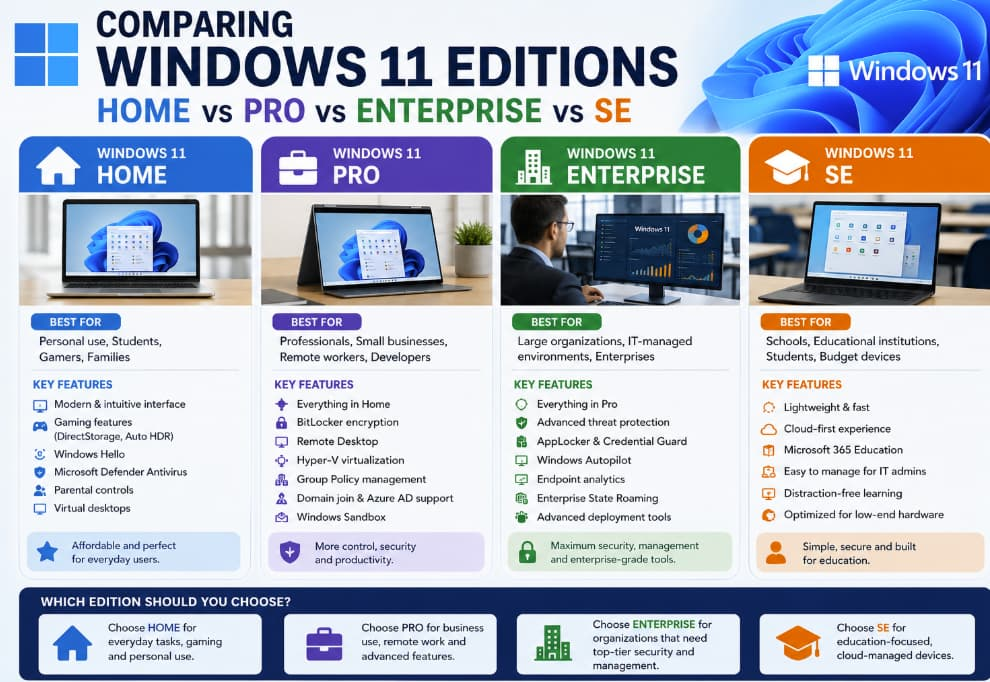
Windows 11 offers different editions because users have different needs. While Windows 11 Home works perfectly for everyday users, professionals often benefit from the added security and productivity tools in Pro. Enterprise takes things further with enterprise-scale management and advanced protection, while SE targets education with simplicity and affordability.
Before choosing an edition, consider:
- Your security requirements
- Device management needs
- Work environment
- Budget
- Software compatibility
For most users, Windows 11 Pro provides the best balance between features and cost. However, casual users can comfortably stick with Home, while large organizations should seriously consider Enterprise for advanced management and protection.