
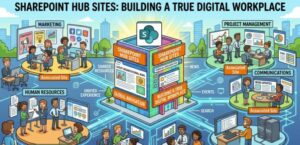
As an information architect, I often see organizations struggle with a familiar problem: content exists everywhere, but meaning exists nowhere. Teams build sites, departments create silos, and before long, employees are lost in a maze of disconnected information. This is where SharePoint Hub Sites step in—not just as a feature, but as a structural philosophy for building a true digital workplace.
Let’s break this down from both a conceptual and technical perspective, while answering the most common questions I hear from clients.
What is the Purpose of a SharePoint Hub Site?
At its core, a SharePoint Hub Site is designed to organize related sites into a unified structure, without physically merging them. Think of it as a “digital umbrella” that connects multiple sites under a shared experience.
Key Purposes:
1. Logical Grouping of Sites
Hub sites allow you to associate multiple SharePoint sites (team sites, communication sites) based on:
- Department (HR, Finance)
- Function (Projects, Operations)
- Region (EMEA, APAC)
This creates a flat architecture instead of deeply nested subsites, which aligns with modern SharePoint best practices.
2. Consistent Branding and Navigation
Once sites are associated with a hub:
- They inherit shared navigation
- They adopt consistent themes and branding
This ensures users don’t feel like they are jumping between completely different systems.
3. Unified Search Experience
Hub sites enable scoped search, meaning users can search across all associated sites from one place. This is critical for knowledge discovery.
4. Aggregated Content Rollups
Using web parts like:
- News
- Events
- Highlighted content
You can dynamically pull content from all associated sites, creating a centralized information feed.
5. Governance Without Rigidity
Unlike subsites, hub sites allow autonomy. Each associated site:
- Maintains its own permissions
- Has independent lifecycle management
But still participates in a broader structure.
👉 In short: Hub sites balance central governance with distributed ownership, which is exactly what a digital workplace needs.
What Are the Limitations of Hub Sites in SharePoint?
Hub sites are powerful—but they are not a silver bullet. Understanding their limitations is key to designing effectively.
1. No Inherited Permissions
Unlike subsites:
- Hub sites do NOT pass permissions to associated sites
Each site manages its own access.
Implication:
You must design security separately from structure.
2. Limited Hierarchy (Flat Model)
Hub sites do not support:
- Multi-level nesting (hub within hub)
You get a one-level association model.
Implication:
You must carefully plan your information architecture upfront. Overcomplicating hub structures leads to confusion.
3. Association Limits
There are limits on:
- Number of hubs per tenant
- Number of sites associated with a hub
(These limits evolve, but they still exist in large-scale environments.)
4. Navigation Constraints
Hub navigation:
- Is shared across all associated sites
- Cannot be easily customized per site
Implication:
Navigation must be designed for broad usability, not niche use cases.
5. Search Scope Is Hub-Based, Not Global by Default
While hub search is useful:
- It doesn’t replace enterprise search
- It may exclude relevant content outside the hub
6. No Content Database Consolidation
Hub sites do not:
- Merge data storage
- Combine site collections physically
They are logical connections only.
How to Create Hub Sites in SharePoint
Creating a hub site is straightforward—but requires admin permissions.
Step-by-Step (Technical Overview):
1. Create a Site (If Not Already Created)
- Go to SharePoint Admin Center
- Create a Communication Site (recommended for hubs)
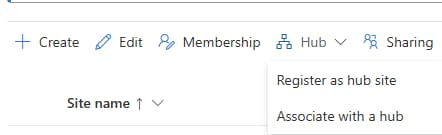
2. Register the Site as a Hub
- Navigate to SharePoint Admin Center
- Go to Active Sites
- Select the site you want
- Click “Register as Hub Site”
You’ll need to define:
- Hub name
- Hub owner(s)
3. Configure Hub Settings
Once registered, you can:
- Apply a theme
- Set hub navigation
- Define permissions for site association
4. Associate Sites with the Hub
You can:
- Associate sites manually via Admin Center
- Allow site owners to self-associate (if enabled)
Best Practice Tip (From an Architect’s Lens):
Do NOT create hub sites randomly. Instead:
- Map your organization structure first
- Define clear taxonomy
- Limit the number of hubs
A poorly designed hub architecture becomes just another layer of confusion.
How to Make a SharePoint Site a Trusted Site?
This question often comes from a security or browser configuration perspective.
If You Mean Browser Trusted Site (e.g., Internet Explorer / Edge Legacy):
Steps:
- Open browser settings
- Go to Security settings
- Select Trusted Sites
- Add your SharePoint URL (e.g., https://yourtenant.sharepoint.com)
If You Mean Organizational Trust (Governance Perspective):
“Trusted site” often refers to:
- Verified ownership
- Approved content
- Governed access
To achieve this:
1. Apply Governance Policies
- Define site ownership
- Enforce lifecycle policies
2. Use Sensitivity Labels
- Classify sites (Confidential, Public, Internal)
3. Control Sharing Settings
- Limit external sharing
- Define access boundaries
4. Use Hub Site Association
Being part of a hub often signals:
- “This site is part of an official structure”
Designing a True Digital Workplace with Hub Sites
A digital workplace isn’t just technology—it’s experience design.
Here’s how hub sites enable that:
1. From Chaos to Clarity
Instead of:
- Hundreds of disconnected sites
You get:
- Structured, discoverable ecosystems
2. From Static to Dynamic Content
Hub rollups ensure:
- News flows across the organization
- Employees stay informed without searching
3. From IT-Controlled to Business-Owned
Departments can:
- Manage their own sites
While IT: - Maintains governance via hubs
4. From Navigation to Experience
Hub navigation becomes:
- A user journey tool, not just links
Common Questions Answered Simply
Q: Should every department have a hub?
No. Only create hubs when there is a clear need for grouping multiple related sites.
Q: Can a site belong to multiple hubs?
No. A site can only be associated with one hub at a time.
Q: Are hub sites replacing intranets?
Not exactly. They are building blocks of modern intranets.
Extra posts:
 Follow SharePoint Online Sites
  Performance Optimization Tips for Large SharePoint Sites
  A Complete Guide to Migrating from Google Sites to SharePoint Online
  Building a Culture of Knowledge Sharing with SharePoint & Viva
  How to Migrate from Facebook Workplace to Microsoft Viva Unlocking Workplace Productivity with Microsoft Viva Insights