
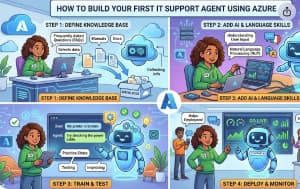
Artificial Intelligence is transforming the way businesses provide IT support. Instead of waiting for a technician to answer every question, organizations are increasingly using AI-powered support agents that can troubleshoot common issues, answer employee questions, and automate repetitive tasks. Thanks to Microsoft Azure AI, building an intelligent IT support agent is no longer limited to data scientists or large enterprises. Even beginners can create a functional AI assistant with minimal coding.
In this guide, you’ll learn how to build your first IT support agent using Azure AI, what services you’ll need, and the best practices for creating an assistant that delivers accurate, helpful, and secure responses.
Why Build an AI-Powered IT Support Agent?
Every IT department handles a large number of repetitive requests every day. Users often ask the same questions:
- How do I reset my password?
- Why can’t I connect to the VPN?
- How do I install Microsoft Office?
- My laptop is running slowly. What should I do?
- How do I access shared drives?
These questions consume valuable time that IT teams could spend solving more complex technical problems.
An AI support agent can instantly respond to these common requests, reducing ticket volumes and improving employee satisfaction. Since it is available 24/7, users receive assistance even outside regular business hours.
Azure AI provides the tools needed to build these intelligent assistants quickly while integrating seamlessly with the Microsoft ecosystem.
What is Azure AI?
Azure AI is Microsoft’s collection of artificial intelligence services that help developers create intelligent applications without building machine learning models from scratch.
For an IT support chatbot or virtual assistant, Azure AI offers capabilities such as:
- Natural language understanding
- Conversational AI
- Knowledge retrieval
- Document search
- AI-generated responses
- Secure enterprise integration
Combined with Azure AI Foundry, Azure OpenAI Service, and Azure AI Search, developers can build enterprise-grade support agents capable of answering questions based on internal documentation.
What You’ll Need Before You Start
Before creating your AI support agent, make sure you have:
- An active Microsoft Azure subscription
- Access to Azure AI Foundry
- Azure OpenAI Service
- Azure AI Search (optional but highly recommended)
- IT support documentation or knowledge base
- Basic understanding of Azure resources
Don’t worry if you’re new to Azure. Most of the setup can be completed through the Azure portal with step-by-step guidance.
Step 1: Create an Azure AI Project
The first step is creating an Azure AI project.
Inside Azure AI Foundry, create a new project where you’ll manage your AI resources, prompts, models, and deployments.
This project acts as the workspace for your AI agent and keeps everything organized.
Once your project is ready, connect it with Azure OpenAI so your agent can generate intelligent responses.
Step 2: Choose the Right AI Model
Microsoft provides several large language models through Azure OpenAI.
For most IT support scenarios, GPT-based models work extremely well because they can:
- Understand natural language
- Answer technical questions
- Explain troubleshooting steps
- Generate helpful responses
- Maintain conversational context
Choose a model that matches your expected workload and budget.
Step 3: Build Your Knowledge Base
An AI agent is only as useful as the information it can access.
Gather documents such as:
- IT policies
- Password reset guides
- VPN setup instructions
- Software installation manuals
- Internal FAQs
- Network troubleshooting documents
- Employee onboarding guides
Instead of relying solely on the model’s built-in knowledge, connect these documents using Azure AI Search. This allows the AI to retrieve company-specific information before generating responses.
This technique, known as Retrieval-Augmented Generation (RAG), significantly improves answer accuracy.
Step 4: Configure Azure AI Search
Azure AI Search indexes your documentation so the AI can quickly locate relevant information.
The process usually involves:
- Uploading documents
- Creating an index
- Running an indexer
- Connecting the search service to your AI application
Whenever a user asks a question, Azure AI Search retrieves the most relevant information, and the language model generates a natural, easy-to-understand response.
This approach helps reduce hallucinations while keeping answers aligned with your organization’s documentation.
Step 5: Design the Conversation
An effective IT support agent should communicate like a helpful technician rather than a search engine.
For example:
User: My VPN isn’t connecting.
AI Agent:
“I can help with that. Let’s check a few things:
- Make sure you’re connected to the internet.
- Restart the VPN client.
- Verify your login credentials.
- If the issue persists, try reconnecting after restarting your computer.
If none of these steps resolve the problem, I can help you create an IT support ticket.”
This conversational style feels natural and keeps users engaged.
Step 6: Add Automation
The real power of Azure AI comes when your support agent performs actions instead of only answering questions.
For example, your AI agent can:
- Create IT tickets
- Reset passwords through approved workflows
- Check ticket status
- Schedule technician appointments
- Retrieve device information
- Provide software download links
By integrating Azure Functions, Logic Apps, or Power Automate, you can automate routine IT tasks and reduce manual effort.
Step 7: Test with Real Scenarios
Before deploying your AI agent, test it with realistic support questions.
Examples include:
- I forgot my password.
- My Outlook isn’t syncing.
- Teams keeps crashing.
- I can’t print documents.
- How do I install VPN?
- My account is locked.
- My Wi-Fi keeps disconnecting.
Testing helps identify gaps in your documentation and improves response quality.
Step 8: Monitor and Improve
Launching your AI support agent is only the beginning.
Regularly monitor:
- Frequently asked questions
- Failed responses
- User satisfaction
- Escalation rates
- Response accuracy
As new IT issues emerge, update your knowledge base so the assistant continues delivering reliable answers.
Continuous improvement ensures your AI agent becomes more valuable over time.
Best Practices for Building an IT Support Agent
To create a reliable and user-friendly assistant:
- Keep documentation updated.
- Use Retrieval-Augmented Generation (RAG) for accurate responses.
- Limit access to sensitive information using Azure security controls.
- Log conversations for quality improvement while respecting privacy requirements.
- Provide a clear option to escalate complex issues to a human technician.
- Write prompts that encourage concise, actionable responses.
- Test regularly with real-world IT scenarios.
These practices help build trust and improve the overall support experience.
Benefits of Using Azure AI for IT Support
Organizations that adopt Azure AI for IT support often experience:
- Faster response times
- Reduced help desk workload
- Lower operational costs
- Improved employee satisfaction
- Consistent support quality
- Better knowledge sharing
- 24/7 availability
- Scalable support without increasing staff
As the knowledge base grows, the AI assistant becomes even more capable of resolving issues independently.

Building your first IT support agent with Azure AI is an excellent way to modernize IT operations while improving the user experience. With Azure AI Foundry, Azure OpenAI Service, and Azure AI Search, you can create an intelligent assistant that understands user questions, retrieves accurate information from your organization’s documentation, and provides helpful, conversational responses.
The journey doesn’t end after deployment. Continue refining prompts, expanding your knowledge base, and integrating automation to unlock even greater value. Over time, your AI support agent can evolve from answering FAQs into a trusted digital teammate that empowers both employees and IT professionals.
Whether you’re a beginner exploring AI or an experienced Azure developer looking to streamline IT support, Azure AI provides a powerful and flexible foundation for building intelligent, enterprise-ready support solutions.
Extra posts:
 How Agentic AI Works and How to Build It in Azure
  How to Build Your First AI Agent in Copilot Studio in 15 Minutes
  Unlocking Innovation with Azure AI Foundry Agent Service
  25 Copilot Studio Agent Ideas You Can Build This Weekend
  Agent Optimizer in Foundry Agent Service: Building Smarter and More Efficient AI Agents
  Build Your First Autonomous Copilot Agent (Step-by-Step) Using Microsoft Copilot Studio (Almost No Code)