
Modern applications demand speed, scalability, and cost-efficiency. As database queries grow heavier with time, implementing a caching strategy becomes essential to reduce load and improve responsiveness.
One of the most common caching patterns is Cache-Aside, also known as Lazy Loading. In this blog, we’ll break down what Cache-Aside means and how to implement it in AWS using Amazon ElastiCache for Redis.
What is Cache-Aside (Lazy Loading)?
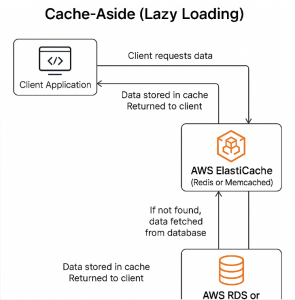
The Cache-Aside pattern is simple and powerful. Here’s how it works:
- Your cache (Redis) starts empty.
- When your application needs data:
- It first checks the cache.
- If the data is present (cache hit), return it.
- If the data is not in the cache (cache miss), fetch it from the database.
- Save the data into the cache for next time.
- Return the data to the user.
This approach ensures you only cache what’s actually used, and only when it’s needed.
Diagram: Cache-Aside Pattern
mathematicaCopyEditApplication
   |
   |---> Query Cache (ElastiCache for Redis)
           |
     Hit   |   Miss
     |     v
     |   Query DB (RDS / DynamoDB)
     |     |
     |   Update Cache
     |     |
     ----> Return Data
Benefits of Cache-Aside
✅ On-demand loading: Cache only what’s accessed.
✅ Simple logic: Easy to implement without tying cache and DB updates together.
✅ Control: App handles cache reads/writes explicitly.
Use Case: AWS Implementation Example
Let’s say you have a .NET Core application using Amazon RDS (MySQL) and ElastiCache for Redis.
Step 1: Set Up AWS Resources
- Amazon ElastiCache for Redis – A fully managed Redis cluster.
- Amazon RDS – Your persistent database (could also be DynamoDB).
- IAM Role and Security Groups – Ensure your app has access to both services.
Step 2: Install Redis Client
For .NET Core:
bashCopyEditdotnet add package StackExchange.Redis
Step 3: Connect to ElastiCache (Redis)
csharpCopyEditvar redis = ConnectionMultiplexer.Connect("your-elasticache-endpoint:6379");
var cache = redis.GetDatabase();
Step 4: Implement Cache-Aside Logic
csharpCopyEditpublic async Task<Product> GetProductAsync(int productId)
{
    string cacheKey = $"product:{productId}";
    string cachedProduct = await cache.StringGetAsync(cacheKey);

    if (!string.IsNullOrEmpty(cachedProduct))
    {
        // Cache hit
        return JsonConvert.DeserializeObject<Product>(cachedProduct);
    }

    // Cache miss - load from RDS
    Product product = await _dbContext.Products.FindAsync(productId);

    if (product != null)
    {
        // Save to Redis
        await cache.StringSetAsync(
            cacheKey,
            JsonConvert.SerializeObject(product),
            TimeSpan.FromMinutes(30) // Set TTL
        );
    }

    return product;
}
Considerations in AWS Environments
🔒 Security
- Use VPC peering and security groups to control access to ElastiCache.
- If possible, enable TLS for Redis.
🧠 Memory Management
- Configure eviction policies in ElastiCache (e.g., LRU).
- Monitor memory usage to prevent OOM issues.
🔁 Invalidation
- On DB updates or deletes, make sure to:
- Delete the corresponding Redis key, or
- Update the cache if the data changes.
📊 Monitoring
- Use Amazon CloudWatch to track:
- Cache hit ratio
- Memory usage
- Connection count
Alternative: Using AWS Lambda and DynamoDB
If you’re serverless, this pattern works great with:
- DynamoDB as your main data store.
- ElastiCache for Redis as a low-latency cache.
- AWS Lambda functions implementing the Cache-Aside logic.
Pros and Cons of Cache-Aside
| Pros | Cons |
|---|---|
| Simple and widely used | Requires manual invalidation |
| Efficient memory usage | Slightly higher latency on first load |
| No coupling of cache and DB | Can serve stale data if not managed |
The Cache-Aside pattern is ideal for read-heavy applications where performance and cost matter. By combining Amazon ElastiCache with Amazon RDS or DynamoDB, you can deliver fast, scalable applications without overloading your primary database.
Whether you’re running microservices, serverless functions, or traditional web apps, this pattern fits well into the AWS ecosystem.
Extra posts:
 Cache-Aside (Lazy Loading) Load Data into a Cache on Demand in Azure
  🚀 Materialized View Pattern in AWS Precompute for Performance
  Building Resilient Systems with Immutable Infrastructure on AWS
  Token-Based Authentication in AWS Using JWT for Stateless Security
  CQRS on AWS Separating Read and Write Operations for Performance and Scalability
  Implementing Event Sourcing in AWS Modeling State as a Sequence of Events