
As enterprises accelerate their AI adoption strategies, Microsoft Copilot Studio has emerged as one of the most powerful platforms for building custom AI assistants, automating business processes, and creating intelligent customer experiences. Whether you’re developing internal employee copilots, customer support agents, or workflow automation tools, Copilot Studio provides a flexible environment to create AI-powered solutions tailored to your business needs.
However, one of the most common questions among IT leaders and procurement teams is simple: How much does Copilot Studio cost?
The answer is more nuanced than a traditional software subscription. Microsoft has introduced a capacity-based and credit-based pricing model that allows organizations to scale AI deployments according to usage. Understanding these licensing options is critical for budgeting, forecasting, and maximizing return on investment.
In this guide, we’ll break down Copilot Studio pricing, explain available licensing models, compare costs with Microsoft 365 Copilot, and help enterprises determine whether the platform is worth the investment.
Understanding Copilot Studio Licensing
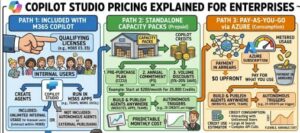
Microsoft offers Copilot Studio through a capacity-based licensing model rather than a simple per-user subscription.
This approach allows organizations to purchase AI capacity based on anticipated usage rather than the number of employees accessing the platform.
The primary licensing options include:
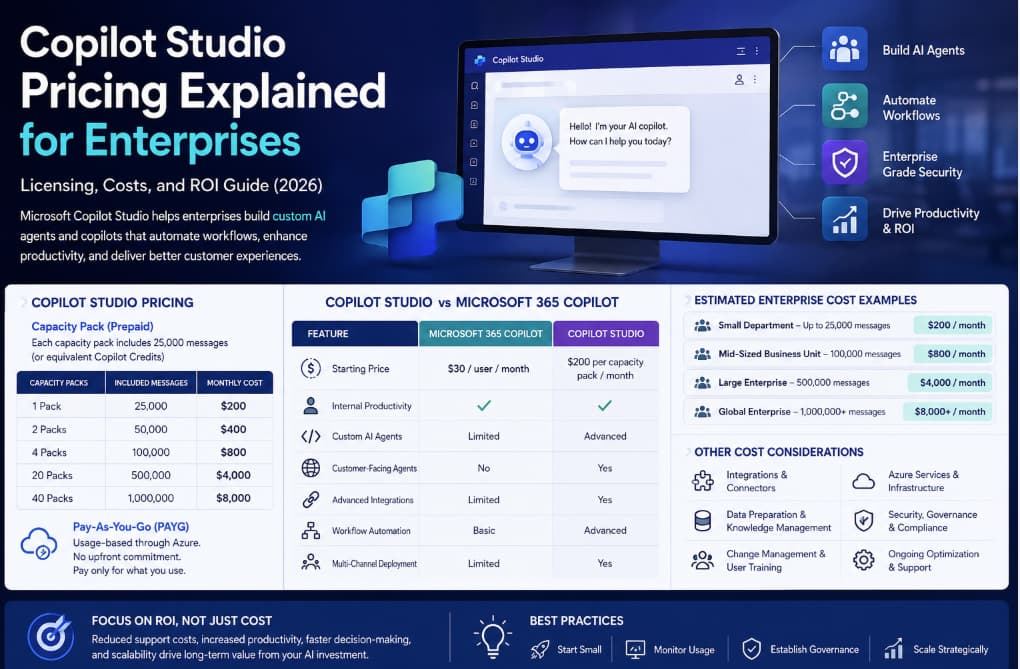
Copilot Studio Capacity Pack
The standard Copilot Studio subscription starts at:
$200 per month per capacity pack
Each capacity pack includes:
- 25,000 messages (or equivalent Copilot Credits)
- Tenant-wide usage
- Custom AI agent creation
- Enterprise deployment capabilities
Organizations can purchase additional capacity packs as usage increases.
For example:
| Capacity Packs | Included Messages | Monthly Cost |
|---|---|---|
| 1 Pack | 25,000 | $200 |
| 2 Packs | 50,000 | $400 |
| 4 Packs | 100,000 | $800 |
| 20 Packs | 500,000 | $4,000 |
This model allows enterprises to scale AI initiatives without purchasing separate licenses for every employee.
The Shift to Copilot Credits
Beginning in late 2025, Microsoft transitioned from a purely message-based pricing model to a Copilot Credits system.
Copilot Credits serve as the standard measurement for AI consumption across Microsoft Copilot services.
Different AI activities consume varying amounts of credits depending on factors such as:
- Agent complexity
- AI reasoning requirements
- Data retrieval operations
- Workflow execution
- Generative AI responses
While many organizations still estimate usage based on message volume, enterprises should increasingly focus on Copilot Credit consumption when forecasting costs.
Pay-As-You-Go Pricing
For businesses that want flexibility, Microsoft also offers a Pay-As-You-Go (PAYG) option through Azure.
This model is ideal for:
- Pilot projects
- Seasonal workloads
- Experimental AI initiatives
- Organizations with unpredictable usage patterns
Benefits include:
- No long-term commitment
- Automatic scaling
- Usage-based billing
- Easier testing and validation
Many enterprises begin with PAYG pricing before transitioning to prepaid capacity packs as usage stabilizes.
Copilot Studio vs Microsoft 365 Copilot Pricing
One of the biggest misconceptions in the market is that Microsoft 365 Copilot and Copilot Studio are the same product.
While they complement each other, they serve different purposes and have different pricing structures.
| Feature | Microsoft 365 Copilot | Copilot Studio |
| Starting Price | $30 per user/month | $200 per capacity pack/month |
| Internal Productivity AI | Yes | Yes |
| Custom AI Agents | Limited | Advanced |
| Customer-Facing Bots | No | Yes |
| Multi-Channel Deployment | Limited | Yes |
| Advanced Integrations | Limited | Yes |
| Workflow Automation | Basic | Advanced |
Microsoft 365 Copilot focuses on personal productivity within applications such as Word, Excel, Outlook, and Teams.
Copilot Studio, on the other hand, enables organizations to build enterprise-wide AI solutions that interact with customers, employees, and business systems.
For many enterprises, the two solutions work together rather than compete with each other.
Enterprise Cost Examples
The actual cost of Copilot Studio depends on adoption levels and message consumption.
Here are some realistic deployment scenarios:
Small Department Deployment
A company deploys an HR assistant for employee self-service.
- Monthly Messages: 25,000
- Capacity Packs Required: 1
- Estimated Cost: $200/month
Mid-Sized Business Unit
A finance and operations team deploys multiple AI assistants.
- Monthly Messages: 100,000
- Capacity Packs Required: 4
- Estimated Cost: $800/month
Large Enterprise Deployment
A global organization deploys copilots across multiple departments.
- Monthly Messages: 500,000
- Capacity Packs Required: 20
- Estimated Cost: $4,000/month
Enterprise-Wide AI Strategy
An international company supports employees and customers through AI-powered agents.
- Monthly Messages: 1,000,000+
- Estimated Cost: $8,000+ per month
These figures represent licensing costs only and do not include implementation expenses.
Hidden Costs Enterprises Should Consider
Licensing is only one component of the total investment.
Many organizations underestimate the operational and implementation costs associated with AI deployment.
Integration Costs
Most enterprise copilots require connections to:
- CRM systems
- ERP platforms
- Databases
- SharePoint
- Knowledge management systems
The more integrations required, the higher the implementation effort.
Data Preparation
AI assistants rely on quality information.
Organizations often need to invest in:
- Data cleanup
- Documentation updates
- Knowledge base optimization
- Content governance
Change Management
Successful AI adoption requires employee engagement and training.
Costs may include:
- User onboarding
- Training programs
- Internal communication campaigns
- Support resources
Ongoing Optimization
Enterprise AI projects are never truly finished.
Organizations should budget for:
- Performance monitoring
- Agent improvements
- Prompt optimization
- Governance reviews
- Security updates
How to Calculate ROI
The most successful organizations evaluate Copilot Studio based on business outcomes rather than licensing costs alone.
Increased Productivity
Employees spend less time searching for information and completing repetitive tasks.
Reduced Support Costs
AI agents can resolve common questions without human intervention.
Faster Service Delivery
Employees and customers receive answers instantly, improving satisfaction and efficiency.
Scalability
AI copilots can handle increasing demand without proportional staffing increases.
When measured against productivity gains and operational savings, many enterprises find that Copilot Studio delivers significant value beyond its subscription cost.
Best Practices for Controlling Copilot Studio Costs
To maximize value while managing expenses, enterprises should:
Start Small
Launch with one or two high-impact use cases before expanding organization-wide.
Monitor Usage
Track message and Copilot Credit consumption regularly to avoid unexpected charges.
Establish Governance
Implement policies for:
- Data access
- Security
- Compliance
- Responsible AI usage
Scale Strategically
Expand deployments gradually based on measurable business results.
Is Copilot Studio Worth the Cost?
For organizations already invested in the Microsoft ecosystem, Copilot Studio offers a compelling path to enterprise AI adoption.
At a starting price of $200 per month for 25,000 messages, the platform provides a relatively accessible entry point compared to many custom AI development projects. The ability to scale through additional capacity packs or pay-as-you-go billing makes it suitable for businesses of all sizes.
The greatest value comes from its deep integration with Microsoft 365, Dynamics 365, Power Platform, and Azure, enabling organizations to build intelligent agents without starting from scratch.
Copilot Studio pricing is designed to scale with enterprise AI adoption. While the platform starts at $200 per month for 25,000 messages, actual costs depend on usage levels, Copilot Credit consumption, integrations, and deployment complexity.
Organizations evaluating Copilot Studio should look beyond licensing fees and consider the total cost of ownership, including implementation, governance, training, and ongoing optimization. When deployed strategically, Copilot Studio can deliver substantial productivity improvements, lower operational costs, and create scalable AI experiences that support long-term digital transformation goals.
As AI becomes a core component of business operations, understanding Copilot Studio licensing and pricing is essential for building a sustainable and cost-effective enterprise AI strategy.
Extra posts:
 Microsoft 365 Copilot Licensing Shake-Up Explained
  How Enterprises Are Leveraging Microsoft Copilot to Drive Innovation
  Azure Pricing Models Explained: Pay-As-You-Go, Reserved, and Spot Instances
  Building an Enterprise ServiceNow AI Copilot Agent with Microsoft Copilot Studio: A Complete Guide to IT Operations Automation, Ticket Auditing, and Engineer Performance Intelligence
  Build Your First Autonomous Copilot Agent (Step-by-Step) Using Microsoft Copilot Studio (Almost No Code)
  Copilot Studio vs Azure AI Agents: What Should You Use?