
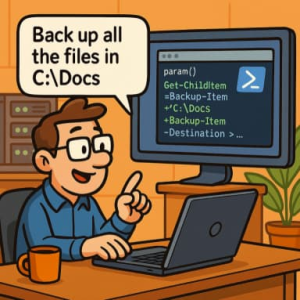
For years, IT administrators have relied on PowerShell to automate everything from user provisioning to tenant maintenance. But writing and debugging those scripts can be tedious, especially when the task involves multiple steps, complex logic, or integration with Microsoft 365, Azure AD, or on-prem Active Directory.
Now, with GitHub Copilot Chat, sysadmins can skip the boilerplate and go straight to automation. By describing a task in plain English, Copilot can generate ready-to-run PowerShell scripts — and even help you refine, explain, or troubleshoot them in real time.
From Natural Language to PowerShell Automation
Imagine this scenario: you need to bulk-create new users, assign licenses, and add them to specific groups in Microsoft 365. Traditionally, you’d piece together a script from memory or old snippets, test it line by line, and debug authentication issues.
With Copilot Chat, you can simply type:
“Create a PowerShell script that imports a CSV of new employees, creates users in Azure AD, assigns Microsoft 365 E3 licenses, and adds them to the ‘All Staff’ group.”
Copilot responds with a full PowerShell script — including parameters, error handling, and comments. From there, you can iterate:
- “Add logging to a CSV file.”
- “Make it compatible with PowerShell 7.”
- “Explain what the Connect-MgGraph command does.”
Copilot not only writes the code — it acts as a contextual assistant, teacher, and code reviewer all at once.
Real-World SysAdmin Use Cases
Here are a few ways system administrators are using Copilot Chat today:
1. User Management
Automate repetitive tasks like:
- Bulk-creating, disabling, or offboarding accounts
- Resetting passwords or MFA settings
- Synchronizing users between systems
Prompt example:
“Generate a PowerShell script to find all disabled users in Active Directory who haven’t logged in for 90 days and export their info to a CSV.”
2. Tenant Maintenance
Simplify recurring tenant checks and reports:
- License usage audits
- Security compliance scans
- Automated backup verifications
Prompt example:
“Write a script to check all SharePoint sites for external sharing links and email a summary report.”
3. Environment Setup & Configuration
Accelerate onboarding for new environments:
- Installing required modules
- Configuring policies
- Deploying baseline settings
Prompt example:
“Create a PowerShell script that installs RSAT tools, enables WinRM, and sets the PowerShell execution policy to RemoteSigned.”
Iterative Refinement: The True Power of Copilot Chat
What makes Copilot Chat stand out isn’t just that it generates scripts — it’s that it understands context. You can refine your requests iteratively:
- “Add try/catch for better error handling.”
- “Make the script interactive so I can choose which users to disable.”
- “Convert this to a function I can reuse in other scripts.”
This conversational workflow bridges the gap between natural language and precise automation — perfect for sysadmins who think in tasks, not syntax.
Best Practices for SysAdmins Using Copilot
- Be specific with prompts.
Include what systems, modules, and parameters you want (e.g., “Use the Microsoft Graph PowerShell module.”). - Review every line.
Copilot is a strong assistant, but you remain responsible for running code in production. - Keep prompts modular.
Break complex workflows into smaller, testable steps. - Leverage Copilot explanations.
Ask “What does this command do?” to deepen your understanding as you automate.
The Future of SysAdmin Productivity
For IT pros, Copilot Chat represents a major leap forward. Instead of spending hours writing and debugging scripts, sysadmins can now focus on higher-value tasks — strategy, architecture, and proactive maintenance.
The ability to describe what you need and instantly generate PowerShell automation is reshaping how sysadmins work. Whether you’re managing hybrid AD environments, performing tenant cleanups, or enforcing compliance, Copilot helps turn ideas into action faster than ever.
Bottom line: Copilot isn’t replacing PowerShell expertise — it’s amplifying it. Think of it as your scripting partner that never gets tired, never forgets syntax, and always has your back.
Extra posts:
 The ‘Digital Twin’ Employee Creating Hyper-Personalized Copilot Prompts with Copilot Studio
  Best Prompts to Use with Microsoft 365 Copilot for Maximum Efficiency
  Writing Effective Prompts for Microsoft 365 Copilot Work Smarter, Not Harder Automating Repetitive Tasks with Microsoft 365 Copilot
  The “Copilot Loop” in Loop: Collaborative Content Generation and Iteration in the Flow of Work
  25 Microsoft Copilot Prompts Every IT Professional Should Know