Email has long been the backbone of professional communication, but managing what comes after the email the follow-ups, tasks, and deadlines can quickly become overwhelming. Important action items get buried in long threads, and even the most organized inbox can turn into a to-do list that’s hard to manage.
This is where Copilot steps in and fundamentally changes the way we interact with email. Instead of treating your inbox as a passive stream of messages, Copilot transforms it into an active productivity hub where follow-up actions are identified, organized, and even created for you.
Let’s explore how creating follow-up actions directly from emails using Copilot can simplify your workflow and help you stay consistently on top of your responsibilities.
The Problem with Traditional Email Workflows
Most people read an email, mentally note what needs to be done, and then either:
- Flag it for later
- Add a task manually to a to-do app
- Or, more often than they’d like to admit, forget about it
This process is not only inefficient but also prone to human error. When you’re juggling dozens or even hundreds of emails per day, it’s easy to miss key action points like:
- “Can you send me the report by Friday?”
- “Let’s schedule a meeting next week.”
- “Please review the attached document.”
Each of these requires action, but extracting and tracking them manually takes time and attention.
How Copilot Changes the Game
Copilot integrates directly into your email environment and uses AI to understand the content and context of your messages. Instead of simply helping you read or draft emails, it actively assists in identifying what needs to happen next.
When you open an email, Copilot can:
- Detect actionable requests
- Suggest follow-up tasks
- Help you create those tasks instantly
- Link tasks back to the original email for context
This means your inbox evolves from a static communication tool into a dynamic task management system.
Turning Emails into Actionable Tasks
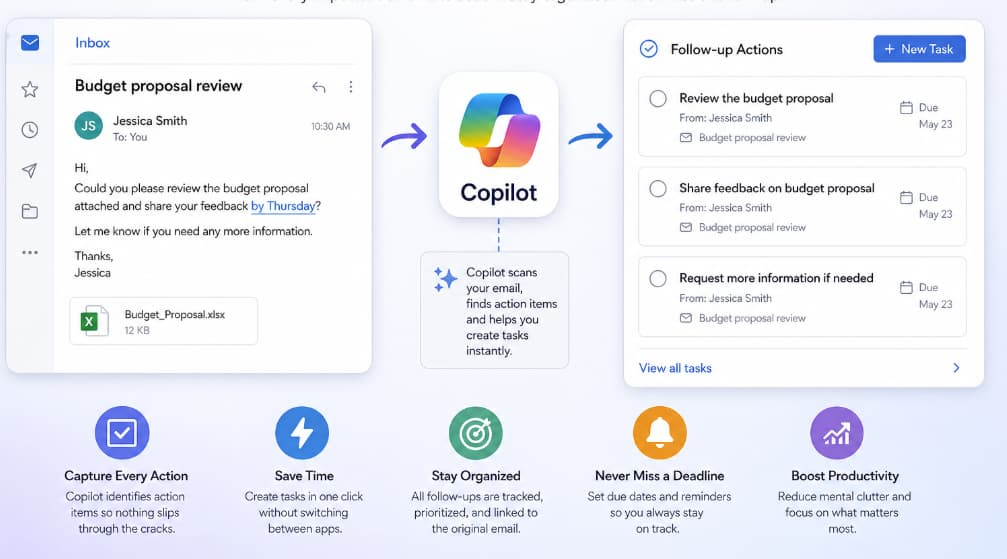
One of the most powerful features of Copilot is its ability to convert email content into structured tasks.
For example, imagine you receive an email that says:
“Hi, could you finalize the budget proposal and share it with the team by Thursday?”
Instead of manually copying this into your task manager, Copilot can automatically:
- Identify “finalize the budget proposal” as the task
- Recognize “by Thursday” as the deadline
- Suggest creating a follow-up action
With just a click, you can turn that email into a task—complete with a due date and a reference to the original message.
Seamless Integration with Your Workflow
What makes this even more useful is how seamlessly Copilot integrates into your existing tools. You don’t need to switch between apps or disrupt your workflow.
Follow-up actions created from emails can be:
- Synced with your task management system
- Added to your calendar if needed
- Tracked alongside your other responsibilities
Everything stays connected. If you revisit the task later, you can easily jump back to the original email for full context—no more digging through your inbox trying to remember details.
Reducing Cognitive Load
One underrated benefit of using Copilot for follow-up actions is the reduction in mental clutter.
Instead of constantly thinking:
- “Did I reply to that?”
- “Was I supposed to send something?”
- “What was the deadline again?”
Copilot keeps track for you.
By automatically capturing and organizing tasks, it frees up your brain to focus on higher-value work. You’re no longer relying on memory or scattered notes to manage your responsibilities.
Improving Accountability and Follow-Through
Missed follow-ups can damage trust and slow down projects. Copilot helps prevent this by making sure action items don’t slip through the cracks.
Because tasks are:
- Clearly defined
- Time-bound
- Linked to their source
You’re much more likely to complete them on time.
It also creates a subtle but powerful sense of accountability. When tasks are clearly visible and organized, it becomes easier to prioritize and follow through.
Smart Suggestions That Learn Over Time
Copilot doesn’t just apply generic rules it learns from how you work.
Over time, it becomes better at:
- Identifying which emails typically require action
- Understanding your priorities
- Suggesting relevant follow-ups based on your habits
For instance, if you frequently turn meeting requests into calendar events, Copilot will start suggesting that automatically. If you often delay certain types of tasks, it may prompt you with reminders.
This personalization makes the experience feel less like a tool and more like an assistant that understands your workflow.
Real-World Use Cases
1. Project Management
When working on a project, emails often contain updates, requests, and deadlines. Copilot ensures every action item is captured and tracked without manual effort.
2. Sales and Client Communication
Following up with clients at the right time is critical. Copilot can create reminders and tasks directly from client emails, helping you stay responsive and professional.
3. Team Collaboration
In team environments, responsibilities are frequently assigned via email. Copilot helps ensure nothing gets overlooked, improving coordination and efficiency.
Best Practices for Using Copilot Effectively
To get the most out of this feature, consider the following tips:
- Review suggestions regularly: While Copilot is smart, a quick review ensures tasks are accurate and relevant.
- Use clear email language: The clearer the request in the email, the better Copilot can interpret it.
- Organize tasks by priority: Once tasks are created, prioritize them to stay focused.
- Leverage reminders: Set reminders for critical tasks to avoid last-minute stress.
The Future of Email Productivity
The ability to create follow-up actions directly from emails is more than just a convenience—it represents a shift in how we interact with digital communication.
Instead of emails being endpoints, they become starting points for action.
Copilot bridges the gap between communication and execution, ensuring that every important message leads to meaningful progress.
Managing email effectively isn’t just about keeping your inbox clean—it’s about making sure nothing important gets lost along the way.
By using Copilot to create follow-up actions directly from emails, you can:
- Save time
- Reduce mental load
- Improve organization
- And stay consistently on top of your work
In a world where productivity often depends on how well you manage information, tools like Copilot offer a smarter, more intuitive way to stay in control.
Once you start turning emails into actionable tasks automatically, you’ll wonder how you ever managed without it.
Note: Proper License is needed check this post
https://dellenny.com/microsoft-365-copilot-licensing-shake-up-explained/