
Microsoft is rapidly reshaping its entire productivity ecosystem around artificial intelligence, and at the center of this transformation is Microsoft 365 Copilot. What started as a premium AI add-on is now evolving into a layered, tiered AI model embedded across Microsoft 365 Business and Enterprise plans.
However, with this evolution comes one of the biggest challenges organizations face today: understanding what is included, what is extra, and what is changing in licensing across M365 Business (M365B) and Enterprise (E3/E5).
In 2026, Copilot is no longer just a feature it is a licensing strategy.
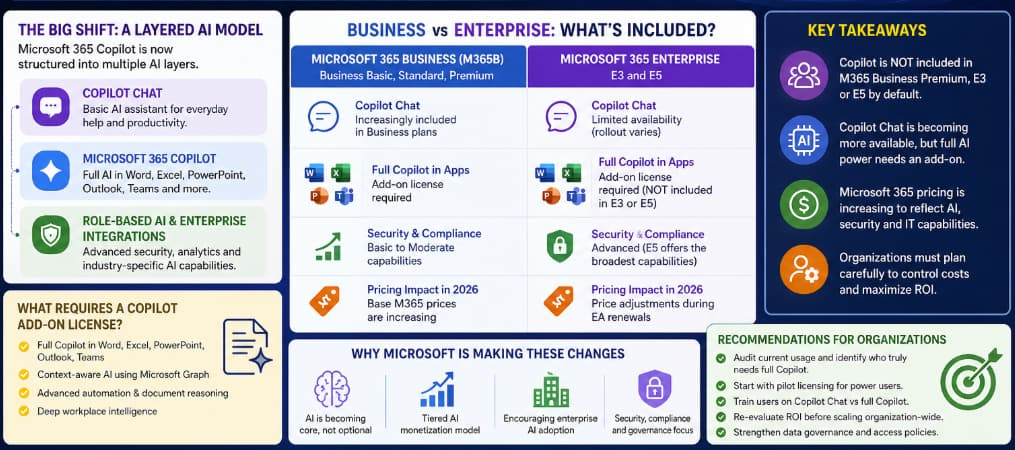
The Big Shift: Microsoft 365 Copilot is Now a Layered AI Model
Microsoft has moved away from a single Copilot product and is now offering multiple AI layers:
- Copilot Chat (basic AI layer) – entry-level AI assistance
- Microsoft 365 Copilot (full version) – advanced AI across apps
- Role-based AI integrations – security, analytics, and enterprise AI tools
This structure applies across both Business and Enterprise plans but behaves differently depending on the license type.
Microsoft 365 Business (M365B) Copilot Changes
For Business plans—Business Basic, Business Standard, and Business Premium—Microsoft is gradually introducing AI features into base subscriptions while keeping advanced Copilot capabilities as paid add-ons.
What Business Users Now Get
- Copilot Chat (light AI assistant for web and productivity help)
- Limited AI assistance in Microsoft 365 apps
- Basic summarization and writing support in some tools
This gives small and medium businesses a taste of AI without requiring full Copilot licensing.
What Still Requires Paid Copilot License
- Full Copilot integration in Word, Excel, PowerPoint, Outlook
- Context-aware AI using Microsoft Graph data
- Advanced automation and document reasoning
- Deep workplace intelligence features
Simply put:
Business users get AI assistance, but full productivity AI still comes at a premium.
Microsoft 365 Enterprise (E3 and E5) Copilot Licensing
Enterprise customers operate in a different environment. Many assume that premium plans like Microsoft 365 E3 or E5 include Copilot by default—but they do not.
Key Fact:
Microsoft 365 Copilot is NOT included in E3 or E5 plans. It is still a separate add-on license.
What E3 and E5 Actually Include
Microsoft 365 E3
- Core Office applications
- Enterprise identity and security basics
- Compliance and device management tools
- ❌ No Copilot included
Microsoft 365 E5
- Advanced security (Defender, Purview, etc.)
- Advanced compliance and analytics tools
- Extended enterprise protection capabilities
- ❌ Still requires Copilot add-on
Even at the highest level of Microsoft 365 licensing, Copilot remains optional.
AI Features in Enterprise Plans (Without Copilot)
Even without a Copilot license, enterprise customers may see limited AI capabilities such as:
- Copilot Chat (depending on rollout)
- AI-enhanced search in Microsoft 365
- Security Copilot integrations for IT teams
- AI-assisted insights in select analytics tools
However, these are not equivalent to full Copilot functionality inside Office apps.
Pricing Impact Across Business and Enterprise
Microsoft’s licensing updates are not just feature-based—they are cost-driven.
Across Both Business and Enterprise:
- Microsoft 365 suite prices are increasing in 2026
- AI features are influencing base subscription value
- Copilot remains a separate per-user add-on license
- Enterprise agreements may adjust pricing during renewal cycles
The key change is not just “Copilot costs more,” but that Microsoft 365 itself is being re-priced to reflect AI integration.
Key Challenges for Organizations
1. Licensing Complexity is Increasing
Organizations now must manage:
- Base Microsoft 365 licenses
- Copilot Chat availability
- Full Copilot add-ons
- Security and compliance tiers
2. Not All Users Need Copilot
Copilot is powerful—but not every employee requires it. IT teams must segment users carefully.
3. Cost Control Becomes Critical
At enterprise scale, Copilot licensing can become one of the most expensive per-user add-ons.
4. Data Governance is Essential
Copilot relies heavily on Microsoft Graph, meaning:
- Permissions matter
- Data access policies affect AI output
- Compliance rules must be tightly enforced
Business vs Enterprise Copilot Strategy
| Feature | Business (M365B) | Enterprise (E3/E5) |
|---|---|---|
| Copilot Chat | Increasingly included | Limited / controlled rollout |
| Full Copilot | Add-on required | Add-on required |
| AI Depth | Moderate | Advanced |
| Security Integration | Basic–Medium | Advanced (especially E5) |
| Pricing Impact | SMB-sensitive | Enterprise contract-based |
| Adoption Style | Gradual | Strategic rollout |
What’s Next for Microsoft 365 Copilot Licensing?
Microsoft is clearly moving toward a long-term model where:
- AI becomes a default layer in Microsoft 365
- Premium Copilot remains a paid productivity upgrade
- Licensing becomes more modular and role-based
- Enterprise AI integrates deeper into security and compliance (especially E5)
- Future bundling may evolve during enterprise renewals
However, as of 2026:
Copilot is still NOT included in Microsoft 365 Business Premium, E3, or E5 by default.
The Microsoft 365 Copilot licensing changes represent a major shift in how organizations consume software.
For Business users, AI is becoming more accessible—but still tiered.
For Enterprise users, even premium E3 and E5 plans do not eliminate the need for Copilot licensing.
The key takeaway is simple:
Microsoft is not just adding AI to Microsoft 365—it is rebuilding its licensing model around it.
Organizations that understand this early will be able to:
- Control costs better
- Deploy AI more strategically
- Avoid licensing confusion
- Maximize ROI from Copilot adoption
Those that don’t risk paying more for AI without fully using its potential.